


What “Archive” Really Means in Zoho Mail
When you archive an email in Zoho Mail:
- The message is removed from the normal list view
- It stays in the same folder, marked as archived
- It remains fully searchable
- It does not reduce storage usage
One important side effect, though: archived emails are not synced to IMAP clients like Apple Mail. That can noticeably improve performance on mobile and desktop apps.
A few practical implications worth knowing:
- Archived unread emails no longer count toward your unread total
- You won’t see archived mail unless you switch the folder view to Archived
- Archiving is reversible—you can unarchive anytime
Think of it as decluttering your workspace, not throwing anything away.

How to Archive Emails in Zoho Mail (Individual, Bulk, and Folder-Level)
Zoho gives you several ways to archive, depending on how much control you want.
Archive Individual or Multiple Emails
This is the most common method:
- Open a folder
- Select one or more emails
- Click Archive
The messages disappear from the main list but remain in the folder as archived items.
This works well for:
- Clearing yesterday’s conversations
- Hiding finished threads without deleting them
Archive an Entire Folder by Date or Count
For larger Zoho email cleanups:
- Right-click a folder
- Choose Archive options
- Archive:
- All messages before a specific date, or
- All except the most recent N emails
Zoho automatically excludes flagged emails, which is a thoughtful safeguard.
This method is useful for:
- Old project folders
- Sent mail buildup
- Long-running shared inboxes
But it’s still folder-based, which matters later.
Where Clean Email Fits for Zoho Users (and Why It Matters)
This is where many Zoho users realize something important:
Archiving hides emails—but it doesn’t explain why they’re piling up.
Clean Email doesn’t replace Zoho’s archive system. It complements it by handling the parts Zoho intentionally leaves out.
Clean Email works with Zoho Mail via IMAP and is available on web, macOS, iOS, and Android, which makes it practical across devices—not just on the Zoho web app.
Sender-Level Archiving (Zoho Can’t Do This Well)
Zoho archive policies work by:
- Folder
- Age
- Message count
Clean Email works by:
- Sender
- Category (newsletters, receipts, notifications)
- Behavior over time
Example difference:
- Zoho: “Archive emails older than 6 months in Inbox”
- Clean Email: “Automatically archive all emails from this sender except the newest one”
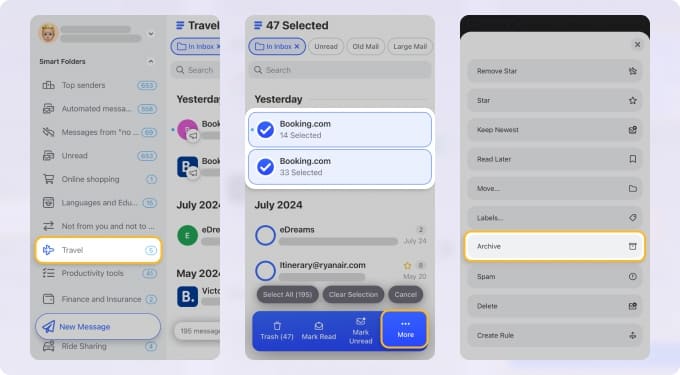
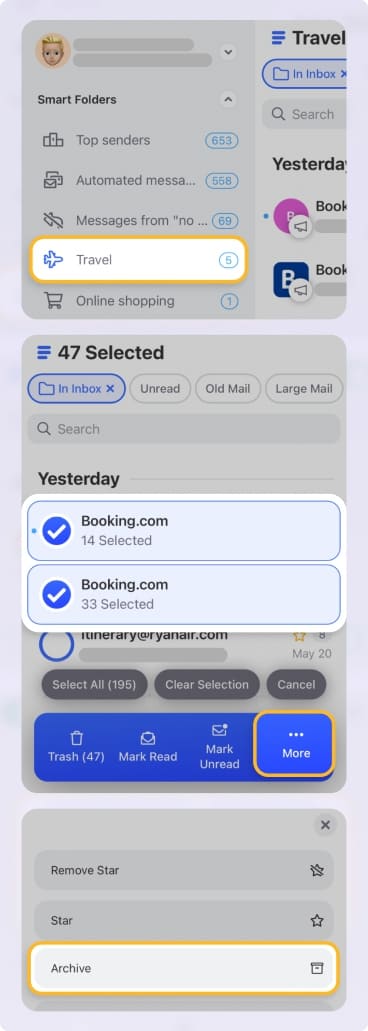
For everyday inbox management, that’s a big usability gap.
Archiving That Actually Helps With Storage
This is the critical distinction:
Archiving in Zoho does not reduce storage.
Clean Email gives Zoho users tools to:
- Identify emails with large attachments
- Permanently delete old, low-value mail by sender
- Combine unsubscribe + archive decisions in one step
Used together:
- Zoho archive improves performance and visibility
- Clean Email enables real storage relief
Screener: Preventing the Need to Archive at All
Zoho archive only works after emails arrive.
Clean Email’s Screener stops inbox pollution earlier:
- New senders are held for approval
- You decide once: allow, auto-archive, or block
- That decision applies going forward
For Zoho users on custom domains, this quietly reduces the long-term need for archiving altogether.
Clear Visibility Into Archived Mail
Zoho’s archived messages:
- Stay buried inside folders
- Require view switching or advanced search
- Are easy to forget about
Clean Email:
- Groups archived and cleaned emails by sender
- Shows why something was archived
- Makes it easy to change rules or unarchive intentionally
That clarity matters, especially when Zoho automation is involved.
Finding and Viewing Archived Emails in Zoho Mail
If you stick with Zoho’s native tools, here’s how to locate archived messages:
- Open the original folder
- Use the View selector and choose Archived
- Or search by sender, date, subject, or attachment—archived mail is included
There’s no separate “Archive” folder. Everything stays where it started.
How to Unarchive Emails in Zoho Mail
To unarchive emails in Zoho Mail:
- Switch the folder to Archived view
- Select one or more messages
- Click Unarchive
The emails immediately return to the normal folder view and behave like regular messages again.
Unarchiving When Using Clean Email
If you’re also using Clean Email with Zoho Mail, unarchiving can be even more straightforward.
Clean Email connects to Zoho Mail via IMAP and is available on web, macOS, iOS, and Android. It shows archived emails grouped by sender, making it easier to understand why something was archived.
From Clean Email, you can:
- Unarchive messages in bulk from a sender group
- Adjust or disable Auto Clean rules that archived those emails
- See changes reflected instantly back in Zoho Mail
This is especially helpful when emails were archived automatically and you don’t remember the original rule.
Deleting Archived Emails (Important Difference)
Deleting archived emails works differently from deleting regular messages:
- Depending on your settings, deletion may be permanent
- Some archived emails may not pass through Trash
- Folder-level archive options allow permanent deletion of archived items
This can be useful for cleanup—but it’s something to use carefully, especially in shared or compliance-sensitive mailboxes.
eArchive vs Regular Archiving (For Compliance Scenarios)
Zoho’s eArchive is a separate, admin-controlled feature designed for compliance and recovery.
Key differences:
- eArchive stores retained and deleted emails separately
- Access depends on organizational policies
- Users search eArchive through a dedicated interface
If eArchive isn’t enabled, users won’t see it at all. Regular archiving and eArchive solve very different problems.
Final Take
Zoho Mail’s archive feature answers a specific question:
“How do we hide old emails safely without breaking workflows?”
It does that well.
What it doesn’t answer is:
“Why is my inbox growing forever—and how do I stop that?”
That’s where tools like Clean Email become genuinely useful for Zoho users. Used together:
- Zoho archive handles structure, performance, and retention
- Clean Email handles sender behavior, automation, and storage reality
Not because Zoho is lacking—but because archiving alone isn’t inbox management.












