


At the center of that system is Zoho CRM, supported by Zoho Campaigns, Marketing Automation, and Zoho Survey. Together, they cover most outbound automation needs: follow-ups, nurturing, reminders, surveys, and handoffs between sales, marketing, and support.
But there’s an important distinction worth making upfront:
- Zoho automation decides what gets sent
- Inbox automation decides what you actually have to deal with
Zoho does the first part extremely well. The second part? That’s where complementary tools come in.
Zoho CRM: The Engine Behind Email Automation
Zoho CRM is where email automation becomes contextual instead of generic.
Once you connect a mailbox—Zoho Mail, Gmail, Microsoft 365, or others—emails live directly inside CRM records. Deals, contacts, and cases all show their full conversation history, which changes how automation feels. It’s less “email marketing,” more “workflow logic with email attached.”
Workflow-Driven Emails
Under Setup → Automation → Workflow Rules, you can trigger emails based on almost anything:
- A lead is created
- A deal stage changes
- A field reaches a specific value
- A record hasn’t been updated in X days
Time-based actions let you stagger follow-ups:
- Send a reminder after 3 days of no reply
- Nudge again after a week
- Escalate internally if nothing happens
This is how most Zoho users build practical, low-noise sequences—especially for B2B sales.

Templates and Personalization
Email templates use merge fields pulled directly from CRM records:
- First name
- Company
- Deal amount
- Last activity date
You typically end up with a small library:
- New lead welcome
- Demo confirmation
- Quote follow-up
- Renewal reminder
Nothing fancy. Just consistent and relevant.
Cadences: Replacing Old Autoresponders
By 2025, Zoho has largely phased out legacy autoresponders in favor of Cadences.
Cadences let you orchestrate:
- Emails
- Tasks
- Follow-up actions
…across time, with branching logic based on behavior. Opened but didn’t reply? One path. No activity at all? Another.
This is one of Zoho’s biggest automation improvements—and a clear sign of where things are heading in 2026.
Clean Email: Inbox Automation That Zoho Intentionally Doesn’t Do
After setting up CRM workflows and sequences, many users hit the same wall:
“Automation worked. Now my inbox is full.”
That’s where Clean Email fits—not as a competitor to Zoho, but as the missing inbound automation layer.
Clean Email works with Zoho Mail, Gmail, Microsoft 365, and others, and is available on web, macOS, iOS, and Android. Its job isn’t sending email. It’s controlling what happens after emails arrive.
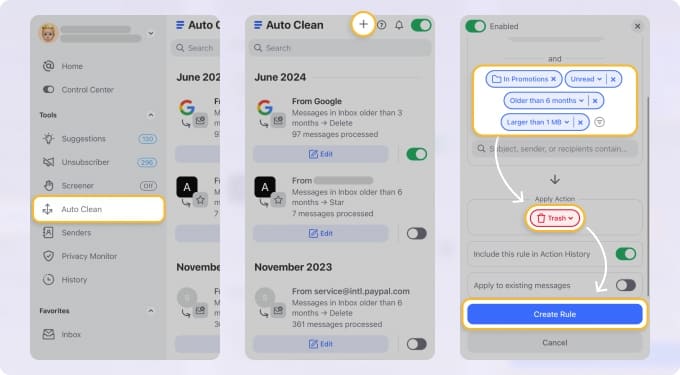
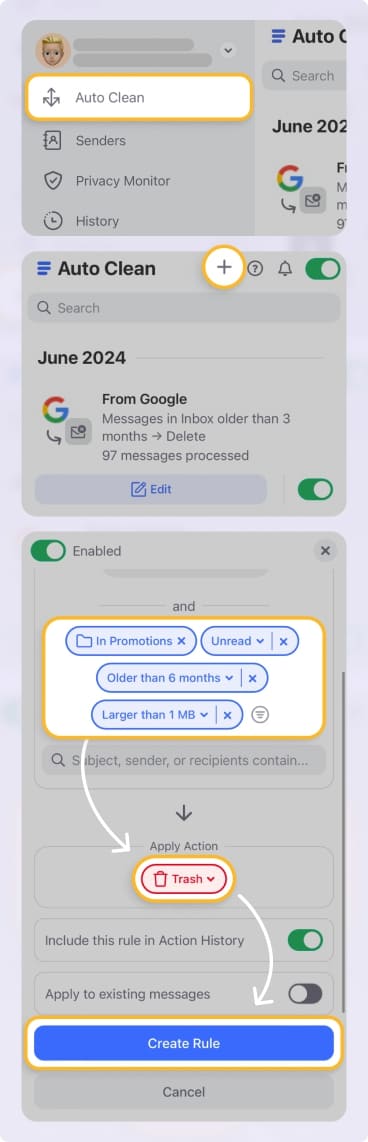
Auto Clean Rules
Auto Clean Rules let you automatically:
- Label
- Archive
- Move
- Delete
…recurring emails like:
- Invoices
- Trial expiration notices
- Renewal confirmations
- SaaS marketing noise
This is especially useful for teams running lots of tools—many of which Zoho automation itself may trigger. Clean Email keeps that from turning into inbox overload.
Screener: Stop Clutter Before It Starts
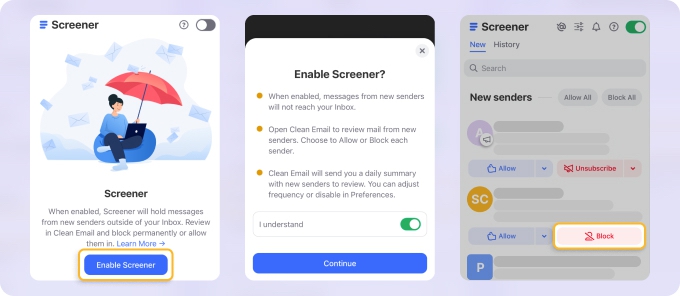
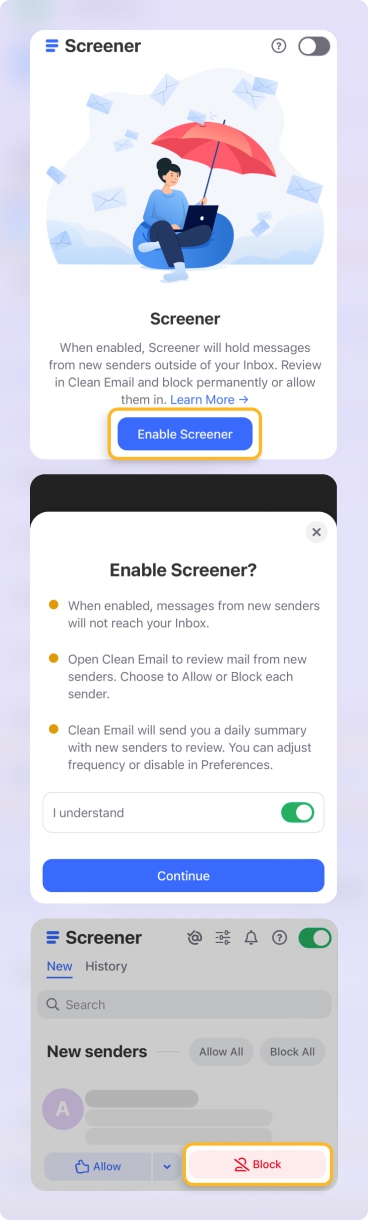
Screener holds emails from new senders for approval before they ever hit your inbox.
That means:
- Random vendors
- Tools you tested once
- Services you didn’t fully opt into
…never become long-term clutter.
Sender-Based Grouping
Instead of sorting by threads or campaigns, Clean Email groups messages by sender.
If you’ve ever tried to shut down an unused SaaS subscription from Gmail’s native UI, you’ll understand why this matters. It’s faster. Much faster. → Try it for Free
What Clean Email Does Not Do
Clean Email does not:
- Send emails
- Run campaigns
- Replace CRM workflows
- Handle customer journeys
And that’s exactly why it works alongside Zoho instead of overlapping with it.
Check out our comparison of Zoho Mail vs Gmail.
Email Tracking, Visibility, and Control Inside Zoho CRM
Back on the Zoho side, tracking is deeply embedded.
Zoho CRM records:
- Opens
- Clicks
- Replies
These signals can:
- Update lead scores
- Trigger workflows
- Change deal stages
- Appear in reports and dashboards
Email threads stay visible directly inside records, which reduces context switching. The 2025 CRM interface updates improved filters and navigation here, making it easier to manage high volumes of automated and manual emails in one place.
Admins also get more control over:
- Email sharing visibility
- Access to deactivated users’ mailboxes
- Backup and retention settings
That balance between collaboration and privacy matters more as automation scales.
Email + Survey Automation: Closing the Loop
Zoho Survey integrates cleanly into the automation stack.
You can:
- Embed survey links into CRM-sent emails
- Trigger surveys after key events (deal won, ticket closed)
- Map responses back to CRM fields
From there, automation kicks in again:
- High satisfaction → thank-you email or upsell flow
- Low score → task for account owner
- No response → reminder after a delay
This is where Zoho starts to feel less like “email automation” and more like process automation with email as the delivery layer.
Zoho Campaigns & Marketing Automation: When Email Becomes a Journey
For marketing-driven automation, Zoho Campaigns and Marketing Automation take over.
They’re built for:
- Welcome sequences
- Re-engagement flows
- Lifecycle nurturing
- Behavior-based branching
Triggers include:
- Email opens and clicks
- Website visits
- Date-based events
- CRM field changes
Actions can push data back into CRM, create tasks for sales, or adjust lead status—closing the loop between marketing activity and sales follow-up.
There’s a learning curve here, no question. But once set up, these tools reduce manual follow-up dramatically.
Zoho Email Automation: Strengths and Real-World Tradeoffs
| Area | What Works Well | What to Watch |
|---|---|---|
| CRM email workflows | Highly flexible, logic-driven automation tied to real sales data. Excellent for follow-ups and nurturing. | Requires planning. Poorly designed workflows create noise instead of value. |
| Cadences | Modern replacement for autoresponders with branching and task orchestration. | More powerful means more setup time up front. |
| Tracking & analytics | Clear visibility into engagement, tied directly to CRM records and reports. | Tracking must be used responsibly to stay compliant with privacy laws. |
| Campaigns & journeys | Strong lifecycle automation and CRM integration at competitive pricing. | Advanced automation isn’t plug-and-play for non-marketers. |
| Inbox control (via Clean Email) | Automates cleanup, prevents clutter, and keeps inboxes usable as automation scales. | Not a sending tool—by design. Complements Zoho rather than replacing it. |
Final Take
Zoho’s email automation in 2025 is less about volume and more about intent.
- CRM decides when and why emails go out
- Campaigns manage journeys at scale
- Surveys close feedback loops
- Clean Email keeps the inbox from collapsing under the weight of it all
If you treat automation as a system—not just a feature—Zoho gives you the structure. Clean Email gives you the breathing room.
And that combination is what keeps automation productive instead of overwhelming.












