


Quick Comparison
The eight inbox management tools below solve genuinely different problems, so here's an honest read on who each one is for, where it shines, and where it falls short:
| Tool |
|---|
| Clean Email |
| Mailstrom |
| Superhuman |
| Spark |
| Mailman |
| Boomerang |
| Canary Mail |
| Missive |
| Best for | Strongest at | Weak spot | AI workflow | Privacy note |
|---|---|---|---|---|
| Someone with thousands of old unread emails and clutter | Bulk cleanup and unsubscribe, automated rules | Learning curve for new users | Smart filtering and automation, not generative AI | Processes mail through cloud servers; it doesn't read or sell user data |
| Same clutter problem, but you want fast manual control | Grouping and bulk-deleting by sender, subject, time | Can't replace your daily email client | No | On-device-leaning approach, privacy-focused solution |
| High-volume professionals who live in email all day | Raw speed, keyboard-driven triage, AI drafts | Won't clean a messy inbox; premium price | Strong: AI triage, drafting, summaries | Cloud-based, caches mail locally for speed |
| Someone who wants a smarter everyday inbox without high cost | Smart Inbox sorting, affordable AI, cross-platform | Sync can be inconsistent; not a cleanup tool | Built-in AI writing and summaries on paid tier | Cloud sync required for some features |
| Anyone whose focus is destroyed by constant email | Holding email and delivering it in batches | Gmail/Workspace only; can’t fully replace your daily client or cleaner | Smart sender filtering, no generative AI | Says it doesn't read or store email content |
| People who forget follow-ups and need send-later | Scheduling, return-to-inbox reminders, conditional follow-ups | Credit system on free tier; pricey at the top | Respondable AI writing assistant on Pro | Add-on to Gmail/Outlook |
| Privacy-minded users who want AI plus encryption | End-to-end encryption, optional AI copilot | Smaller ecosystem; UI quirks | Optional AI writer and triage | Strong: end-to-end encryption, local options |
| Small teams sharing inboxes and collaborating on email | Shared inboxes, assignments, internal comments | Overkill for solo users | Team-oriented AI features | Cloud-based collaboration email management platform |

How Modern Email Management Tools Actually Work
In 2026, email management apps no longer differ mainly by features. Almost everyone has snooze, unsubscribe, and some flavor of AI now. What actually separates these products is their core approach, the fundamental bet each one makes about why your inbox is a mess.
There are roughly six approaches on the market, and once you see them, the whole category clicks into place:
- Cleanup-first tools assume the problem is email volume. You have too much old junk, and the fix is to delete and manage emails in bulk. Clean Email and Mailstrom live here.
- Speed-first tools assume the problem is processing time. You get plenty of email, you just need to handle each message in seconds instead of minutes. Superhuman is the obvious example.
- Focus-first tools assume the problem is interruption. Email itself isn't the enemy, the constant pinging is. So they hold messages back and hand them to you in batches. That's Mailman.
- Follow-up-first tools assume the problem is dropped threads. You reply fine, you just lose track of what needs a nudge. Boomerang built its whole identity on this.
- AI-assisted tools assume the problem is mental effort. They want to draft, summarize, and triage for you. Spark and Canary lean this way, and Superhuman layers it on top of speed.
- Organization-first tools assume the problem is structure, especially when more than one person touches the same inbox. Missive is the team-collaboration end of this spectrum.
Most products blend two or three of these. But every one of them has a center of gravity, and that center is what you're really choosing between. Pick a speed tool when your real problem is clutter, and you'll end up with a fast inbox that's still a swamp.
The Top Email Management Apps
A quick word on how this list came together. We focused on tools that a regular person or a small team can set up and feel a difference from within a day, not enterprise platforms that need an IT rollout.
Each tool was assessed on what it's genuinely best at rather than its longest feature list.
Pricing was verified in May 2026, but plans on email inbox management tools change often, so treat the numbers as a current snapshot rather than a contract.
Where a tool overlaps with others, we tried to be clear about who it actually beats and who it doesn't.
Clean Email
Price: free tier with a 1,000-email limit; monthly and yearly subscription plans.
Trial: 14-day premium trial, no credit card.
Core features: intuitive Smart Folders, true unsubscribe in bulk, Auto Clean rules, Screener tool, works across Gmail, Outlook, Yahoo, and any IMAP.
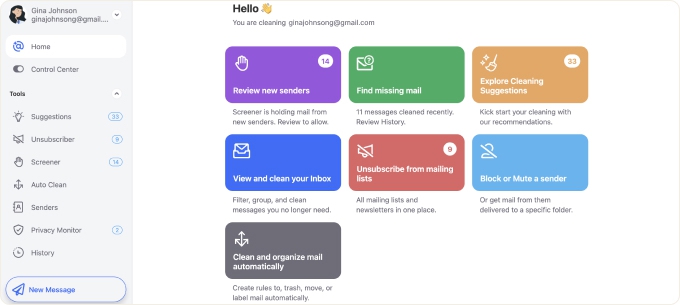
Clean Email is built for the users whose inbox is buried under years of newsletters, receipts, notifications, and dead subscriptions, the 40,000-unread situation. But it doesn't stop at the one-time dig-out. It's also the tool that keeps the inbox clear long after that first sweep. It is available on the web, Mac, Android and as an email management app for iPhone.
What it feels like
Methodical and reassuring rather than flashy. You connect an account, it groups everything into views you can act on in bulk, and you start clearing in sweeps instead of one message at a time.
The first big cleanup is genuinely satisfying. Then Auto Clean rules take over in the background, archiving, labeling, and trashing new clutter automatically, so the mess never builds back up.
Where it works best
Inboxes with thousands of old emails and heavy newsletter clutter, and people who want mass unsubscribes that actually stick instead of just hiding senders. It shines as a set-and-forget maintenance layer: create your rules once and the inbox stays clean on its own.
Where it breaks down
It won't make you faster at writing or replying, because that's not what it does. There's no AI drafting, and it isn't meant to replace your daily mail app, it runs alongside whatever client you already use.
Who should skip it
If your inbox is already tidy and your problem is workflow, this isn't your best tool.
Mailstrom
Price: $9.95/month or $59.99/year.
Trial: free trial that scans your whole inbox and lets you clean a portion before paying.
Core features: bundle and bulk-act by sender, subject, time, and more; one-click unsubscribe; works across major providers.
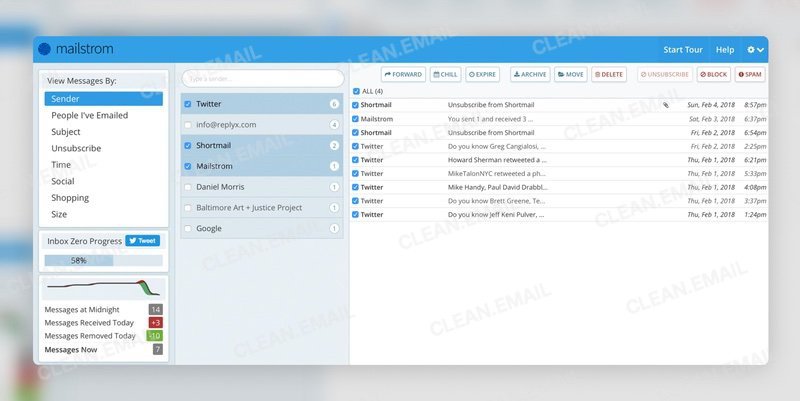
Same core pain as Clean Email, an overstuffed inbox, but for the person who wants to drive the cleanup manually and watch the numbers drop. It's about getting your unread count down fast and feeling in control of every sweep.
What it feels like
Fast and a little addictive. Mailstrom groups your mail into stacks, and you knock them out one bundle at a time, watching a running count of how many emails are left.
Where it works best
A big one-time dig-out where you'd rather make the calls yourself than set rules. It's best suited for users who want full control over what gets deleted, archived, or kept.
Where it breaks down
It's not an ongoing email client, and it won't write or triage for you. Once the inbox is clean, the heavy lifting is done, and the tool fades into occasional maintenance.
Who should skip it
People who want set-and-forget automation rather than hands-on cleaning, or anyone looking for a daily inbox management tool to actually live in.
📌 Weighing the two? See our full Clean Email vs Mailstrom comparison to find the better Mailstrom alternative.
Superhuman
Price: Starter $30/month (or $300/year), Business $40/month.
Trial: available, typically with a guided onboarding session.
Core features: keyboard-first navigation, instant search, AI triage and drafting, split inbox, read statuses, snippets; works with Gmail and Outlook.
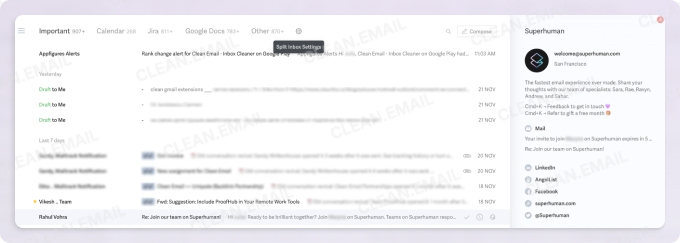
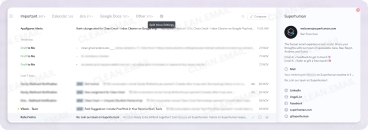
Superhuman is built for people who spend an absurd amount of time inside email every day and want to process messages faster without constantly losing momentum.
What it feels like
Everything is optimized for speed: keyboard shortcuts, instant search, fast email triage, and quick navigation. It feels more like a command center than a traditional inbox. The newer AI features for summarizing threads and drafting replies fold into that same rhythm.
Where it works best
High-volume email workflows. Founders, operators, recruiters, and sales-heavy roles who measure the day in messages handled.
Where it breaks down
It won't magically clean a chaotic inbox full of old newsletters and clutter. And the price is steep enough that if you're debating whether it's worth it, it probably isn't for you yet.
Who should skip it
People mainly looking for email management solutions for cleanup or lightweight email organization, and anyone who only touches email a handful of times a day.
Spark
Price: free tier; Premium $7.99/month or $59.99/year; Teams $6.99/month per user (annual).
Trial: 7-day Premium trial.
Core features: Smart Inbox auto-sorting, AI writing and summaries, Gatekeeper for unknown senders, snooze, send later; iOS, Android, macOS, Windows.
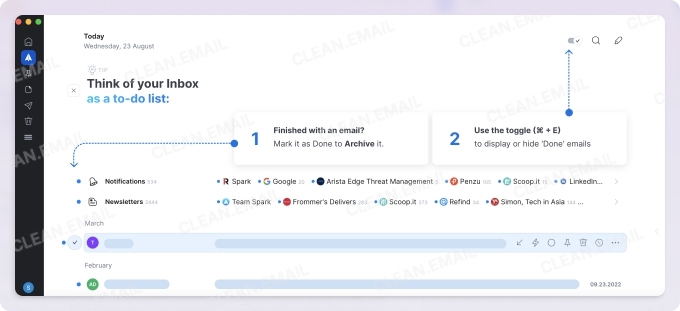
Spark is for the person who doesn't have a catastrophic clutter problem or a 100-emails-a-day job, but just wants a calmer, smarter everyday inbox than Gmail or Apple Mail gives them, ideally without paying Superhuman money.
What it feels like
Clean and approachable. Smart Inbox automatically sorts mail into people, newsletters, and notifications, so the important stuff floats up and the noise sinks. The AI assistant helps draft and summarize, though in practice many users reach for it less than they expect to.
Where it works best
Individuals and students who want a low-commitment upgrade, people juggling several accounts who want them unified to manage all emails in one place, and anyone who likes the idea of AI help but doesn't want a premium price tag.
It's the best polished email client with a genuinely usable free version.
Where it breaks down
Sync isn't always flawless, and the desktop version of this email manager app can feel less native than you'd like. It also won't dig you out of a deeply buried inbox, that's a cleanup job, not a client job.
Who should skip it
Heavy-volume professionals who need raw speed, and privacy purists uncomfortable with cloud sync.
Mailman
Price: free version; paid upgrade for full scheduling and filtering control.
Trial: 21-day free trial, no credit card.
Core features: batched email delivery, Do Not Disturb windows, VIP list, manual pause; Gmail and Google Workspace only.
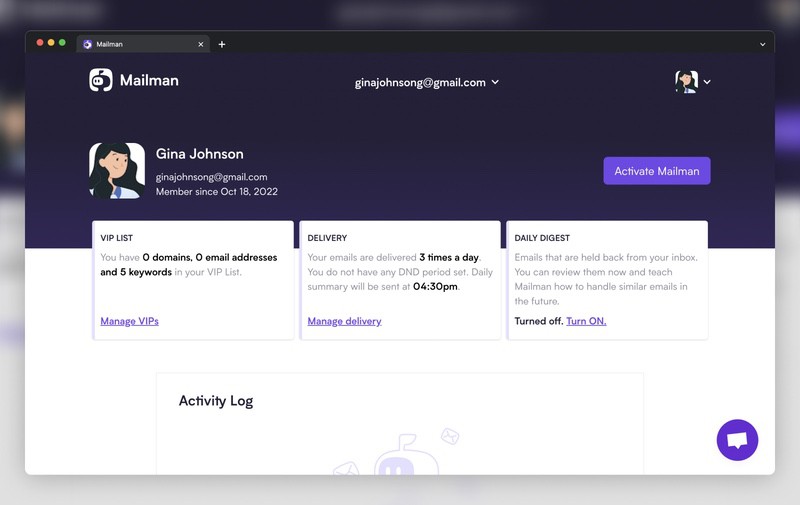
Mailman exists for one specific pain: email constantly shattering your focus. It doesn't clean, organize, or write anything. It just controls when email is allowed to reach you.
What it feels like
Quiet. Instead of a steady drip of new messages, mail arrives in scheduled batches, a few times a day, or never during your deep-work and sleep hours. The first day feels strange, then the silence becomes hard to give up. It sits on top of your existing Gmail, so there's no new client to learn.
Where it works best
People doing focus-heavy work, writers, developers, students, anyone whose productivity dies by a thousand notifications. VIP rules let genuinely urgent senders through immediately so you're not cut off from what matters.
Where it breaks down
It only works with Gmail and Google Workspace, full stop. And if your problem is clutter or reply speed rather than interruption, it does nothing for you.
Who should skip it
Non-Gmail users, and anyone whose mailbox management pain is volume rather than constant distraction.
Boomerang
Price: free (10 message credits/month); Personal $4.98/month, Pro $14.98/month, Premium $49.98/month (annual billing).
Trial: the free tier functions as a permanent limited trial.
Core features: send later, return-to-inbox reminders, conditional follow-ups, Inbox Pause (Pro), Respondable AI writing (Pro); Gmail and Outlook.
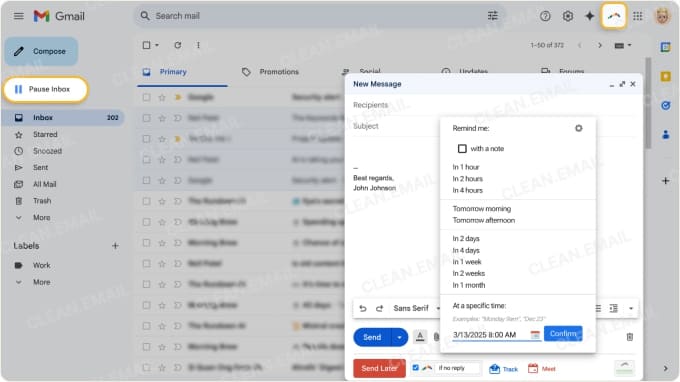
Boomerang is for the person who replies fine but keeps losing the thread, forgetting to follow up, sending at the wrong time, letting a no-reply slip through the cracks until the opportunity is gone.
What it feels like
Like a safety net bolted onto your existing inbox. You schedule a message for Monday morning, set it to boomerang back if nobody answers in three days, and stop holding all of it in your head. It's not a new inbox, it's reminders and timing done right.
Where it works best
Anyone whose work depends on follow-through: sales, recruiting, client work, fundraising. The "return to inbox if no reply" workflow is the feature people get genuinely dependent on.
Where it breaks down
The free tier's 10-credit limit is more teaser than tool, and any real use pushes you to Pro. Gmail now does basic send-later for free, so if that's all you want, you don't need Boomerang. The top Premium tier gets pricey for what's essentially an add-on.
Who should skip it
People who only schedule the occasional email, and anyone wanting a full inbox overhaul rather than a follow-up layer.
Canary Mail
Price: free-forever plan; Growth $36/year, Pro+ $100/year (single-user; lifetime purchase also available).
Trial: free plan works as the entry point.
Core features: end-to-end encryption and PGP, optional AI copilot for writing and triage, unified inbox, snooze, read receipts; macOS, iOS, Windows, Android.
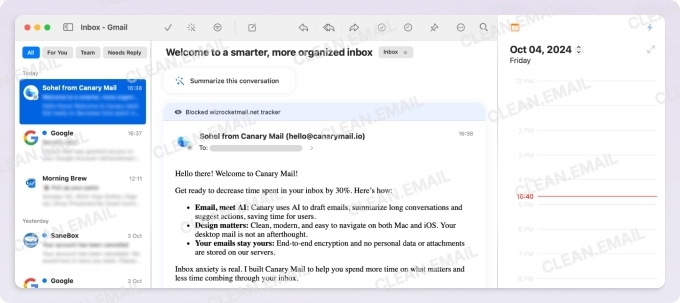
Canary is for the person who wants a smart, AI-capable everyday client but isn't willing to hand their email contents to the cloud without protection. It pairs modern AI features with end-to-end encryption, which is an unusual combination.
What it feels like
Capable and a bit power-user-leaning. The AI copilot can write, summarize, and surface what needs attention, but the AI is optional, so you can run it as a clean, secure client and ignore the smart stuff entirely. Encryption is the headline rather than an afterthought.
Where it works best
Privacy-minded professionals, people handling sensitive correspondence, and anyone who wants AI assistance and security in the same email management app. The lifetime-purchase option appeals to people tired of subscriptions.
Where it breaks down
The email management ecosystem is smaller than the giants, and some users find the interface a little fiddly, especially digging through long threads. AI features land behind the paid tier.
Who should skip it
People who want dead-simple, and anyone whose problem is bulk clutter rather than daily email handling.
Missive
Price: free for up to 3 users; Starter $14/user/month, Productive $24/user/month (annual billing).
Trial: free plan covers small teams.
Core features: shared inboxes, email assignment, internal comments and chat alongside threads, shared drafts, team AI features; web, desktop, mobile.
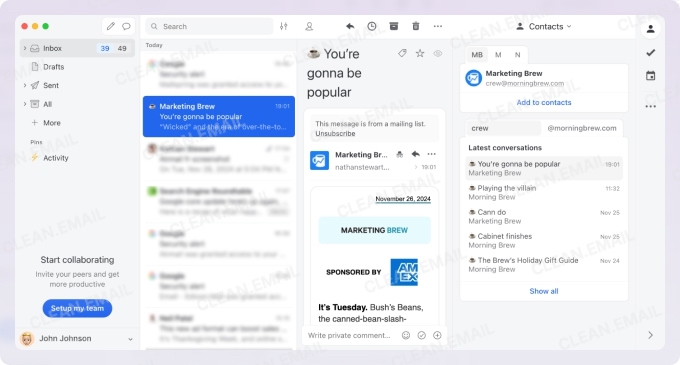
Missive is the outlier on this list because its core problem isn't your inbox, it's a shared one. It's for small teams who collaborate on email, a support address, a sales line, a founders@ inbox, and keep stepping on each other.
What it feels like
Like email and a team chat fused together. You can comment on a thread privately, assign it to a teammate, draft a reply together, and see who's handling what, all without the messy "FW: FW: who's got this?" chains. For a team, it's a relief. For a solo user, it's a lot.
Where it works best
Small teams sharing one or more inboxes who want accountability and internal discussion attached to the actual emails. It sits comfortably between a personal client and a heavy helpdesk platform.
Where it breaks down
It's overkill for an individual. If you're managing only your own email, the collaboration machinery is weight you'll never use.
Who should skip it
Solo users, and anyone whose pain is personal clutter, focus, or speed rather than coordinating a shared inbox.
Which Type of Email Overload Do You Actually Have?
If you skipped everything above, this is the section that matters. Don't pick by brand, pick by which of these sentences sounds like your life.
If your inbox is full of unread clutter → Clean Email or Mailstrom. You don't need a faster inbox, you need a smaller one. Clean Email if you want automation that keeps it clean; Mailstrom if you'd rather drive the dig-out by hand.
If email constantly interrupts your focus → Mailman. Your problem isn't the email, it's the timing. Batch it and the rest of your day comes back.
If you spend hours replying every day → Superhuman. When email is the job, shaving seconds off every message compounds into real hours.
If you keep forgetting follow-ups → Boomerang. You're not disorganized, you just need the inbox to remember for you.
If you want a smarter everyday inbox → Spark or Canary. Spark for affordable, friendly, cross-platform; Canary if privacy and encryption matter to you.
If your team shares an inbox → Missive. The moment more than one person answers the same address, this becomes the obvious pick.
Final Thoughts
Email overload isn't one problem anymore. Some people genuinely need less email, fewer subscriptions, fewer old threads, a smaller pile. Others need a faster workflow to get through the volume they can't reduce. Others need protected focus time more than anything else. And small teams need coordination so two people stop replying to the same customer.
The trap is choosing the wrong type of tool. A speed tool won't fix clutter. A cleanup tool won't fix interruptions. When the tool's center of gravity doesn't match your actual pain, you add friction instead of removing it, and you end up back where you started, just with another subscription.
So before you install anything, name the single biggest source of friction in your email day. The best email management tool is simply the one that removes that friction. Everything else is a distraction.












