


Key Takeaways
- Availability: OpenAI added the iCloud Mail and iCloud Calendar plugins to all ChatGPT plans, including Free, on October 27, 2026.
- Platforms: The plugins work in ChatGPT in the browser, the desktop app and iOS; OpenAI hasn't mentioned Android.
- Addresses: Only Apple addresses ending in @icloud.com, @me.com or @mac.com work, not Gmail or Outlook accounts added to Apple Mail.
- Sign-in: ChatGPT needs an Apple app-specific password, and Apple only issues those when two-factor authentication is on.
- Disconnecting: Removing the plugin in ChatGPT doesn't revoke the password, so you also need to delete it at account.apple.com.

What Is the ChatGPT iCloud Mail Plugin?
Picture this. You know the email with your flight details is somewhere in iCloud Mail, but scrolling and searching isn't getting you there. With the new plugin, you can simply ask ChatGPT to find it.
The iCloud Mail plugin lets ChatGPT search and read your messages, manage drafts, send email and look up your iCloud contacts. Contacts are read-only, so ChatGPT can find an address but can't edit a contact card. A separate iCloud Calendar plugin reads, adds and updates events.
OpenAI also says both plugins work with ChatGPT Dots, its proactive agent, so a Dot can help you set them up. Gmail users follow a different path, explained step by step in how to connect ChatGPT or Claude to Gmail.
What You Need Before You Connect
First things first. Check that you have three things ready:
- An Apple address ending in @icloud.com, @me.com or @mac.com.
- Two-factor authentication switched on for the Apple Account.
- A ChatGPT account on any plan, signed in through a browser, the desktop app or an iPhone.
Keep in mind, the plugin sees only your iCloud mailbox. If you added a work Outlook account to Apple Mail, it stays out of reach.
How to Connect iCloud Mail to ChatGPT
The connection takes two parts: a password from Apple, then the plugin in ChatGPT.
Here's how to make the password at Apple:
- Sign in at account.apple.com.
- Open Sign-In and Security and select App-Specific Passwords.
- Select Generate an app-specific password, give it a name like "ChatGPT" and follow the prompts.
- Copy the password that appears.
Here's how to connect the plugin in ChatGPT:
- Open Settings and choose Plugins.
- Search iCloud Mail, and click the + to install the plugin.
- Select Connect iCloud Mail to open the sign-in form.
- Type the iCloud address, then paste the password you copied.
- Review the permissions and finish the setup.
💡 Tip: Never type your regular Apple password into the form or paste any password into a chat. Apple's help page explains how app-specific passwords work (nofollow), including the limit of 25 active passwords.
The Calendar plugin connects separately with its own password and your primary Apple Account email, which can differ from your iCloud Mail address.
What Can ChatGPT Do With Your iCloud Mail?
Once you're connected, you talk to your mailbox in plain words. Ask ChatGPT to find the receipt from last week, summarize what came in today, or draft a reply to your landlord.
What's good:
- Fast search: You can describe an email instead of guessing the right keyword.
- Catching up: ChatGPT can sum up a busy inbox so you know what needs an answer.
- Drafts and replies: It can write a draft and, with your approval, send it.
What's missing:
- One mailbox only: It can't reach the other accounts you've added to Apple Mail.
- No cleanup tools: OpenAI doesn't list deleting, moving or archiving mail, so a big inbox stays big.
- No Android: The announcement covers the browser, desktop and iOS apps only.
If your inbox needs more than a search, folders and rules still do the heavy lifting. Our guide on how to organize iCloud email with folders and rules walks through the built-in options.
Privacy: Permissions, Training, and Disconnecting
Before you connect, decide how much ChatGPT may do on its own. In Settings, then Plugins, then Permissions, you can pick Always ask, Allow read actions, Allow low-risk actions or Allow all actions. Starting with read actions is a cautious choice.
On Free, Go, Plus and Pro plans, OpenAI may use information from connected apps to train its models while Improve the model for everyone is on. You can turn that off under Data Controls. Business, Enterprise and Edu accounts are excluded by default.
Here's the part many people miss: disconnecting the plugin in ChatGPT doesn't revoke the password at Apple. The password never expires, so remove it at account.apple.com when you're done testing. The wider risks are covered in whether it's safe to connect ChatGPT or Claude to your inbox.
ChatGPT iCloud Plugin vs Clean Email
The iCloud plugin is built to work with email. Clean Email is built to clean it, in bulk, in iCloud as well as Gmail, Outlook, Yahoo, AOL and more.
| ChatGPT iCloud Mail plugin | Clean Email in ChatGPT | |
|---|---|---|
| Main job | Find, read, draft and send | Bulk delete, unsubscribe and cleanup rules |
| Mailboxes | One iCloud mailbox | Every account you add to Clean Email |
| Sending email | Yes | No |
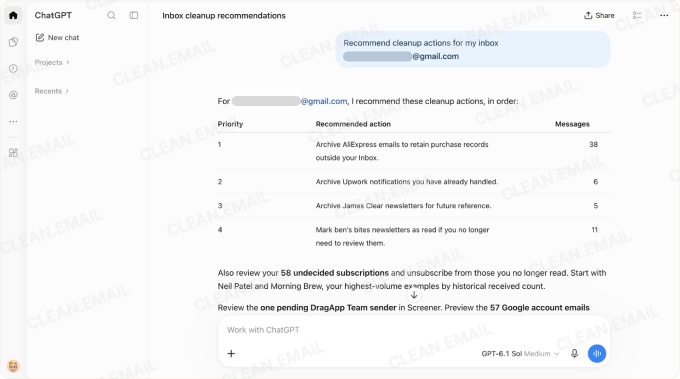
After you connect Clean Email to your AI assistant, you can ask ChatGPT to clear out old newsletters or create an Auto Clean rule, and Clean Email does the work once you approve it. The free trial covers cleaning up to 1,000 emails.
Wrap-Up
The iCloud Mail plugin finally gives Apple email users the kind of ChatGPT access Gmail users already had. It's handy for finding, reading and answering mail. Just remember that it works with one iCloud mailbox, and that removing it means a second stop at account.apple.com.
FAQs
Is the ChatGPT iCloud Mail plugin free?
Yes. OpenAI made the iCloud Mail and Calendar plugins available on all ChatGPT plans, including Free.
Can ChatGPT delete my iCloud emails?
OpenAI lists searching, reading, managing drafts and sending, and it doesn't confirm deleting or moving mail. For bulk deletion, see how to delete iCloud emails in bulk.
Does the iCloud Mail plugin work on Android?
OpenAI's announcement names only the browser version, the desktop app and iOS.
How do I fully disconnect iCloud Mail from ChatGPT?
Disconnect or uninstall the plugin in ChatGPT, then sign in at account.apple.com and remove the app-specific password you created for it.


