


Key Takeaways
- Capabilities of an AI cleaner for Gmail vary by the setup and/or tool you use.
- Google Gemini is useful for Gmail-native search and known tasks.
- ChatGPT adds broader reasoning and analysis for cleaning Gmail.
- ChatGPT connected to Clean Email adds dedicated cleanup tools and ongoing inbox management actions for Gmail.
- For heavy mailboxes or high-volume inboxes, an effective cleanup is incomplete without the final step of reducing future clutter.
Can AI Really Clean Up Gmail?
Yes! You can clean up a Gmail inbox with AI; however, the depth of cleaning and available actions depend on your AI setup.
A simple process for defining cleanup includes the following steps or stages:
Find → Analyze → Categorize → Clean → Unsubscribe → Prevent
Because not every AI setup supports each stage in this process, or offers limited functionality with it, we’ll explain what you can do with common Gmail AI cleanup tools like Google Gemini and ChatGPT.

How to Use AI to Clean Up Gmail
Using the cleanup process, you can get AI assistance with your Gmail inbox cleaning. But before you do, ask AI to analyze your inbox ahead of suggesting changes and be sure to understand what each step in the cleanup process involves.
Identify the clutter including newsletters, promotions, notifications, old unread emails, large messages, and emails from high-volume senders.
Separate routine clutter from important mail to protect receipts, orders, billing, finance, security, account, work, and personal messages.
Review uncertain groups for those that are safe to clean. AI should help narrow down the decision but not blindly determine what is safe to remove and what isn’t; that’s up to you.
Clean the backlog with actions available through your particular AI setup and/or tool. As examples, not all AI tools can archive or delete batches of emails based on age or follow a true unsubscribe process for bulk subscriptions.
Prevent future clutter using actions like unsubscribe, auto-archive, mailbox rules, and keeping only useful recent messages. Using an AI assistant that offers these capabilities keeps the email overload from returning.
Gemini vs ChatGPT for Gmail Cleanup
Learning the capabilities provided by various cleanup options for Gmail is important in choosing an AI setup and/or tool.
The below comparison includes Gemini AI for Gmail, the Gmail plugin in ChatGPT, and ChatGPT connected to Clean Email. Note that features may vary by account, plan, and Workspace settings.
| Task | Gemini in Gmail | ChatGPT connected to Gmail | ChatGPT connected to Clean Email |
|---|---|---|---|
| Find specific email | ✅ | ✅ | ✅ |
| Natural-language inbox analysis | ✅ | ✅ | ✅ |
| Understand full email content | Reads and summarizes message content | Reads and summarizes message content | Metadata-focused, with full-message review when needed for cleanup decisions |
| Identify high-volume senders/patterns | Can search by sender; no documented ranking of top senders | Explains patterns in retrieved emails | ✅ |
| Diagnose thousands of emails | Limited/task-dependent | Analyzes retrieved messages; complete mailbox coverage is not guaranteed | Core use case |
| Group clutter with message counts | Can find matching emails; no documented cleanup report with group totals | Can analyze retrieved emails; complete cleanup-group counts are not guaranteed | ✅ |
| Take bulk cleanup actions | Yes, after confirmation; requests exceeding 10,000 matching threads are not processed | Archive, label, and Trash actions supported; large-batch limits are not specified | ✅ |
| Identify subscriptions | ✅ | ✅ | ✅ |
| Recommend what to unsubscribe from | ✅ | ✅ | ✅ |
| Dedicated unsubscribe action | No documented Gemini unsubscribe action; use Gmail’s unsubscribe controls | No documented dedicated unsubscribe action | ✅ |
| Create recurring cleanup rules | Use Gmail filters; direct rule creation through Gemini is not documented | Direct creation of Gmail filters is not documented | ✅ Auto Clean |
| Keep only useful/recent recurring messages | Can archive or delete by age on request; no documented Keep Newest rule | No documented Keep Newest rule | ✅ Keep Newest |
| Use analysis to prevent future clutter | Limited/task-dependent | Can support scheduled inbox reviews in ChatGPT Work; saved cleanup rules are not documented. | ✅ |
As you can see, each AI setup can help you perform cleanup tasks in Gmail. They can each help identify clutter with an inbox analysis, find and list subscriptions, and suggest which emails to unsubscribe from or clear out.
Depending on the size of your mailbox or types of emails it contains, something simple may suffice. On the other hand, you might need a tool with deep cleaning capabilities.
Gemini in Gmail: Convenient for Gmail-native tasks and when you know roughly what you want or what needs to be done.
ChatGPT connected to Gmail: Works well for broad reasoning and analysis with useful details and recommendations, but not necessarily dedicated cleanup controls.
ChatGPT connected to Clean Email: Ideal for mailbox analysis, bulk cleanup actions, mass unsubscribing, and recurring mailbox management rules.
Can You Clean Thousands of Emails With AI?
An AI assistant can be beneficial when cleaning up thousands of Gmail emails. The connected tool determines which actions it can perform, informs you of any limitations, and awaits your approval to move forward.
A bulk mailbox cleanup typically uses this process:
Analyze → Group → Review → Approve → Act
The assistant starts by identifying cleanup candidates and grouping them by type such as recurring notifications or old promotions. It then displays the results and recommends actions.
You then review the findings, approve the proposed actions, and allow the tool to act.
Here’s an example:
| Message group | Count | Suggested action |
|---|---|---|
| Automated messages | 2,107 | Remove obsolete notifications |
| Promotions older than one year | 1,768 | Review and move to Trash |
| Personal messages | 296 | Keep or archive |
ChatGPT Connected to Clean Email: Clean the Backlog and Fix the Cause
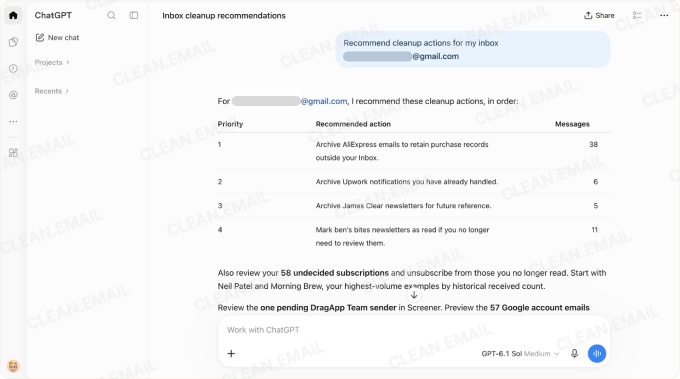
An advantage to using the ChatGPT to Clean Email connection is the ability to combine a mass cleanup of existing clutter along with fixing the cause of that clutter moving forward.
Here’s the core workflow:
Analyze → Review recurring senders and message patterns → Clean backlog → Prevent future clutter
To accomplish this, start with a prompt similar to the one below, tailored to your particular needs:
Analyze this Gmail inbox without changing anything. Group the largest sources of clutter into Likely Safe to Clean, Keep, and Review. Exclude purchases, billing, finance, security alerts, account changes, and personal correspondence. Then suggest how to prevent each major clutter group from building up again.
You should receive a detailed, read-only analysis for your review with recommended actions per group/message and best prevention methods for future clutter per group.
Actions and prevention can include:
- Sending existing clutter to the Trash or Archive such as old promotions, automated reminders, or outdated job alerts.
- Using Unsubscriber to unsubscribe from mailing lists and remove existing subscriptions.
- Creating Auto Clean mailbox rules to manage recurring notifications or to clear age-based emails.
- Choosing Keep Newest for repeating messages that become useless over time where only the most current one matters.
The AI assistant may then provide you with a handy Cleanup Priority list to help you tackle your cleaning efficiently.
1. Old recurring newsletters: High cleanup potential, unsubscribe from clearly promotional streams
2. Repeated document edit notices: Largest single sender; preserve collaboration and approval records
3. Promotional product updates: Review sender preferences, archive, remove, or reroute
4. Automated reminders and job alerts: Switch to digests, reduce frequency, or automatically route to separate labels
You’ll also notice that nothing has been changed; the analysis is a recommendation only.
You can then control what you clean and how you clean it by instructing the AI assistant to take the actions you wish based on the results. Move to the Trash, unsubscribe, set up an Auto Clean rule, or Keep Newest—your inbox, your choice.
What Can ChatGPT Control Through Clean Email?
As with any connection to your inbox, you should be aware of what an external tool can access and control.
With the ChatGPT connection through Clean Email, an inbox analysis can be performed without any changes. Actions usually require your approval and that approval applies to the specific action being requested. This includes actions like archive, move, mark read/unread, subscription management, Auto Clean rules, and Trash.
The assistant can access email information such as headers and metadata. It may also retrieve message content if necessary to complete the request.
What the assistant cannot do is send, reply, forward, or permanently delete emails. These are concrete controls that enhance your privacy and safety and reduce the risk of potentially detrimental results.
Can AI Tell What Is Safe to Delete?
AI assistants can help you identify cleanup candidates like unread messages, large emails, or newsletters. But you should not expect them to unquestionably declare emails as safe to remove. An AI email cleanup tool lacks personal context and can sometimes accidentally misclassify legitimate emails.
You should protect sensitive emails and important categories. You can do this by separating them from your inbox, applying importance markers, using exclusions in automated filters, or archiving rather than deleting.
Additionally, after an inbox analysis and suggestions for cleanup, always perform another review before requesting or taking a removal action.
Can AI Unsubscribe From Emails?
When it comes to inbox clutter, the biggest culprits are subscriptions. So, it only makes sense to let an AI tool tackle the job of unsubscribing in Gmail and removing these distractions.
- Gemini in Gmail can identify subscriptions, but not unsubscribe you. You must manually unsubscribe with Gmail’s built-in controls or Manage Subscriptions feature.
- ChatGPT connected to Gmail can also identify subscriptions and offers to unsubscribe you with approval. However, the subsequent response instructs you to manually unsubscribe within Gmail; a true unsubscribe process is neither executed nor documented.
- ChatGPT connected to Clean Email identifies subscriptions, recommends ones to unsubscribe from, and follows a true unsubscribe process. The assistant allows you to select, request, and approve one or more to unsubscribe from. Existing subscriptions can then move to the Trash with your approval, and any future emails are handled automatically.
Can AI Keep Gmail Clean Automatically?
Clutter prevention is part of the same cleanup process described earlier; it’s the final step. And the answer is yes; AI can keep your Gmail clean automatically.
With the ChatGPT connection to Clean Email, you can use advanced features not offered by other AI assistants.
Here’s a simple workflow to an ongoing cleanup routine:
- Set up Auto Clean rules for recurring notifications that create inbox noise.
- Use Keep Newest for repeated updates where only the most recent email matters.
- Use Unsubscriber to unsubscribe from and remove unwanted newsletters and promotions.
- Automatically archive emails that are useful or for reference but distract from important messages.
Is It Safe to Let AI Clean Gmail?
It’s generally safe to let AI clean your Gmail, but you shouldn’t relinquish control or choose a tool or setup without being aware of its access or permissions.
Review the following before using AI to clean your mailbox:
- What the tool can see and whether full message bodies are read.
- What the tool can modify, both with and without approval.
- How approvals work including which actions require confirmation and your options for changing these.
- Whether or not the tool can send, reply, forward, or permanently delete emails.
- Connection requirements, permissions requested, and how to revoke access.
You should also perform a periodic review of the granted permissions and allowed access as circumstances can change over time.
FAQs
Can ChatGPT clean up Gmail?
Yes, ChatGPT can help with a Gmail cleanup using connections and integrations. With the ChatGPT connection to Clean Email, you can take advantage of an inbox analysis with cleaning recommendations and dedicated cleanup capabilities.
Can Gemini clean up Gmail?
Yes, Gemini can help with a Gmail cleanup though it can be more limited in its capabilities. You can ask Gemini to do things like identify clutter and modify labels, but it cannot perform some cleaning actions like multi-step workflows for unsubscribing.
Can AI delete 10,000 Gmail emails at once?
Yes, AI can mass delete Gmail emails by the thousands, all at one time, if your connected AI setup supports this instruction and for bulk actions.
Can AI identify emails I probably do not need?
Yes, AI can analyze your inbox using sender history, patterns, categorization, and interactions to find those like low-priority messages, outdated emails, subscriptions, and promotions that can often be safe to archive or remove.
Can AI accidentally delete important Gmail messages?
Yes, if you use an autonomous AI email cleaner and grant it the ability to execute deletions without your approval. It’s best to employ an AI assistant or agent that requires confirmation before permanently deleting emails.
Can ChatGPT unsubscribe me from emails?
Yes, ChatGPT can unsubscribe you if the connection or integration you use supports the action.
Can AI automatically keep Gmail clean?
Yes, there are AI tools that can help keep your Gmail clean including replacement AI email clients and standalone web-based cleaners with automations.
Is there a free AI Gmail cleaner?
Yes, but free options have limitations. Google Gemini offers free AI-powered email summaries, while more advanced Gmail management features require an eligible plan. Clean Email lets you clean up to 1,000 messages through ChatGPT, Claude, or Codex.


