


Key Takeaways
- Apple Mail is an email app that supports iCloud, Gmail, Outlook, and other accounts, while iCloud Mail is Apple’s email service.
- You can connect AI assistants to Apple Mail, iCloud, or Yahoo through compatible tools, but the setup differs for each option.
- Built-in features such as Apple Intelligence in Mail or Yahoo Mail’s AI summaries are separate from connecting an outside assistant.
- One assistant can work with several inboxes and providers, but it won’t merge them into one inbox.
- The connection tool decides what the assistant can do and which safeguards you get.
- Clean Email gives supported AI assistants specialized cleanup tools for accounts already added to Clean Email, without connecting each mailbox separately during AI setup.

Can You Connect Apple Mail, iCloud and Yahoo to an AI Assistant?
Yes. ChatGPT, Claude and Codex can work with Apple Mail, iCloud and Yahoo accounts through add-on connection tools, but it’s important to know that each tool supports a different mix of AI apps, accounts and actions.
Apple Mail vs iCloud Mail
Apple Mail is an email client (it’s the Mail app on your Mac, iPhone and iPad). iCloud Mail is the email provider Apple runs for @icloud.com, @me.com and @mac.com addresses. Since you can add other email accounts to Apple Mail, many people use the app to access their iCloud, Gmail, Outlook and Yahoo inboxes from one place.
The difference matters when you connect an AI assistant. A connection that works through the Mail app on your Mac can reach every account added there, while one that signs in to iCloud Mail directly sees only your iCloud mailbox.
📌 Note: MCP, short for Model Context Protocol, is a technology that lets an AI assistant connect to tools such as Clean Email. In setup screens, “MCP server” or “custom MCP server” means the connection you’re adding, not an email account or another AI assistant.
Use an Apple Mail MCP Server on Your Mac
Apple Mail MCP is a free, open-source tool by developer Patrick Freyer, and gets regular updates.
If you install it on your Mac, it turns Claude Desktop, Claude Code, or another compatible AI app into an Apple Mail AI assistant that can search, read, organize, send, and delete messages in every Mail account. The only downside is that the setup is technical and involves the installation of Python 3.10 (you can of course ask your favorite AI agent to do the setup for you).
Connect Directly to iCloud or Yahoo
Apple and Yahoo don’t publish their own iCloud MCP server or Yahoo Mail MCP server, but other tools reach both mailboxes directly. OpenAI’s iCloud Mail plugin, launched in October 2026, is rolling out to all ChatGPT plans on the web, desktop, and iOS. It can search and read mail at an @icloud.com, @me.com, or @mac.com address, manage messages and drafts, and send email, but it can’t see other Apple Mail accounts.
mcp-email-server is a free, open-source tool for iCloud, Yahoo, and several other providers that runs on Windows, macOS, or Linux. It handles several accounts and can search, read, organize, send, and delete mail from Claude Desktop and other AI apps that run local tools. Expect a technical setup with Python 3.11 or later, the uv package manager, and manual configuration.
Built-In Email AI vs Connected AI Assistants
Built-in AI comes with the email app or service you already use. Apple Mail AI features come from Apple Intelligence, which adds message summaries, Smart Reply, and Writing Tools on supported devices, as explained in our guide to Apple Intelligence in Mail. Yahoo Mail AI includes message summaries in the new Yahoo Mail on desktop and, for U.S. users, Planner, which turns dates and tasks in emails into calendar and to-do items.
A connected AI assistant is a separate app, such as ChatGPT, Claude, or one of the other AI email assistants. It uses a tool you add and approve to access your mail or carry out supported actions, and MCP is the technology behind that connection.
How AI Assistants Connect to Your Email
An AI assistant reaches your mail in one of three ways:
- Through Apple Mail on your Mac, where a tool running on the computer gives the assistant access to supported Mail app functions.
- Directly through your email provider, where a tool signs in with IMAP to access messages and SMTP to send them.
- Through an online service like Clean Email. You add your supported accounts to the service, then connect the assistant to it.
How to Connect AI Assistants to Apple Mail, iCloud, and Yahoo
Start from where your mail lives. Local options run on your computer, remote ones on the tool maker’s servers.
| Email app or provider | Connection option | Authentication & permissions | Main limitation |
|---|---|---|---|
| Apple Mail on a Mac | Apple Mail MCP (local) | macOS Automation permission; uses the accounts already signed in to Mail | Mac only; connecting it to ChatGPT requires additional setup |
| iCloud Mail | ChatGPT iCloud Mail plugin (remote) | App-specific password, which requires two-factor authentication | ChatGPT only; iCloud addresses only |
| iCloud Mail and Yahoo Mail | mcp-email-server (local) | App-specific password for iCloud, app password for Yahoo; you choose which actions are allowed | Technical setup; ChatGPT requires a compatible remote connection or tunnel |
| iCloud, Yahoo and other supported providers | Clean Email (remote) | OAuth sign-in to Clean Email; iCloud is added with an app-specific password, Yahoo with Yahoo sign-in | Cleanup tools only; can’t send, reply or forward |
Local tools also need your computer on and an AI app that runs them, like Claude Desktop or Codex.
Can One AI Assistant Manage Multiple Email Accounts?
Yes, one AI assistant can manage multiple mail accounts if each account is supported by it. The complexity of getting a multi-account setup to work can vary greatly.
Apple Mail MCP sees every account already in Apple Mail, whether iCloud, Gmail, Outlook or Yahoo, and it can search across them or stay within one. If all your mail lives in Apple Mail, then it’s definitely a good idea to start with it, since Mail already handles every sign-in. For several accounts from the same provider, Apple Mail MCP lets you configure each account separately and tell the assistant which one to use.
When it comes to mixed provider setups, you can connect each one separately, with its own sign-in and permissions, such as a Gmail or Outlook connection next to ChatGPT’s iCloud Mail plugin. Our roundup of AI for Outlook email covers the Outlook side. Or you can add every mailbox to one service that supports several providers, such as Clean Email, and connect the assistant once.
| Setup | Connection option to consider |
|---|---|
| Several accounts already in Apple Mail on a Mac | Apple Mail MCP |
| Two or more accounts with one provider, such as iCloud or Yahoo | mcp-email-server, with one entry per account |
| Gmail or Outlook plus iCloud | The assistant’s Gmail or Outlook connection plus ChatGPT’s iCloud Mail plugin |
| Several providers you want to clean up through one connection | Clean Email |
None of these options merges accounts into a unified inbox. Name the account and folder in each request, like “my iCloud Inbox” or “both Yahoo accounts,” and check which mailboxes the assistant plans to change before you approve. To handle several inboxes without AI, see how to manage multiple email accounts from one place.
What Can an AI Assistant Do With Your Email?
Only what the connection tool supports. The options in this guide cover four groups of actions:
| Type of action | Examples | Available in |
|---|---|---|
| Read | Search, summarize, retrieve messages | All options in this guide |
| Organize | Archive, move, mark as read or unread | Apple Mail MCP, mcp-email-server; Clean Email to archive, move, mark read/unread, and perform other actions |
| Write | Draft, reply, forward, send | Apple Mail MCP, mcp-email-server, ChatGPT iCloud Mail plugin |
| Destructive | Move to Trash, delete permanently | Apple Mail MCP, mcp-email-server; Clean Email moves mail to Trash only |
Not every connection can organize or delete messages, and most AI apps let you block unwanted actions. OpenAI doesn’t list which changes the iCloud Mail plugin’s message management covers, so ask the assistant which tools it has before you rely on a connection.
Dedicated AI email automation tools can sort or answer mail without a chat, and our AI email management guide has ideas on what to hand to an assistant.
Use Clean Email to Connect Your AI Assistant and Clean Multiple Inboxes
Clean Email gives supported AI assistants such as ChatGPT or Claude specialized tools to clean iCloud, Yahoo, Gmail, Outlook, AOL, and other supported inboxes.
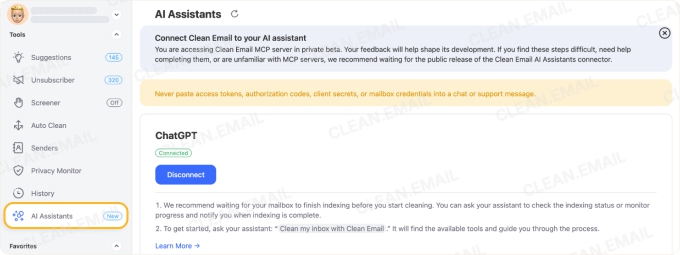
Describe what you want to clean, review the proposed changes, and let Clean Email handle bulk cleanup, unsubscribing, and cleanup rules across your connected accounts.
Clean Email is built to find matching groups and clean them up, for a large backlog, repetitive cleanup, or several accounts.
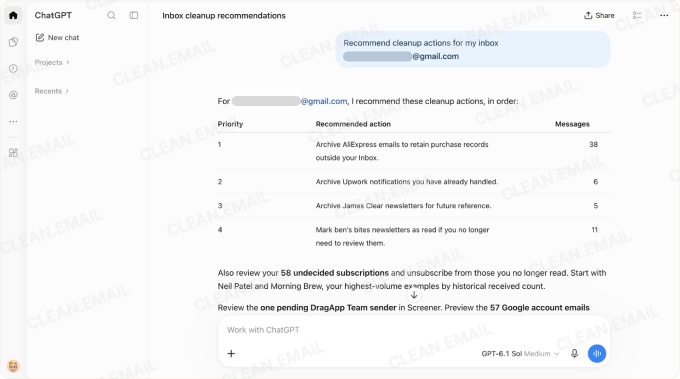
From the chat, you can archive or trash messages in bulk, unsubscribe from several senders (blocking those that ignore unsubscribe requests), and create or change Auto Clean rules by describing them. The assistant can also review your top senders and subscriptions and suggest where to start.
Approved bulk cleanup and unsubscribe jobs keep running in the background after you close the chat. For cleanup that repeats, ask for a saved Auto Clean rule, which applies to future matching mail.
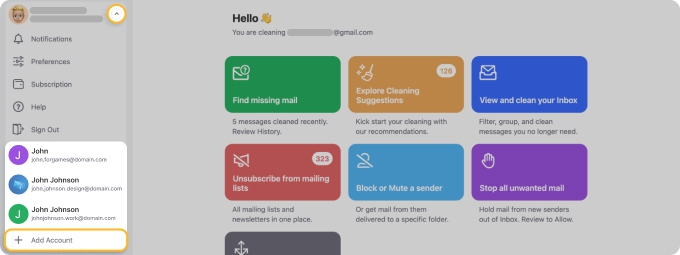
Clean Email connects to email accounts rather than the Apple Mail app, so Apple Mail users add the iCloud or other account behind it. The AI assistant connection is available to all Clean Email users, including the free trial.
- Add your mailboxes to Clean Email and let the initial sync finish.
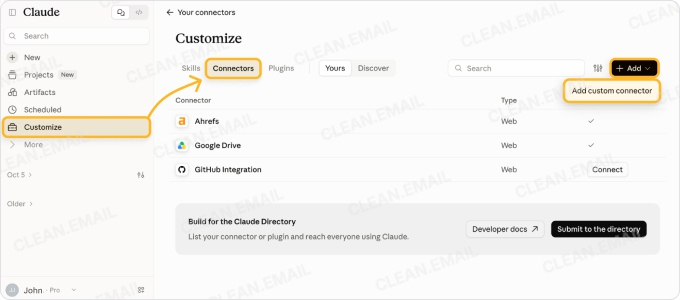
- Add the Clean Email connection in ChatGPT, Codex, or Claude with the steps to connect Clean Email to your AI assistant.
- Choose OAuth if asked for an authentication method.
- Sign in to your Clean Email account and approve the requested access. The assistant can then use every mailbox in that account, with no separate sign-in for each.
- Start a new chat, ask the assistant to use Clean Email, and name the mailbox and what to clean.
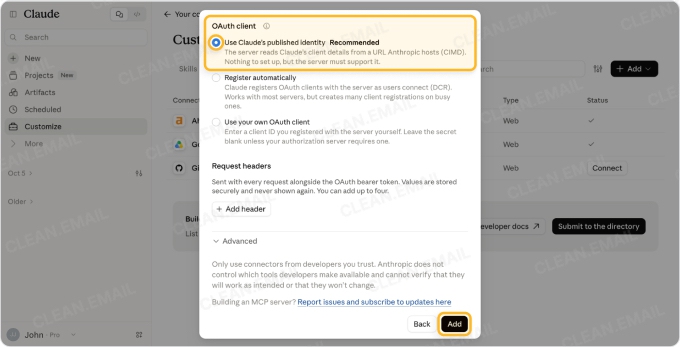
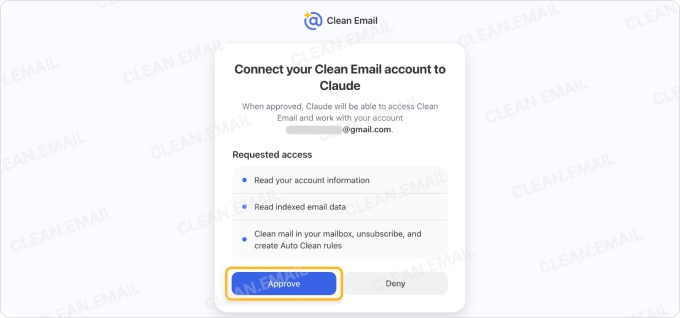
For example:
Use Clean Email to find newsletters older than 30 days in my inbox. Show me the matches before archiving them.
Keep in mind that labels are different between apps and change with updates. In a managed ChatGPT workspace, an admin may need to allow the plugin first, and on Claude Team or Enterprise, an Owner must add the connector.
📌 Note: Some AI assistants require a paid plan to connect Clean Email or use certain features. If you use a work account, you may also need admin approval.
Is Connecting an AI Assistant to Your Email Safe?
It can be, if you know where the tool runs, what it may change, and how to revoke its access. Safeguards differ by tool:
| Option | Where it runs | Access controls | Approval before changes |
|---|---|---|---|
| Apple Mail MCP | Your Mac | macOS Automation permission; read-only mode blocks sending only; default limits on trashing and moving | Comes from the AI app |
| mcp-email-server | Your computer | Passwords kept on the computer; can be limited to reading only; no sending until you list recipients | Comes from the AI app |
| ChatGPT iCloud Mail plugin | OpenAI’s servers | App-specific password you can revoke from your Apple Account | ChatGPT may ask before an action; Allow all actions skips that |
| Clean Email | Clean Email’s servers | OAuth sign-in you can remove from the AI app | Set in the AI app |
Local tools keep passwords on your computer, but anything the assistant reads still goes to the AI provider. You can revoke one app-specific password without touching your main password, in Sign-In and Security → App-Specific Passwords at account.apple.com or in Yahoo’s External connections, where app passwords stay active until you delete them. On a Mac, switch off an app’s control of Mail in System Settings → Privacy & Security → Automation.
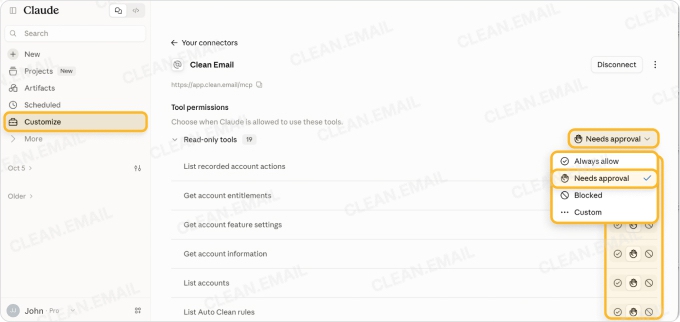
In Claude, keep tools that change mail on Needs approval and pick Allow once over Always allow until you trust a tool. ChatGPT asks before write actions by default, and Codex has its own approval setting.
Prompt injection is the other risk: an email can hide instructions meant to make the assistant forward messages or share data. Ask for specific tasks and check each action before you allow it.
Clean Email does not sell or rent your personal data. Connecting an AI assistant is optional, and information is shared through that connection within the permissions you authorize. See the privacy policy and terms for details.
Mailbox changes need your approval, but permissions and confirmation settings live in your AI assistant, so a separate prompt may not appear for every action. Review the account, matching messages and action before approving, and never paste mailbox credentials, tokens, authorization codes, or client secrets into a chat.
Common Problems & Troubleshooting
The Mailbox Is Still Syncing or the Connection Fails
A mailbox you add to Clean Email must finish its initial sync first. If the connection fails, remove Clean Email from the AI app and add it again, and if sign-in requests repeat, check that the address is exactly https://app.clean.email/mcp.
The Assistant Sees Only One Apple Mail Account
Make sure each account is turned on in Mail → Settings → Accounts and that the tool’s settings don’t name a default account. Then have the assistant list the accounts it sees, and use the exact name in your request.
macOS Shows a Permission Error
“Not authorized to send Apple events” means the app running the tool, such as Claude or Terminal, isn’t allowed to control Mail. Allow it in System Settings → Privacy & Security → Automation, and keep Mail open while you work.
iCloud Authentication Fails
Use an app-specific password, not your Apple Account password. Creating one requires two-factor authentication, and changing your Apple Account password revokes all of them, so make a new one afterward. Our iCloud email settings guide lists server details for manual setups.
Yahoo Authentication Fails
Create a Yahoo app password under Account Security → External connections and use your full address as the username. If Yahoo refuses, try a browser you’ve used to sign in to Yahoo for several days in a row, outside Incognito mode. Server details are in our Yahoo Mail settings guide. Clean Email needs no app password, since it adds Yahoo through Yahoo’s own sign-in.
The Connection Works in Claude but Not in Another AI App
Local tools such as Apple Mail MCP and mcp-email-server run only in apps like Claude Desktop or Codex, since ChatGPT chats use online connections. Each app also needs its own setup and, on a Mac, its own Automation permission, and ChatGPT plans or workspace admins can limit custom connections.
The Assistant Can Read but Can’t Send or Delete
Check for a read-only mode, an action switched off in the tool’s settings, or a tool set to Blocked in the AI app. Some limits are built in. For example, Apple’s mcp-email-server won’t send until you list allowed recipients, and Apple Mail MCP limits how many messages it trashes in one step.
Clean Email’s AI connection does not send, reply to, or forward messages. It supports cleanup actions such as archiving, moving messages, marking them read or unread, and moving them to Trash.
FAQs
Does Apple offer an official connection between AI assistants and Apple Mail?
Apple does not currently provide an official MCP server for Apple Mail. Independent tools such as Apple Mail MCP let compatible AI assistants work with accounts added to the Mail app on a Mac.
Can Claude connect to Apple Mail?
Yes. Claude Desktop can connect through a third-party tool such as Apple Mail MCP. This requires setup on your Mac and permission for the tool to control Mail.
Can I connect ChatGPT to Apple Mail?
The simplest options connect ChatGPT to your email accounts rather than the Apple Mail app itself. For example, you can connect iCloud Mail directly or use Clean Email to clean supported accounts you also access through Apple Mail.
Can I connect an AI assistant to iCloud Mail on Windows?
Yes. You can use a web-based connection, such as ChatGPT’s iCloud Mail plugin, or connect your iCloud mailbox to Clean Email and use a supported AI assistant for cleanup. These options do not require Apple Mail or a Mac.


