


The Big Picture: Zoho’s Email Philosophy in 2025–2026
Zoho doesn’t treat email as a standalone product anymore. It treats it as shared infrastructure.
- Zoho Mail handles day-to-day business communication
- Zoho CRM turns email into sales and relationship data
- Zoho Campaigns manages marketing and lifecycle automation
- Zoho Desk converts emails into structured support workflows
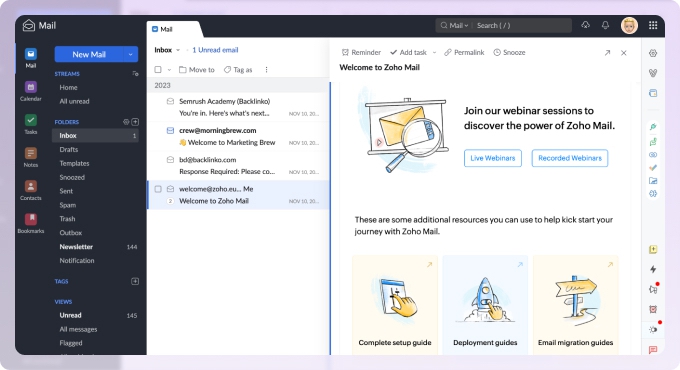
The goal isn’t to compete with flashy inbox features. It’s to keep email deeply connected to the work happening around it.
That’s the throughline across all recent updates—and it’s unlikely to change going into 2026.
Check out the recent Zoho Mail Statistics (2024–2026)

Zoho Mail: Business Email That Stays Out of the Way
Zoho Mail remains the foundation of the stack.
In 2025–2026, its strength isn’t novelty. It’s consistency.
You get:
- Ad-free business email with custom domains
- Multi-domain support, aliases, and group accounts
- Deep folder structures, tags, filters, and rules
- Built-in Calendar, Tasks, Notes, Contacts, and Bookmarks
- Streams for commenting on emails and assigning tasks internally
Security and admin controls are where Zoho Mail quietly outperforms many competitors:
- Spam and phishing protection
- Two-factor authentication
- S/MIME and PGP encryption on higher tiers
- IP-based access restrictions and retention policies
Pricing stays one of Zoho Mail’s biggest advantages in 2025:
- A small free plan for very small teams
- Low-cost Mail Lite tiers
- Premium plans with serious compliance features
- Workplace bundles that combine email with docs, storage, and chat
The trade-off is complexity. New admins will feel it. But once configured, reliability is excellent.
Keeping Your Zoho Inbox Clutter-Free Over Time
Before diving into Zoho’s built-in features, there’s one very real productivity issue Zoho doesn’t fully solve on its own: inbox clutter over time.
Zoho Mail is solid for daily work, but it’s not designed for aggressive cleanup of years’ worth of newsletters, notifications, and automated emails. That’s where Clean Email fits naturally as a companion tool. It works alongside Zoho Mail and is available on web, macOS, iOS, and Android, which helps if you switch between devices throughout the day.
It can unsubscribe you from hundreds of newsletters at once and move existing messages from those senders to Trash or Archive, run background rules that handle things like old emails, large attachments, or recurring notifications, and group similar messages into suggested bulk actions, with more to explore. Because it works on email metadata rather than message content, you get that automation without giving up privacy.
Used alongside Zoho Mail, it keeps inboxes lean, which makes everything else in the Zoho stack feel faster and more manageable.
Zoho CRM: Turning Email Into Sales Intelligence
Zoho CRM is where email stops being just communication and starts becoming data.
Sales teams can:
- Send and receive email directly inside CRM
- Automatically link messages to leads, contacts, deals, and cases
- Use MailMagnet to prioritize replies in real time
- Trigger workflows when emails are opened, clicked, or replied to
Email tracking feeds directly into lead scoring and pipeline automation. For sales teams that live in their CRM, this saves hours each week.
That said, CRM email features assume intentional setup. If you just need basic email, this layer will feel like overkill. If you want visibility and automation, it’s one of Zoho’s strongest pieces.
Zoho Campaigns: Structured Email Marketing Without Leaving Zoho
Zoho Campaigns handles everything Zoho Mail intentionally doesn’t.
It’s built for:
- Newsletter campaigns
- Product updates
- Onboarding and lifecycle sequences
- Re-engagement and follow-ups
Features include:
- Drag-and-drop editors and templates
- Dynamic content and personalization
- A/B testing and send-time optimization
- Visual automation workflows
- Tight integration with Zoho CRM and ecommerce tools
Reporting is solid, with real-time analytics, heatmaps, and deliverability tools. Pricing scales with list size and features, staying competitive in 2025.
There is a learning curve—especially for automation—but once set up, Zoho Campaigns becomes a reliable engine rather than a constant project.
Zoho Desk: When Email Becomes Support Infrastructure
Zoho Desk treats email as a support channel, not just a message.
Incoming emails automatically become tickets. Threads stay grouped. SLAs and workflows trigger based on sender, content, or priority.
Agents reply via email, customers stay in email, and everything gets logged cleanly. When paired with Zoho CRM, support teams get full customer context without switching tools.
Desk works best inside the Zoho ecosystem. Used alone, it can feel redundant. Used together, it’s efficient.
Zoho Email Stack in 2025–2026: The Practical Pros and Cons
| Area | What Works Well | Where You’ll Feel It |
|---|---|---|
| Zoho Mail (core email) | Clean, ad-free business email with strong collaboration tools and dependable security. Once set up, it’s stable and predictable. | Advanced admin and security features live on higher tiers, and the interface can feel dense at first. |
| Zoho Mail (pricing) | Very affordable across plans, especially in Workplace bundles. Storage and pricing are predictable. | Free and lower tiers have limits that growing teams will outgrow sooner than expected. |
| Zoho CRM (email automation) | Deeply ties email to sales data, workflows, and lead scoring. Excellent visibility for teams that live in CRM. | Setup takes thought. For very small teams, it can feel heavier than necessary. |
| Zoho CRM (tracking) | Open, click, and reply tracking feeds directly into CRM records and automation. | Privacy and compliance need careful handling, and some recipients block tracking. |
| Zoho Campaigns | Powerful email marketing with solid automation, personalization, and reporting. Strong CRM integration. | Advanced features come with a learning curve, especially for non-marketers. |
| Zoho Desk (email support) | Turns email into structured, trackable support tickets with full context. | Best value shows up when used with other Zoho apps, not in isolation. |
Final Take
Zoho’s email features in 2025–2026 aren’t about reinvention. They’re about connection.
Mail stays reliable.
CRM adds intelligence.
Campaigns handle scale.
Desk brings structure.
If you want an email stack that grows with your business—without forcing you into enterprise pricing or constant tool switching—Zoho’s approach continues to make a lot of sense.












