


Who Zoho Mail Is Best For
Zoho Mail works best for teams that want:
- A private, ad-free business email with custom domains
- Shared inboxes for support, ops, or finance
- Tight integration with Zoho CRM, Projects, Desk, and Workplace apps
- Strong security and compliance controls without enterprise pricing
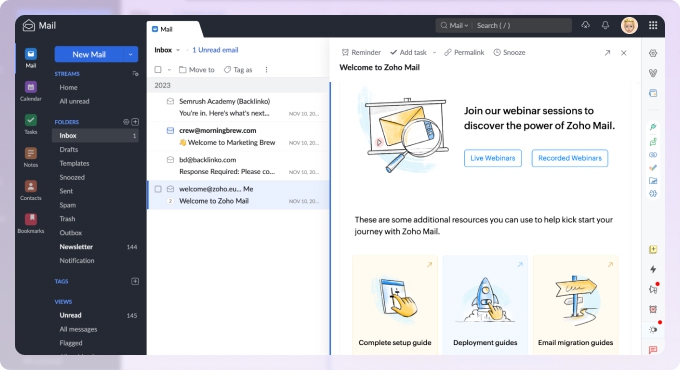
It’s especially well-suited for SMBs that already live inside Zoho—or plan to.
If you’re just looking for a lightweight personal inbox or heavy AI automation out of the box, this probably isn’t your ideal match. More on that later.

Initial Setup & Migration
Getting started with Zoho Mail is still straightforward, assuming you’re comfortable with basic DNS changes.
- Custom domain setup is guided and well-documented
- IMAP migration from Gmail or Outlook is reliable
- Admin controls are extensive, though not always intuitive at first
I’ll be honest: first-time admins can feel a bit overwhelmed. Zoho exposes a lot of knobs. The upside is flexibility. The downside is a learning curve—especially compared to more locked-down consumer email services.
Once everything’s configured, though, stability is excellent.
Interface & Productivity Features (What’s New in 2025)
The 2025 updates focused on small friction points. And that’s exactly where Zoho Mail needed attention.
Notable improvements:
- Automatic attachment inclusion in replies (optional, but useful)
- Easier multi-attachment selection, up to 15 files at once
- A new Tree view that collapses long email threads
- Expanded Streams and comments limits—now effectively unlimited for real-world use
Shared mailboxes also got a cleaner, more compact view, letting teams scan more messages at once. For support-style inboxes, that matters.
Nothing here is revolutionary. But it all adds up to a calmer, more efficient inbox.
Collaboration & Shared Mailboxes
Zoho Mail’s collaboration features remain one of its strongest differentiators.
Streams lets teams comment on emails internally, assign tasks, and share context without forwarding messages around. In 2025, shared mailboxes improved significantly:
- Bulk actions (tag, archive, delete, mark spam/read)
- Quick jumps to unread, archived, spam, or trash
- Tags and contact cards for shared addresses
If you’re running a lightweight support or ops inbox, this works surprisingly well—especially when paired with Zoho Desk. It won’t replace a full helpdesk for SLA-heavy environments, but for many teams, it’s “good enough” without adding another tool.
Performance With Large Archives
Zoho Mail handles large mailboxes reliably. Search performance is solid, and message loading stays consistent even with years of email.
Where it falls short is bulk historical cleanup. Native tools work, but they’re manual and time-consuming. That’s why pairing Zoho Mail with a dedicated inbox management app makes sense for users with 50,000+ messages sitting around.
Once cleaned up, ongoing performance is smooth.
Security & Privacy
This is where Zoho Mail continues to stand out.
- No ad-based monetization
- Data hosted on Zoho’s own infrastructure
- Two-factor authentication and strong spam filtering
- Improved PGP key management in 2025
- Controls to restrict copying or downloading sensitive attachments
For compliance-focused organizations, these additions matter. Zoho’s security posture feels deliberate rather than reactive.
That said, stricter anti-spam enforcement means cold-email and bulk outreach users need to be careful. Sending patterns that look spammy will get flagged. Quickly.
Mobile Experience
Zoho Mail’s Android and iOS apps remain first-class citizens.
They support:
- Multiple accounts
- Offline access to recent messages
- Calendar, contacts, and notifications
- Custom swipe actions
Stability is good. Performance is consistent. Admin-heavy tasks are still easier on the web, but for daily email work, the mobile apps hold up well.
Read More: How to Add Zoho Mail to iPhone
Free vs Paid Plans
Zoho Mail is still cost-effective, especially inside Zoho Workplace or Zoho One bundles.
That said, the free plan has tightened over time:
- Limited storage
- Fewer features
- No real long-term scalability
Most growing teams will need to move to paid tiers sooner than they expect. The pricing itself is reasonable. The plan structure just isn’t always obvious at first glance.
Zoho Mail 2025–2026: Pros and Cons (The Practical View)
| Area | What Works Well | Where It Falls Short |
|---|---|---|
| Core email & reliability | Ad-free, business-grade email with custom domains, solid uptime, dependable spam filtering, and two-factor authentication. Once it’s set up, it just runs. | Advanced admin settings aren’t especially forgiving. Power users will get there, but it takes time compared to simpler consumer inboxes. |
| Collaboration & shared mailboxes | Streams comments, internal sharing, tasks, notes, and the improved 2025 shared inbox tools make team workflows manageable without constant forwarding. | There’s a learning curve, and for teams needing strict SLAs or complex ticketing, a dedicated helpdesk can still feel cleaner. |
| Integrations & Zoho ecosystem | Deep, native integration with Zoho CRM, Projects, Desk, and Workplace apps. The value really shows up when you’re all-in on Zoho. | If you’re only using Zoho Mail by itself, it can feel a bit boxed in compared to platforms with huge third-party plugin ecosystems. |
| Security & privacy | Strong security posture, better PGP key handling, compliance-friendly attachment controls, and no ad-driven data usage. This is one of Zoho Mail’s quiet strengths. | Anti-spam enforcement is strict. Cold email and outreach workflows can get disrupted if sending patterns cross the line. |
| User experience & features | 2025 refinements—attachments, Tree view, shared inbox UI—genuinely reduce friction. Mobile apps are stable with offline access and multi-account support. | AI-driven conveniences still lag larger competitors, and complex changes are easier on the web than on mobile. |
| Pricing & plans | Generally cost-effective, especially inside Zoho Workplace or Zoho One. Good value for teams that want more than just email. | The free plan is increasingly limited, and the plan structure isn’t always obvious when you’re first comparing options. |
| Looking toward 2026 | Based on recent patterns, steady UX, security, and integration improvements are likely to continue without disrupting existing workflows. | There’s no detailed public roadmap, so users are relying on trends rather than concrete feature commitments. |
Keeping a Zoho Inbox Manageable at Scale
Before wrapping up, it’s worth calling out something I’ve seen Zoho users struggle with: long-term inbox clutter.
Zoho Mail is solid for day-to-day work, but like most business email platforms, its native tools aren’t designed for deep cleanup across years of accumulated mail. That’s where Clean Email fits in nicely as a complementary tool. It works alongside Zoho Mail rather than replacing it, connecting via IMAP and analyzing email metadata only, not message content, and you can use it on the web, macOS, iOS, or Android with the actions staying consistent everywhere.
In my testing, it's most useful for bulk-cleaning newsletters, notifications, and old automated mail, setting rules to archive or label recurring senders, grouping messages by sender, age, or type, and unsubscribing without clicking links in old emails, with more to explore.
For Zoho users sitting on large archives of vendor alerts and CRM notifications going back years, it solves a problem the native tools don't really solve at scale, and it stays firmly on the metadata side, which matters for privacy.
Who Shouldn’t Use Zoho Mail
Zoho Mail may not be ideal if:
- You want cutting-edge AI features without adopting a broader ecosystem
- You prefer minimal admin controls and zero configuration
- You rely heavily on cold email or bulk outreach
- You want a large third-party extension marketplace
It’s a business platform first. That focus shows.
Final Take
Zoho Mail in 2025 doesn’t try to impress you. It tries to work. And mostly, it does.
If you value stability, privacy, and ecosystem depth—and you’re willing to invest a little time learning the platform—it’s a dependable long-term choice. Pair it with an email cleanup tool, and many of the inbox-management pain points disappear altogether.
Not exciting. Just solid. And honestly, that’s what most teams need.












