


What Is Shared Inbox Software?
Shared inbox software is a tool that lets multiple team members access, manage, and respond to messages from a single email address, such as support@company.com or admissions@university.edu.
Without shared inbox software, teams often forward messages back and forth, CC half the department, or use shared login credentials, which is one of the most dangerous practices in terms of cybersecurity.
In 2026, there are many shared inbox software tools to choose from, so the process of finding the right fit can feel overwhelming, especially when each tool promises similar features on the surface.
Most shared inbox software solutions include features like message assignment, collision detection (so two people don't reply to the same email), internal notes for private team discussions, and automated workflows that route inquiries to the right person. Many also offer shared inbox software with CSAT measurement to track customer satisfaction, along with integrations for Slack, CRMs, and other tools.

Making the Most of Shared Inbox Software
Choosing shared inbox software is only the first step. Getting real value out of it requires some work, both in how you configure the tool and in how you prepare your inbox for it.
Before rolling out any tool, it's worth establishing clear routing rules, defining who owns what types of inquiries, and making sure the team understands how assignments, tags, and internal notes work. Without these best email management practices, even the best shared inbox software can quickly become just as cluttered and confusing as the messy workflows it was meant to replace.
It's also easy to forget that team members don't stop using their personal work inboxes just because a shared inbox exists. In most setups, the two run in parallel (agents, faculty, or support staff check both throughout the day).
If someone's personal inbox is overflowing with newsletters, outdated threads, and notifications they never asked for, their attention gets split, important messages get buried, and response times suffer across the board.
15 Best Shared Inbox Software Tools in 2026
The tools cover everything from the best shared inbox software for small teams just getting started to enterprise-grade platforms built for high-volume support operations. Some are designed specifically for Gmail or Outlook users, while others work with all kinds of mail services. Each tool is summarized with a focus on what it does best, who it's built for, and any features worth knowing about.
| Software |
|---|
| Helpwise |
| Drag |
| Zoho TeamInbox |
| FocalScope |
| Kayako |
| HelpMonk |
| Missive App |
| Gmelius |
| Hiver |
| Help Scout |
| Unthread |
| Virtualworkforce.ai |
| Freshdesk |
| Front |
| EmailTree |
| Key Features | IMAP Support | Team/Target Use | CSAT Measurement | Assignment Features | Slack/CRM Integration | Official Website | Notes/Remarks |
|---|---|---|---|---|---|---|---|
| Multi-channel, centralized inbox, collaboration tools | Yes | Teams, support | Unknown | Yes | Yes | https://helpwise.io | Good for multi-channel messaging, team collaboration |
| Shared inbox + project management | Unknown | Teams, small teams | Unknown | Yes | Unknown | https://www.dragapp.com | Ideal for teams needing project management with inbox use |
| Tagging, delegation, in-thread chat, rule-based automation | Unknown | Small teams, Zoho ecosystem users | Unknown | Yes | Yes | https://www.zoho.com/teaminbox | Budget friendly, integrates well with Zoho apps |
| Supports Office365 shared mailbox via IMAP | Yes (Office365 IMAP) | Microsoft Office365 users | Unknown | Yes | Unknown | https://www.focalscope.com | IMAP support via Office365 shared mailbox setup |
| Omnichannel support, ticket routing, self-service | Unknown | Support teams, enterprises | Unknown | Yes | Yes | https://www.kayako.com | Automated ticket routing & self-service options |
| Shared inbox, task management, time tracking | Unknown | Small teams, support | Unknown | Yes | Unknown | https://www.helpmonk.com | Task management with shared inbox |
| Collaborative email, chat integration, task assignment | Unknown | Teams, support | Unknown | Yes | Yes | https://missiveapp.com | Combines chat and email collaboration |
| Gmail integration, shared inbox, workflow automation | Gmail native | Gmail users, support teams | Yes | Yes | Slack, CRM | https://gmelius.com | Gmail-focused, automation, templates, workflow |
| Gmail shared inbox, assignment, private notes, AI features | Gmail native | Gmail teams, support | Unknown | Yes | Yes | https://hiverhq.com | AI summarization, ticket auto-close, multiple mailboxes |
| Assignment, team collaboration, customer support focused | Unknown | Support teams | Unknown | Yes | Yes | https://www.helpscout.com | Invisible to customers, easy reassignment |
| Slack-native shared inbox, conversational ticketing, AI assignment | Unknown | Slack users, teams | Yes | Yes | Slack | https://unthread.io | Fully integrated with Slack, AI triage |
| Manual & automatic assignment, internal notes, SLA rules, templates | Unknown | Teams, support | Yes | Yes | Unknown | https://virtualworkforce.ai | Inbox agents for volume reduction and context sharing |
| Ticketing, SLA, collaboration, multi-channel | Unknown | Customer support, enterprises | Yes | Yes | Yes | https://freshdesk.com | Leading helpdesk software often used as shared inbox |
| Customer service shared inbox with collaboration | Unknown | Support teams, enterprises | Unknown | Yes | Yes | https://frontapp.com | Popular shared inbox with workflow automation |
| AI assisted workflows, SLA automation | Unknown | Enterprises, support | Yes | Yes | Yes | https://emailtree.ai | AI-driven ticket creation and SLA management |
1. Helpwise
Best for: Small to mid-sized support teams managing multi-channel communication.
Helpwise is a multi-channel shared inbox platform that brings email, WhatsApp, SMS, Facebook, and Instagram messages into a single dashboard, which makes it a strong choice for customer-facing teams that need to manage conversations across multiple platforms without constantly switching tabs.
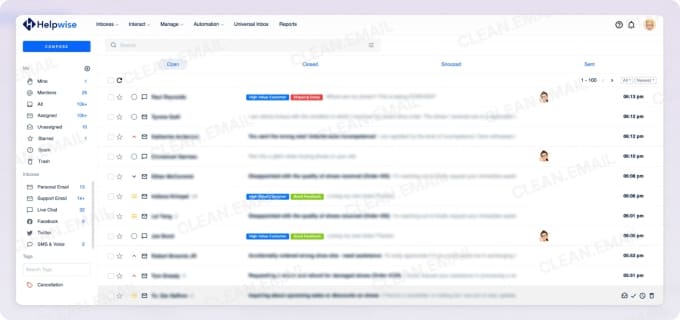
All the essentials you'd expect from shared inbox software for team collaboration are included in Helpwise, such as manual and smart assignment, collision detection, internal notes, shared drafts, and automation rules that can handle repetitive tasks like tagging or routing messages based on content.
I've been pleasantly surprised by how extensive Helpwise's integration library is. It connects natively with popular CRMs like HubSpot, Salesforce, Pipedrive, and Zoho, as well as project management tools like Asana, Trello, and Jira. For teams already using Slack or Microsoft Teams, Helpwise can push notifications and updates directly into those channels. It also supports both Gmail and Microsoft Office 365/Outlook.
In my view, Helpwise hits a sweet spot for small to mid-sized support teams that handle inquiries across multiple channels and want CRM integration without paying enterprise prices. It's also worth considering for shared inbox software for remote customer support, since the async collaboration features (like shared drafts and internal notes) work well for distributed teams.
Pricing: Starts at $12/user/month (billed annually); 7-day free trial available.
2. Drag
Best for: Gmail-native teams that want visual project management built into their inbox.
Drag transforms Gmail into a visual, Kanban-style workspace where you can organize emails and tasks into customizable boards with columns that represent different stages of your workflow. In my experience, this approach works especially well if you also use rules that automatically sort emails in Gmail, since incoming messages can land in the right place before you even open your inbox.
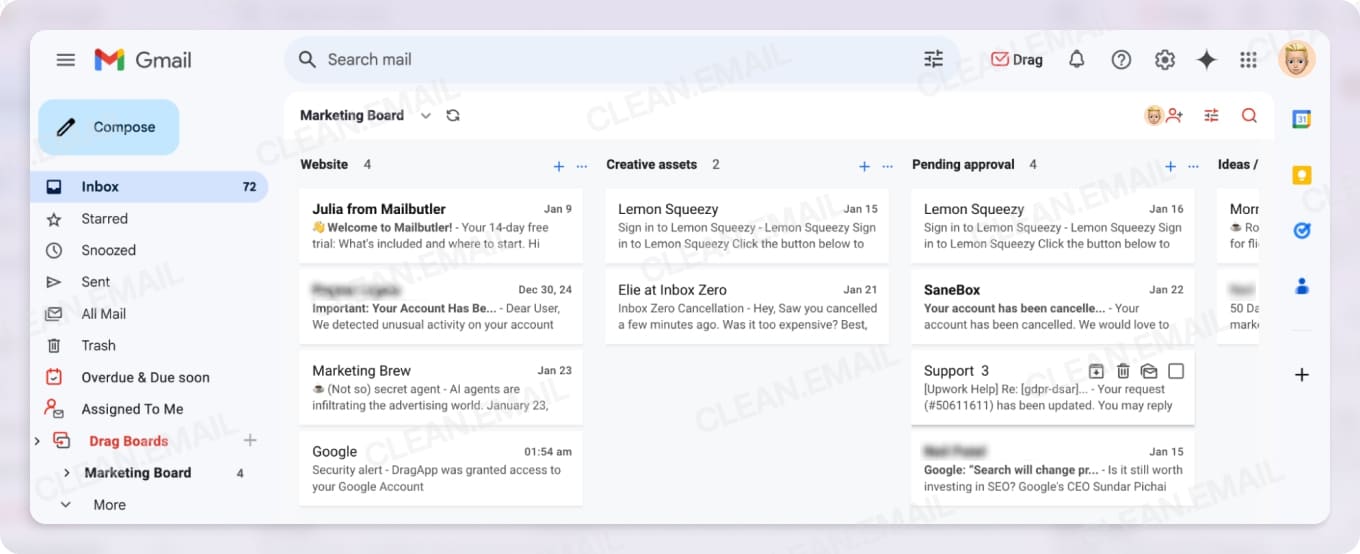
The collaboration features include assignments with clear ownership, collision detection, shared drafts, internal team chat with @mentions, and automation rules for tasks like round-robin assignment and automated tagging. Drag also includes AI-powered features like draft suggestions, email summarization, and sentiment detection, which can help teams respond faster and prioritize urgent messages. It integrates with Google Calendar and Zapier, opening the door to thousands of additional apps.
One thing to keep in mind is that Drag is built exclusively for Gmail and Google Workspace users, so if your organization runs on Outlook or another email provider, this one won't work for you. However, teams already invested in Google's ecosystem can set it up under 5 minutes even without IT support thanks to its clean interface and simple nature (I've done it myself, so I know the setup process is really among the most straightforward).
Pricing: Starts at $12/user/month (billed annually); 7-day free trial available.
3. Zoho TeamInbox
Best for: Budget-conscious small teams, especially those already using other Zoho apps.
You may already be familiar with Zoho from its popular CRM, project management tools, or excellent mail service. TeamInbox is a great multichannel shared inbox solution from the Indian multinational technology company, and it includes all core features you'd expect, such as thread delegation, tagging, internal discussions, draft sharing, and rule-based automation to handle repetitive routing tasks.
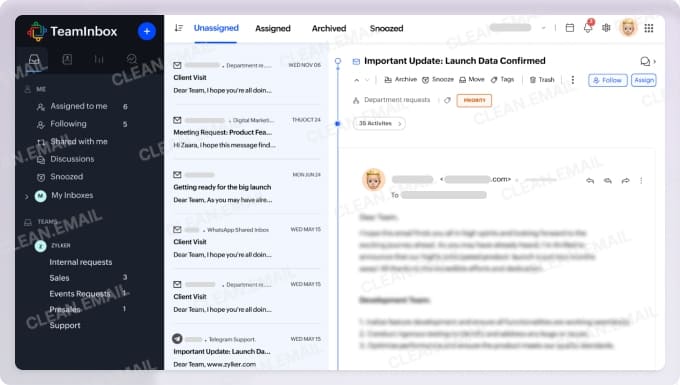
As is the case with other Zoho products, TeamInbox stands out the most because of its attractive pricing. Starting at just €5/user/month (billed annually), it's one of the most affordable options in this shared inbox software comparison, so it's more than accessible for small teams and startups watching their budgets. The Starter plan includes up to 3 shared incoming channels, 25 automation rules, and 10 shared outgoing email channels, which should be plenty for most small operations. If you need more, the Professional plan at €7.50/user/month adds analytics, unlimited rules, and personal incoming channels.
For teams already invested in the Zoho ecosystem, TeamInbox integrates smoothly with other Zoho products through extensions, creating a cohesive workflow across CRM, project management, and communication. That said, if your team relies heavily on non-Zoho tools or needs advanced features like built-in CSAT measurement, you may find it a bit limited.
Pricing: Starts at €5/user/month (billed annually); 14-day free trial available.
4. FocalScope
Best for: Microsoft Office 365 teams and organizations needing flexible deployment options.
FocalScope is a unified helpdesk and contact center platform that handles email ticketing, voice, live chat, and social media messaging. What impressed me probably the most about it is the deployment flexibility. You can run it in the cloud, on-premises, or as a hybrid setup, which makes it one of the few shared inbox solutions that can accommodate strict IT security requirements or data residency policies that many enterprises and government organizations have to deal with.
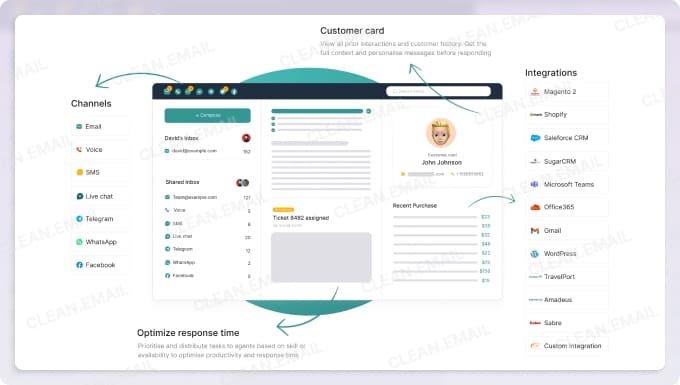
The platform offers solid shared inbox software with assignment features, including automatic ticket distribution based on priority, skills, or availability. Collision alerts prevent duplicate responses, internal notes keep context visible across shifts, and SLA controls help managers track response times. FocalScope also includes built-in customer feedback surveys, live dashboards, and over 70 Excel-based reports for performance analysis.
For teams already familiar with Microsoft products, the interface feels similar to Outlook, which significantly reduces the learning curve. If you already know how to add a shared mailbox in Outlook, you'll find FocalScope's approach intuitive, and you'll definitely appreciate its native integration with Office 365 shared mailboxes via Microsoft's REST API.
Pricing: Starts at $9/agent/month (small cloud); $39/agent/month for full cloud or on-premises; 30-day free trial available.
5. Kayako
Best for: Enterprise support teams looking to scale operations with AI-powered automation.
On its website, Kayako presents itself as a full AI-powered help desk platform designed to help support teams handle growing ticket volumes without proportionally growing headcount. The platform uses AI for triage (auto-classifying, prioritizing, and routing tickets), answers (drafting replies and handling repetitive cases), and continuous learning (improving over time based on human resolutions).
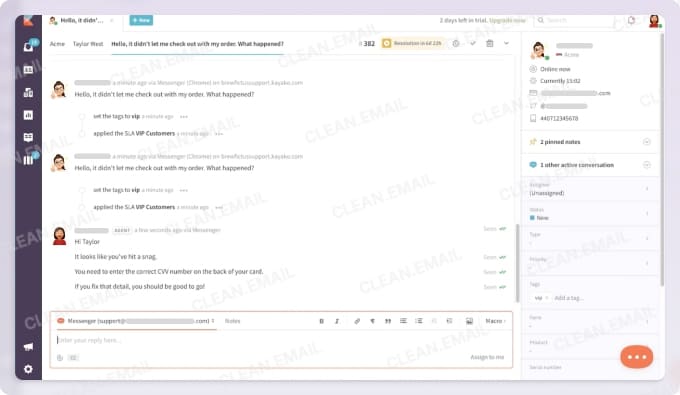
Besides AI features, there's also omnichannel ticketing, automated routing, self-service knowledge bases, and a shared inbox with full customer context displayed in every conversation. I like how Kayako emphasizes measurable outcomes by prominently featuring metrics like reducing average ticket age from 18 hours to under 5 and achieving AI resolution rates above 50%.
The pricing model is different from most competitors because Kayako uses a per-agent fee ($79/month) plus a charge for AI-resolved conversations ($1 each). As such, you only pay extra when the AI actually handles tickets without human intervention, which aligns costs with outcomes rather than capacity.
Pricing: $79/agent/month + $1 per AI-resolved conversation.
6. HelpMonks
Best for: Small to mid-sized teams that want an all-in-one platform combining shared inbox, email marketing, and CRM.
HelpMonks goes beyond the core shared inbox functionality (assignments, internal notes, tagging, and collision detection) by bundling email marketing with campaigns and sequences, a built-in CRM for managing contacts and companies, a knowledge base builder, live chat, and even task management. For teams that want to consolidate multiple tools into a single dashboard, it's an attractive proposition.
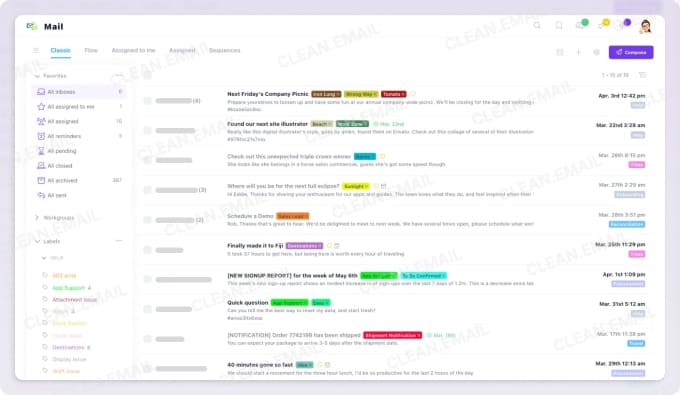
The all-in-one nature of the platform is combined with a flat-rate approach to pricing that can translate to significant savings. The Pro plan at $99/month includes 10 shared mailboxes, unlimited users, and up to 10,000 mailing list subscribers, which is genuinely rare at this price point. There's also HIPAA-compliant hosting as an add-on, which could make it a viable option for healthcare-related support teams.
As much as HelpMonks makes sense for organizations looking to motivate employees to be more productive by reducing tool-switching and centralizing customer communications, it may be overkill if you only need basic shared inbox functionality. The breadth of features means there's more to learn and configure, which could slow down teams that just want to get up and running quickly.
Pricing: Free plan coming soon (1 mailbox, 3 users); Pro at $99/month with unlimited users; Unlimited at $499/month (billed annually).
7. Missive
Best for: Teams that want collaborative email and internal chat in the same workspace.
Missive blends shared inbox software for teams with built-in chat and task management to create a workspace where external communication and internal coordination happen side by side. For example, you can start an internal thread directly inside any email conversation instead of jumping between Slack for team discussions and your email client for customer messages.
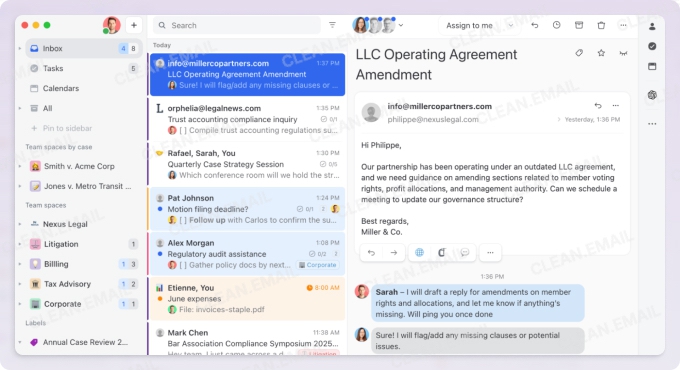
The platform supports a wide range of communication channels, including SMS, WhatsApp, Instagram, Facebook Messenger, and live chat. It also connects with Google Workspace, Office 365, iCloud, and any IMAP-enabled provider, so it works regardless of your existing email infrastructure.
Assignment features include manual delegation and automatic workload balancing with options like round-robin distribution, and every action gets logged in an audit trail so managers can see who did what and when. Missive is SOC 2 Type II compliant, includes AI-assisted drafting and translation, and integrates with over 25 external tools.
I think Missive is ideal for smaller teams that value async collaboration and want to reduce app-switching, though those who are looking for the best shared inbox software for large enterprises might find the reporting features a bit basic compared to dedicated helpdesk platforms.
Pricing: Starts at $14/user/month (billed annually); 30-day free trial available with no credit card required.
8. Gmelius
Best for: Gmail users who want AI-powered email management and collaboration without leaving their inbox.
Gmelius can turn Gmail into a collaborative workspace by adding shared inboxes, shared labels, automation rules, and a suite of AI assistants, which can, for example, draft replies based on your tone and past emails, sort incoming messages into actionable categories, and even route conversations to the right teammate automatically.
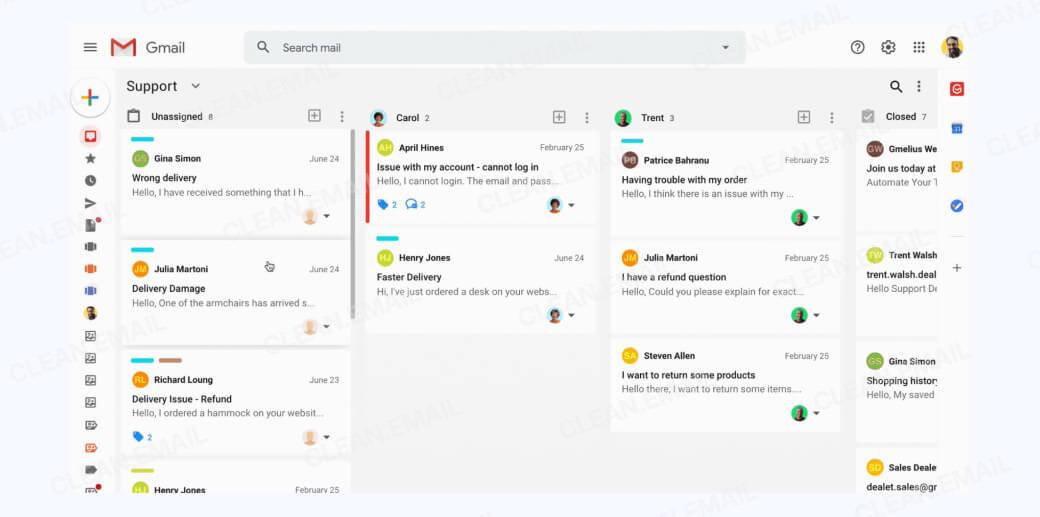
The collaboration features cover all the essentials for managing shared inbox software for teams. You can create shared inboxes from Google Groups, Gmail accounts, or aliases, assign conversations with one click, collaborate on drafts with comments and @mentions, and set up automation rules for repetitive routing tasks like round-robin distribution. The platform also includes shared email templates, SLA tracking, and email analytics, so managers can measure response times, email volumes, and individual performance.
Naturally, the biggest limitation is that Gmelius works exclusively with Gmail and Google Workspace, so if you're evaluating shared inbox software Outlook users can adopt or need support for other providers, this isn't the right choice.
Pricing: Starts at $19/user/month for AI features only (Meli plan); $24/user/month for shared inboxes and collaboration (Growth); $36/user/month for advanced analytics and CRM integrations (Pro); 7-day free trial available.
9. Hiver
Best for: Gmail teams that need omnichannel support with a generous free tier.
Hiver is an AI-powered customer service platform that adds shared inbox functionality directly into Gmail's interface. The setup process takes about 15 to 20 minutes, which is impressively fast, and the familiar Gmail environment means there's almost no learning curve for teams already using Google Workspace.
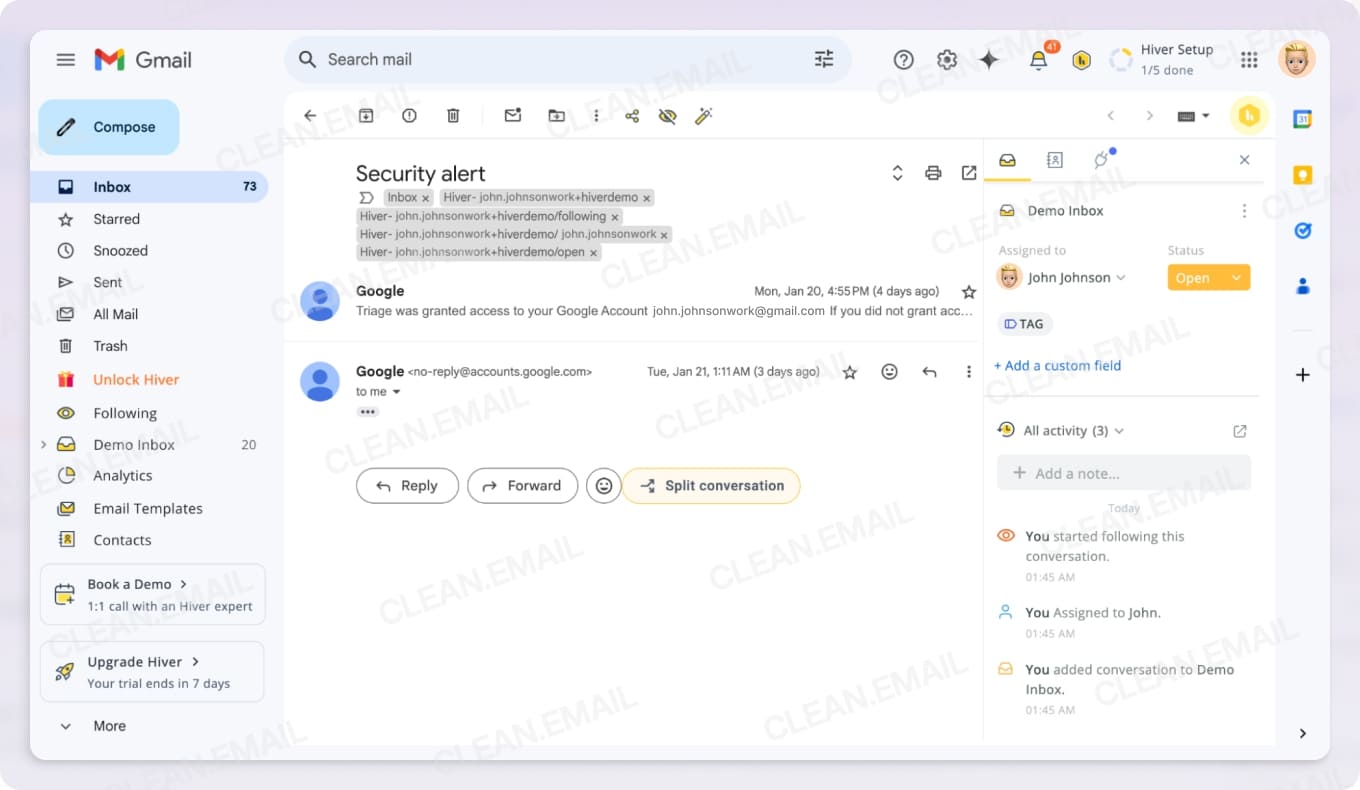
The feature set covers automated assignment with round-robin or skill-based logic, collision alerts to prevent duplicate replies, internal notes and @mentions for team collaboration, and SLA management with breach tracking. The AI capabilities can be used to pull answers from your knowledge base and suggest response drafts, fix grammar, adjust tone, or summarize long email threads for easier handoffs. CSAT surveys are available starting from the Pro tier, along with custom dashboards and scheduled data exports.
Teams that rely on Gmail and want to consolidate their support channels without leaving the inbox, Hiver delivers exceptional value thanks to its forever-free plan with unlimited users. The free tier includes shared inboxes, team collaboration features, and access to all communication channels (email, live chat, WhatsApp, voice, and knowledge base), which is genuinely generous compared to competitors that cap free plans at just a few users or strip out key channels.
However, automations like round-robin assignment, SLA tracking, analytics, and most integrations beyond Slack are reserved for paid tiers, so teams that need to measure performance or automate routing will eventually need to upgrade.
Pricing: Forever free plan with unlimited users; Growth at $25/user/month; Pro at $45/user/month; Elite at $75/user/month (all billed annually); free trial available.
10. Help Scout
Best for: Customer support teams that want a polished experience without making customers feel like they've entered a ticketing system.
One of the biggest complaints about traditional helpdesk software is that it makes customers feel like a number. Help Scout takes a different approach by making your replies look and feel like regular email to the person on the other end, not auto-generated ticket responses. It might seem like a small detail, but it makes a meaningful difference.
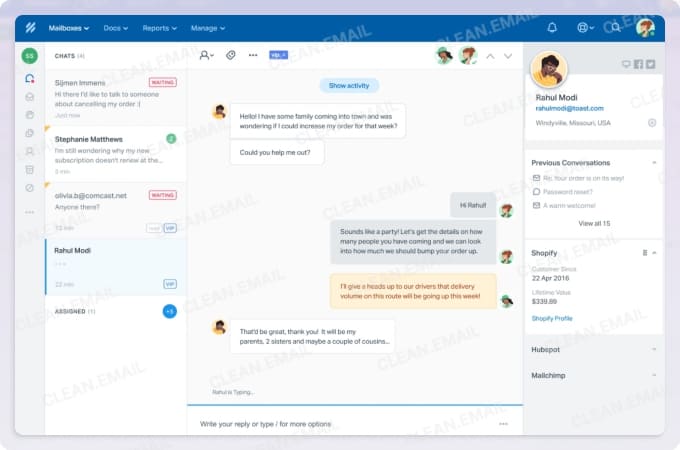
Behind the scenes, you still get all the structure you need: conversations can be assigned automatically or with a single click, internal notes keep teammates aligned before hitting send, and saved replies maintain consistency without copying and pasting the same answers over and over.
Help Scout has built a reputation for being easy to adopt, which is one reason why 70% of its customers come directly from traditional email, and my experience with its onboarding and usability confirms this. The interface is clean enough that teams can be productive almost immediately, yet there's plenty of room to grow into more advanced capabilities.
The trade-off is cost. Starting at $25/user/month on the Standard plan, Help Scout sits at a higher price point than several alternatives on this list, and there's no free tier to test with a full team before committing. This might be a dealbreaker for organizations already tracking expenses closely or those simply looking for the best productivity tips without a significant budget increase.
Pricing: Standard at $25/user/month; Plus at $45/user/month; Pro at $75/user/month (all billed annually); AI Answers add-on at $0.75/resolution with a 3-month free trial.
11. Unthread
Best for: Slack-first organizations that want to handle support requests without leaving their primary communication tool.
If your team already lives in Slack, Unthread makes a compelling case for keeping things that way. Rather than forcing everyone to adopt yet another platform, it turns Slack into a full-fledged support system where emails, chat messages, and internal requests become trackable tickets right inside your existing channels.
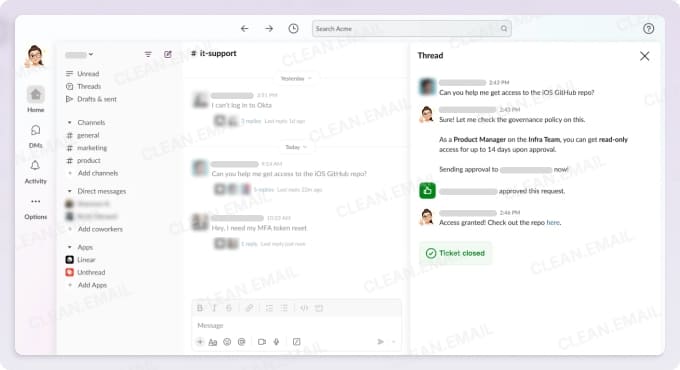
When someone forwards an email into a Slack channel, Unthread automatically creates a private discussion thread with tags, priorities, and linked tasks. Replies sent from Slack threads go back to customers as regular emails, so they never knows the difference.
Thanks to its AI integration, Unthread can draft email responses based on your documentation, assign incoming tickets to the right team member using intelligent triage, and even analyze support patterns to identify knowledge gaps that need addressing. For teams juggling IT, HR, customer support, and internal operations, the platform offers dedicated workflows for each department with custom settings and permissions. CSAT and NPS surveys are built in (available on the Pro tier), and the analytics engine tracks response times, resolution rates, and team performance trends.
In my opinion, the biggest barrier to entry is the minimum five-seat requirement combined with pricing that starts at $50/agent/month. For this reason, I see Unthread as particularly well-suited for well-funded tech companies with deep pockets and existing love for Slack.
Pricing: Basic at $50/agent/month; Pro at $75/agent/month with CSAT surveys and CRM integrations; Enterprise with custom pricing for SSO, HIPAA, and advanced features (all billed annually, minimum 5 seats).
12. Virtualworkforce.ai
Best for: Operations-heavy teams that want AI to handle email triage, drafting, and routing based on live business data.
You can think of Virtualworkforce.ai as an AI-powered "virtual employee" that actively works your inbox rather than just organizing it. When an email arrives, the AI reads it, pulls relevant context from your connected systems, and either drafts a ready-to-send reply or routes the message to the appropriate team member with full context attached. The company claims this approach can cut email handling time from 4.5 minutes per message down to under 1.5 minutes.
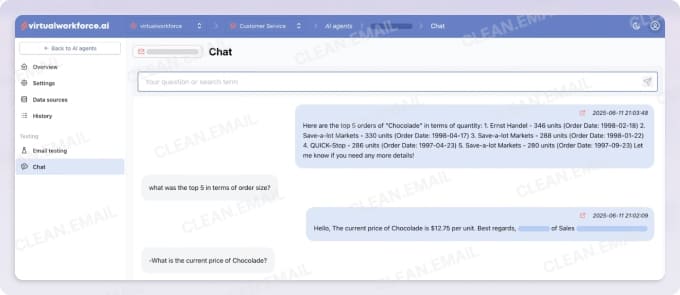
Virtualworkforce.ai connects directly to Gmail or Outlook and integrates with backend systems like ERPs, CRMs, SharePoint, and logistics platforms (TMS, WMS, TOS). It supports both manual and automatic assignment, includes SLA rules and templates, and offers CSAT measurement for teams that need to track satisfaction. It's also GDPR, NIS2, and ISO27001 compliant with EU-based hosting, which could matter for organizations with strict data residency requirements.
That said, this tool occupies a specific niche. If your team's email workflow is straightforward and doesn't require pulling data from external systems, you'd likely get more value from a traditional shared inbox platform with stronger collaboration features. But for operations teams drowning in repetitive inquiries that require system lookups, Virtualworkforce.ai addresses a pain point that most competitors leave unaddressed.
Pricing: Free plan with 1 AI agent and 1 user; Professional at $35/agent/month; Team at $119/agent/month with unlimited users (all billed annually); Enterprise with custom pricing.
13. Freshdesk
Best for: Growing support teams that need a full-featured helpdesk with room to scale.
Freshdesk isn't technically a shared inbox tool in the traditional sense. It's a comprehensive helpdesk platform that happens to include robust shared inbox capabilities as part of a much larger feature set. Because of this, it could be a good choice for teams that anticipate outgrowing simpler solutions or need enterprise-grade functionality from day one.
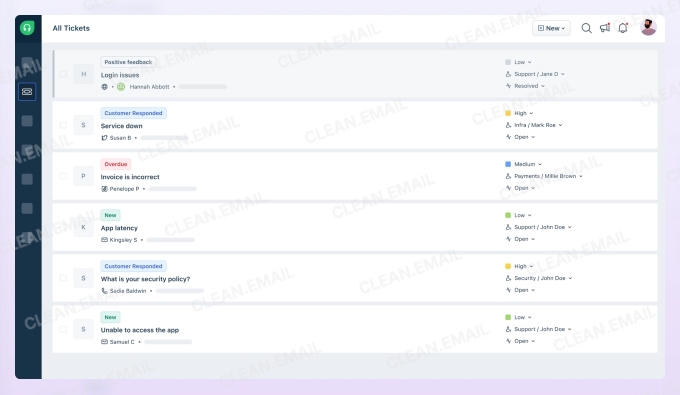
The platform handles omnichannel support across email, chat, phone, social media, and WhatsApp, with built-in SLA management, CSAT tracking, and a self-service portal where customers can find answers without contacting support at all.
The AI capabilities deserve special attention. Freshdesk's Freddy AI suite includes AI Agents that can resolve routine queries automatically (the company claims up to 80% resolution rates in some cases), AI Copilot for drafting responses and summarizing conversations, and AI Insights that surface trends and potential issues before they escalate.
While there is a free tier for up to two agents that includes basic ticketing and collaboration, I would personally not recommend Freshdesk to smaller teams that are likely to remain small for a long time. Simpler tools on this list will likely serve them better without the configuration overhead.
Pricing: Free for up to 2 agents; Growth at $15/agent/month; Pro at $49/agent/month; Enterprise at $79/agent/month (all billed annually); AI Answers add-on at $0.75/resolution.
14. Front
Best for: Mid-sized to enterprise teams that need powerful workflow automation and want to consolidate multiple communication channels.
Front combines the collaborative nature of a shared inbox with the structure of a ticketing system. The platform lets you pull in email, SMS, WhatsApp, live chat, and social media into a unified workspace, then build sophisticated workflows that automate routing, tagging, and escalation. You can collaborate with teammates directly inside any conversation thread, draft responses together, and hand off complex issues without the customer ever seeing the back-and-forth.
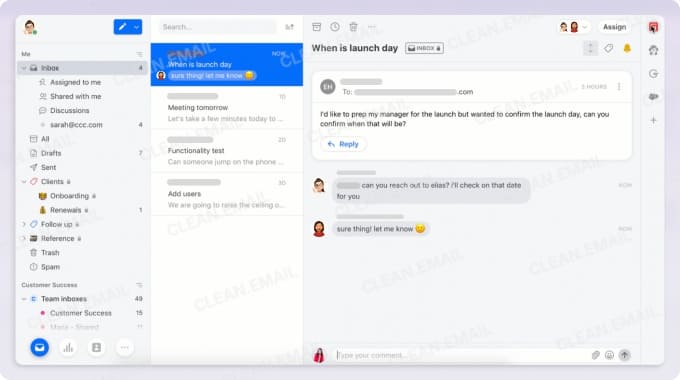
I love how conversations can be moved between inboxes as needed, which is useful when an inquiry starts in sales but needs to be escalated to technical support. The optional ticketing layer adds ticket IDs and status tracking for teams that need that level of formality without adopting a full helpdesk platform.
AI features are available as add-ons, and they include Topics, which automatically categorizes incoming messages for routing and trend analysis, Copilot, which assists with drafting and summarization, and Autopilot, which can handle straightforward inquiries without human intervention.
Pricing: Starter at $25/seat/month (up to 10 seats); Professional at $65/seat/month (up to 50 seats); Enterprise at $105/seat/month (all billed annually); AI add-ons available including Autopilot at $0.89/resolution.
15. EmailTree
Best for: Enterprise teams that need AI-powered email automation with on-premise deployment options.
The platform's core strength is in its AI capabilities. The self-learning classification system automatically categorizes and prioritizes emails based on content, intent, sender, and urgency. The tiered smart reply system is then capable of everything from semi-automatic suggestions to fully autonomous responses with confidence scoring. The company claims the AI features can slash average handling time by up to 80%.
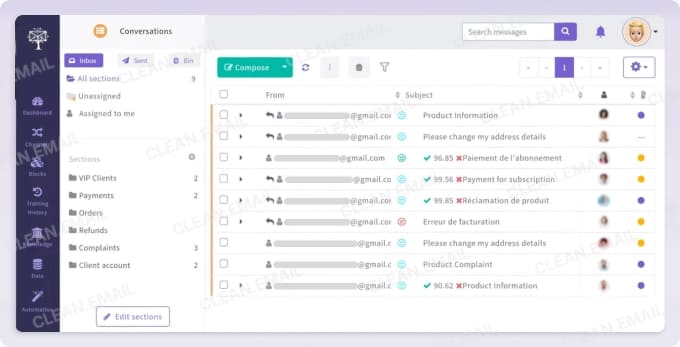
Organizations that need guaranteed data sovereignty can deploy EmailTree on premises, which is why the platform has found traction with government administrations and enterprises in regulated industries. Security features include advanced phishing detection, attachment scanning with OCR, and file threat analysis. The unified inbox interface supports real-time collaboration without collision issues, and automated workflows can be built using no-code tools to handle data extraction, routing, and integration with systems like Zendesk, Salesforce, ServiceNow, and Oracle.
The pricing structure is conversation-based rather than per-seat, starting at $120/month for 300 conversations and scaling up from there. Based on my knowledge and experience, this approach works best for teams with a larger headcount handling moderate email volume, since adding more agents doesn't increase your bill. However, organizations dealing with thousands of daily inquiries could find costs escalating quickly.
Pricing: Starter at $120/month (300 conversations, 3 team members); Essential at $290/month (1,000 conversations); Growth at $490/month (2,000 conversations); Scale at $1,190/month (5,000 conversations); Enterprise with custom pricing.
How to Choose the Best Tool for Your Team
Which of the above-recommended shared inbox software tools will be the best choice for you depends largely on the following factors:
- Team size and workflow complexity
The best shared inbox software for small teams often looks very different from the best shared inbox software for universities or large enterprises. A five-person support team can get by with a lightweight tool, but larger organizations need robust routing rules, detailed analytics, role-based permissions, and other more advanced features that smaller teams wouldn't be able to fully utilize.
- Remote vs. on-site collaboration
If your team works across different time zones or locations, then async communication features like internal comments, clear ownership indicators, and activity logs that show exactly what happened while someone was offline is a good idea. On the other hand, on-site teams might prioritize real-time collaboration features instead.
- Sector-specific requirements
Every industry has its own specific needs when it comes to mail communication. For example, shared inbox software for higher ed and public institutions must support .edu domains, comply with internal policies, and manage large seasonal spikes in volume.
Customer-facing organizations often need advanced automation, SLAs, CSAT tracking, and integrations with helpdesk or CRM systems.
Meanwhile, operational teams in fields like logistics or healthcare may prioritize audit trails, assignment tracking, and role-based permissions to meet compliance standards.
- Customer satisfaction tracking
Those who work in customer support, student services, or any role where feedback matters should choose shared inbox software with CSAT measurement built in. Such software can quick, lightweight satisfaction scores after each interaction to give leaders clear visibility into response quality and trends over time.
- Assignment and other features
Clear ownership is one of the biggest advantages of modern shared inbox tools. Shared inbox software with assignment features can guarantee that every message has a designated owner to prevent duplication and eliminate the risk of unanswered messages.
Other useful features that can help in this regard are internal notes for silent collaboration, collision detection that alerts teammates when someone is already typing a reply, automated routing rules that prioritize or categorize messages, and SLA timers that keep response expectations clear.
- Integration requirements
Shared inbox software isn’t the only tool your team relies on, so it’s important to choose a platform that fits naturally into your existing ecosystem. If your workflows rely heavily on CRM records, look for platforms that offer top shared inbox software CRM integration. Similarly, if you rely on Slack for internal updates, prioritize tools with real-time Slack syncing so messages, assignments, and status changes appear right where your team collaborates.
💡 Even after selecting the right platform, it's worth remembering that shared inbox software is designed to manage team communication, not personal inboxes. For this reason, you shouldn't look for personal inbox management features in your shared inbox tool. Instead, consider complementing it with a dedicated email organizer.
📌 A tool like Clean Email can make it significantly easier for individuals to handle large volumes of emails. It works with any IMAP-enabled email service, including Gmail, Outlook, Yahoo, and .edu domains commonly used in higher education.
Instead of going through messages one by one, it lets you select and manage groups of emails based on sender, type, or other criteria. This is useful when your inbox is filled with recurring messages like newsletters or automated notifications.
It also offers more advanced filtering than most email providers, making it easier to find and manage specific types of emails in bulk. This helps speed up tasks like organizing or clearing out large sections of your inbox without relying on manual sorting.
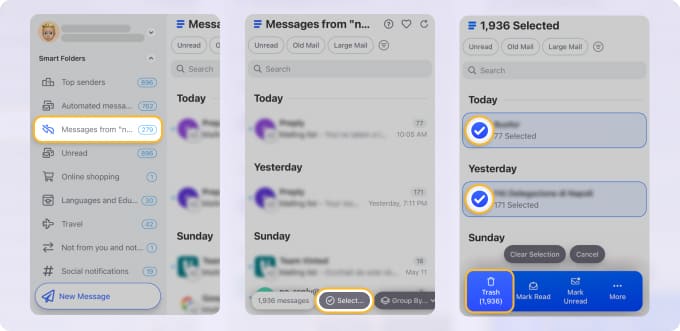
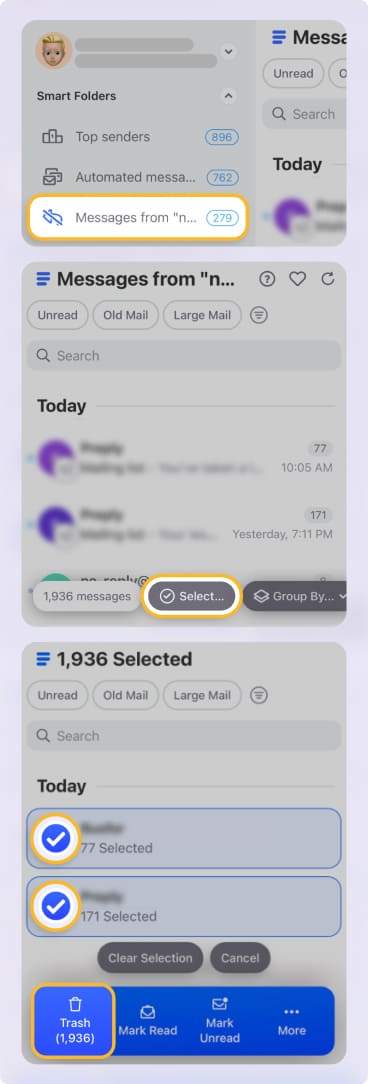
Clean Email has been trusted by millions of users for over 10 years and has never sold user data. It's annually tested and verified by Google for security and Gmail privacy policy compliance, so teams in sensitive industries or educational institutions can use it with confidence.
You can try the free version to see how it complements your shared inbox workflow on macOS, mobile, or the web.
Final Thoughts
The 15 tools covered in this article represent a wide range of approaches. Some prioritize simplicity and fast setup, while others offer deep customization for complex workflows.
Take advantage of free trials where available, involve your team in the evaluation process, and don't hesitate to start with a simpler solution if you're unsure. You can always migrate to something more robust as your needs evolve.












