


Key Takeaways
- Gmail is generally secure, with strong protections like TLS encryption, spam filtering, and phishing detection.
- TLS only protects emails in transit, not after they reach Google’s servers.
- Gmail does not provide end-to-end encryption, meaning sensitive data can still be accessed in certain scenarios.
- Highly sensitive information (SSNs, banking details, contracts) should not be sent via standard Gmail without extra protection.
- Safer alternatives include encrypted attachments, password-protected files, or secure sharing platforms.
- User behavior is critical: enabling 2FA, using strong passwords, and spotting phishing attempts matter more than built-in protections.
Why Does Hotmail Have *the* Reputation?
Why does Hotmail still have a bad rap? Why people think Hotmail is not secure boils down to history. In the early days of the internet, Hotmail was one of the first free email providers, and its security was, by modern standards, primitive. It became a prime target for hackers and spammers, and that reputation stuck like glue.
But here’s the reality check: Hotmail is not the same service it was in 1999.
It was rebranded and fully integrated into the Outlook ecosystem, inheriting Microsoft's enterprise-grade security infrastructure. The architecture, encryption, and threat detection are worlds apart from the original.
So let’s do some mythbusting here:
📌 Myth: Hotmail accounts are easier to hack.
✅ Reality: An Outlook.com account protected with a strong, unique password and 2FA is just as difficult to breach as any other major email service. The "Hotmail is easy" narrative is outdated.
📌 Myth: All security is handled by Microsoft, so I don't need to do anything.
✅ Reality: Microsoft provides the tools, but you have to use them. User behaviour — such as falling for phishing scams or using weak passwords — is the leading cause of account compromise, not platform vulnerabilities.

Is Hotmail Secure? Here’s How Secure Outlook Email Is
Microsoft isn't taking security lightly. They've implemented a multi-layered defense system to protect your inbox from the endless barrage of digital threats. And no, it’s not just how long your password is anymore.
Here’s how secure Outlook encrypted email is — and a breakdown of the security tech working behind the scenes:
Encryption in Transit (TLS)
Think of Transport Layer Security (TLS) as an armored truck for your emails.
As your message travels from your device to the recipient's device, TLS encrypts it, making it unreadable to anyone who tries to intercept it along the way. This is a standard, non-negotiable feature for any modern email service.
And while all this sounds great, the message does NOT remain encrypted once it reaches the recipient.
Message Encryption Options
For emails containing truly sensitive information, Outlook provides extra layers of protection. Office 365 Message Encryption (OME) and S/MIME are powerful options that let you send encrypted messages, ensuring only the intended recipient with the right key can open them.
So these options ensure the message itself remains encrypted — not just the connection (or during transport from sender to receiver).
But for this to happen, there has to be some sort of teamwork going on. Both the sender and recipient need to have a mail application that supports S/MIME, for instance, and they must exchange ‘digital certificates.’
Robust Account Security
Microsoft gives you the tools to fortify your account yourself. Two-factor authentication (2FA) is the big one — it requires a second form of verification, like a code from your phone through the Microsoft Authenticator, before granting access.
Login alerts are also another line of defense. If someone tries to access your account from a new device or unfamiliar location, you’ll get an instant email or text notification — like a heads-up to act fast and change your password.
When it comes to password recovery, Outlook has options aplenty. You can link a recovery email, add your mobile number for text-based resets, or use security questions — these fallback methods make sure you’re not stranded if you forget your login details (let’s admit, this happens more often than we’d like) or your account gets compromised.
Advanced Threat Detection
Outlook's servers are constantly scanning incoming mail for spam, phishing attempts, and malware. Using sophisticated algorithms and machine learning, it identifies and quarantines suspicious emails before they ever land in your primary inbox.
Microsoft updates these filters in real time, drawing from global threat intelligence to spot even brand-new scams. The built-in “Report” and “Block” tools help crowdsource threat data, tightening the net on malicious senders.
Which Is More Secure: Hotmail (Outlook) or Gmail?
As the top-of-mind email service providers, Outlook and Gmail are behemoths in the industry. Naturally, they also have substantial security resources.
And while you can never really go wrong with either, Outlook and Gmail approach encryption and security slightly differently.
So is Gmail more secure than Hotmail? Have a look at below:
| Feature | Microsoft Outlook | Google Gmail |
|---|---|---|
| Encryption in Transit | Standard (TLS) + Microsoft Purview Message Encryption | Standard (TLS) |
| End-to-End Encryption | Supported (OME & S/MIME) | Supported (S/MIME) |
| Phishing & Malware | Microsoft 365 Advanced Threat Protection | Advanced Protection Program |
| Two-Factor Auth (2FA) | Yes (App, SMS, Security Key) | Gmail’s got a 2-step verification process with App, SMS, Security Key. |
| User Data Privacy | Microsoft gives strong emphasis on privacy and how it does not use email content for advertising purposes. | Gmail collects a range of data, including user interactions and device information, which feed into ads and other content. |
And because we like to compare things side-by-side, here are the strengths and weaknesses of each:
| GMAIL | OUTLOOK | |
|---|---|---|
| ✅ STRENGTH | Google's AI-driven phishing and spam filters are exceptionally powerful, and its Advanced Protection Program offers an unmatched level of security for high-risk users. | Strong integration with the Microsoft 365 suite and robust encryption options, such as OME, are significant advantages for business and enterprise users. |
| ❌ WEAKNESS | While privacy has improved, Google's business model is still heavily reliant on data, which is a concern for some privacy advocates. | The user interface can sometimes feel less intuitive than Gmail's, potentially hiding important security settings from less tech-savvy users. |
So if you’re still here and wondering: Is Outlook email more secure than Gmail? Here’s our answer. Ultimately, choosing between them on security alone is splitting hairs. Both are exceptionally secure — but Outlook appears to have added security features and data privacy.
Is Outlook Email Secure From Hackers?
Here’s the million-dollar question: Can a determined hacker bypass Microsoft’s fortress and access your inbox? Technically, a direct brute-force attack on Microsoft’s servers is highly improbable.
The real vulnerability isn't the technology; it's the human using it.
Hackers don't "break in." They trick you into handing over the keys. This is usually done through:
- Phishing: Crafty emails disguised as legitimate messages from banks, services, or even Microsoft itself, designed to steal your login credentials.
- Weak passwords: Using "Password123" or your name and birthday is an open invitation for trouble.
- Bad habits: Clicking on suspicious links, downloading unknown attachments, or using public Wi-Fi without a VPN can expose your information.
Your inbox is a battleground. Proper inbox management is your best defence. If you can stop scams from ever reaching your eyes, you eliminate the risk of human error.
Your Outlook/Hotmail Security Checklist
Take control of your account security with some email best practices. To be honest, it takes less than 10 minutes to do most of these — and they make a monumental difference.
- Enable 2FA immediately: This is the single most effective action you can take. Go to your Microsoft account security settings and turn it on now.
- Create a strong, unique password: Use a password manager to generate and store a long, random combination of letters, numbers, and symbols. Never reuse passwords across different services.
- Turn on login alerts: Get notified via email or text whenever a new device or location is used to access your account.
- Use encryption for sensitive data: If you're sending contracts, financial details, or personal records, use Outlook's built-in encryption features.
- Ruthlessly clean your inbox: Unsubscribe from mailing lists you don't read and block persistent spammers. A cluttered inbox is a security risk — it hides legitimate security alerts and normalizes the presence of junk mail, making phishing attempts harder to spot.
Where Clean Email Strengthens Your Security
Managing your inbox manually is a losing battle. The sheer volume of incoming mail creates digital noise that cybercriminals exploit. This is where automated tools become essential.
Clean Email adds a critical layer of security by decluttering your inbox and acting as a gatekeeper.
Blocks unwanted senders
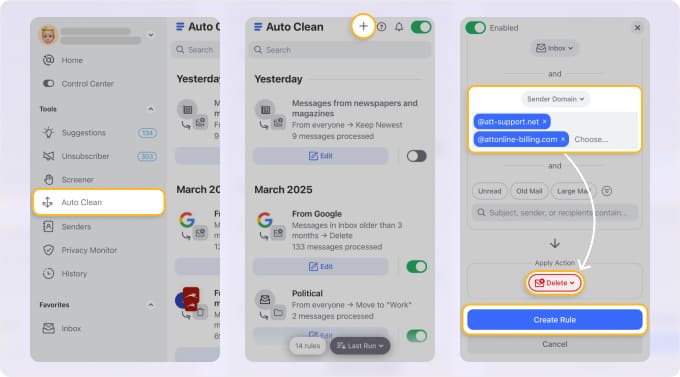
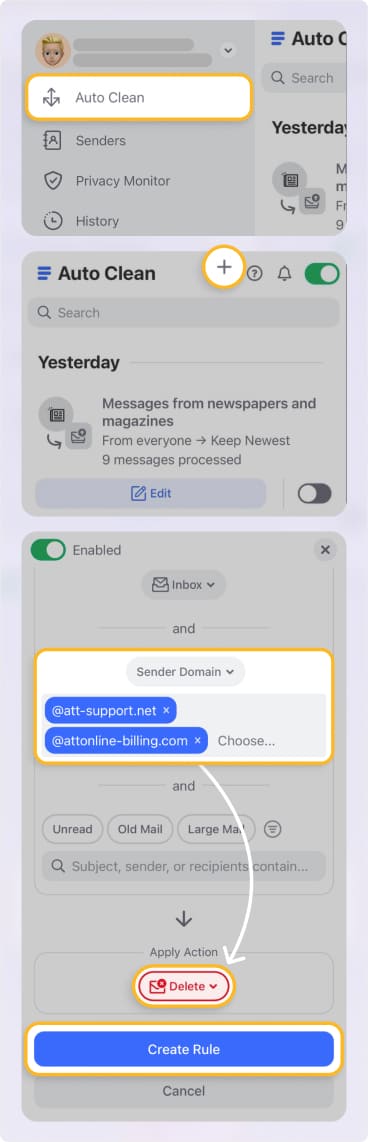
You can block entire domains, ensuring that emails from known spammers or phishing sources are stopped dead in their tracks.
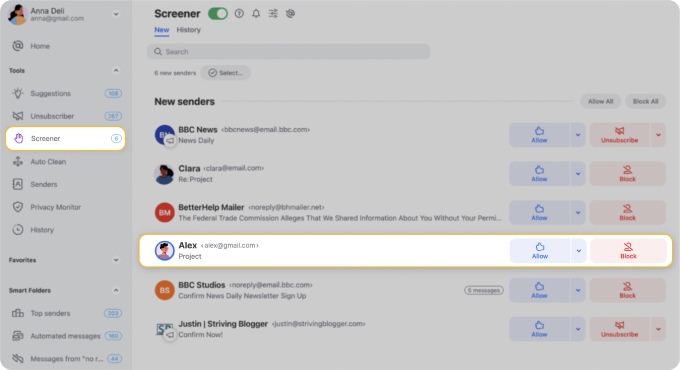
Screener for unknown senders
This feature is a game-changer. It quarantines all emails from new senders into a special folder, letting you decide whether to allow or block them. Phishing attempts from unknown sources never even get a chance to trick you.
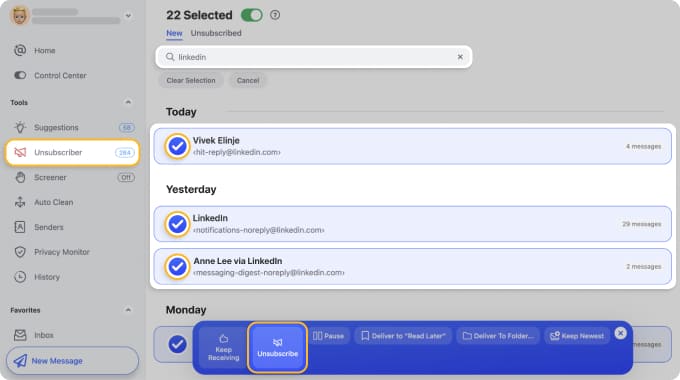
One-click Unsubscriber
Fewer subscriptions mean a smaller attack surface and less clutter hiding genuine threats.
Smart Folders and Auto Clean
This ensures your primary inbox is reserved for important, verified communications, making security alerts from Microsoft impossible to miss.
Is Outlook Email Secure? Here’s the Verdict
So, is Outlook secure enough for 2026? It appears so!
For the average user, Microsoft's built-in security, when combined with your own good habits, creates a formidable defense against digital evil. The platform itself is not the weak link.
However, security isn't just about strong walls; it's also about smart processes. The biggest risk lies in the chaos of a cluttered inbox, where a single mistaken click can unravel everything.
By using a tool like Clean Email to automate your inbox management, you don't just get organized — you build an extra, intelligent layer of security that shields you from the most common threats.
FAQs
Is Outlook email and Hotmail secure?
Yes. Outlook and Hotmail are the same service under different names. Outlook.com uses modern Microsoft security infrastructure, including encryption, threat detection, and account protection. When properly configured, it is a secure email platform.
Why do people say Hotmail isn’t secure?
The perception is historical, not technical. In the late 1990s and early 2000s, Hotmail lacked the security controls we now take for granted. It was frequently targeted by hackers and spammers, and that reputation never fully faded. However, the service has been completely rebuilt and integrated into Outlook.
Is Outlook more secure than Gmail?
Both are highly secure. Outlook offers strong encryption options and stricter data privacy positioning, while Gmail relies heavily on AI-driven threat detection. In practice, the security difference is minimal.
Is Outlook secure from hackers?
Outlook is highly secure at the infrastructure level. Direct attacks against Microsoft’s systems are extremely unlikely to succeed. Most compromised accounts are the result of phishing, weak passwords, or poor security habits. Enabling two-factor authentication significantly reduces risk.
How secure is Outlook encrypted email?
Outlook encrypts emails in transit by default and offers advanced encryption options like Microsoft Purview Message Encryption and S/MIME for sensitive messages. While these features require proper setup and recipient compatibility, they provide strong protection for sensitive information when used correctly.












