Key Takeaways
- There’s a difference between AI email tools that summarize versus act on your messages. Cleaning involves actions not just summaries, drafts, and categorizing emails.
- You should review any AI inbox cleaner for access methods, the data it stores, and how to remove access if necessary. This is important for privacy and security.
- You can build your own AI email cleaner using a combination of tools like ChatGPT with Google Apps Script or with a self-hosted application.
- You can use AI to clean a messy inbox by first performing a bulk cleanup, setting up rules, and adding a maintenance workflow.

Can AI Actually Clean My Inbox?
The short answer is, yes, AI can clean your inbox. BUT you must use the right tool.
Truth: Many AI inbox tools can summarize emails but not act on them.
Summarize versus act is an important distinction as you look at your email client’s native AI tool as well as third-party AI assistants and agents.
Summarize vs. Act: Most AI Email Tools Don’t Clean Anything
You’ll find several AI email tools that are useful for summarizing lengthy email threads, creating drafts, and categorizing messages as they arrive. Most convenient, email client built-in AI like Gemini for Gmail, Copilot for Outlook, and Apple Intelligence in Apple Mail perform these types of tasks within the email app you already use.
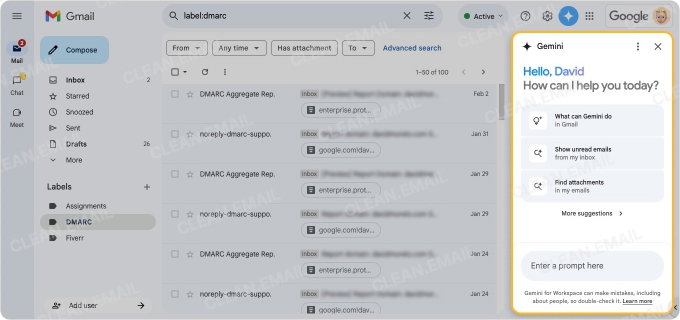
However, these aren’t cleanup actions. For instance, summarizing an email merely provides the gist of the message without the need to read it at length. But this in no way acts on that email such as deleting, archiving, or unsubscribing from it.
For using AI to clean up emails, you need a tool that provides these features at minimum:
- Bulk selection functionality
- Unsubscribe options
- Mass deletion capabilities
- Automated action rules
These basic functions of an AI email cleaner go a long way to creating a tidy inbox today as well as maintaining it long-term.
The Ways AI Can Clean an Inbox Today
With so many AI apps and websites out there these days, it can be easily confusing to determine which tools do what or how AI can truly give you a spotless inbox.
Here are a few common ways that you can clean up emails with AI:
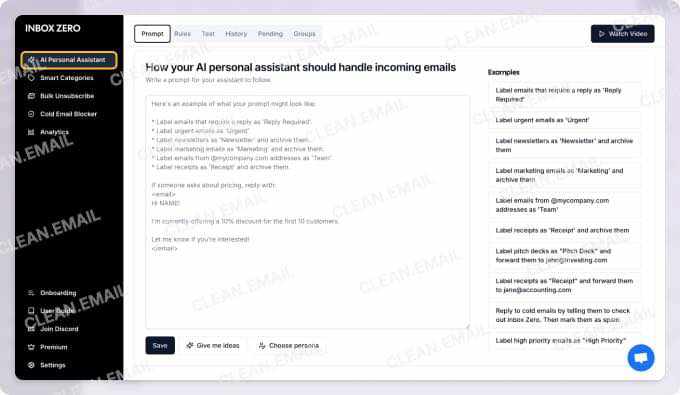
- Dedicated AI Cleaners: Cleanup tools that offer bulk unsubscribe, mass delete, and automated rules to truly clean your inbox. Examples include Clean Email and Zero Inbox.
- AI Inbox Agents: Autonomous tools that act on the inbox by triaging emails, categorizing messages, and performing tasks. Examples include Shortwave and Superhuman.
- AI-Native Email Clients: Inbox replacement tools that provide cleanup features built into the client like automatic sorting and clutter cleanup. Examples include Superhuman and Inbox Zero.
- Build-Your-Own: DIY tools that use scripts and/or automated workflows to archive, label, mark, and delete emails. Examples include Google Apps with ChatGPT and Zapier with Gmail. This method is covered in its own section below.
AI Inbox Cleaners Compared
We mentioned a few AI email cleaners above. For a quick review of their main functions, delete and unsubscribe options, best uses, and more, check out this summary.
| Tool | Main function | AI or agent | Deletes / unsubscribes? | Providers | Free option | Best use case |
|---|---|---|---|---|---|---|
| Clean Email | Bulk cleanup, intuitive automatic filters, auto-clean rules | Rule-based, not generative AI | Yes – bulk archive/delete + block via rules | Gmail, Outlook, Yahoo, iCloud, AOL, IMAP | Free account with limited actions + 14-day trial for Premium | Fast first-pass cleanup of a cluttered inbox |
| Zero Inbox (zeroinbox.ai) | AI sorting + bulk cleanup | AI; asks approval before deleting | Yes – bulk delete + one-click unsubscribe | Gmail, Google Workspace, Outlook, Hotmail | No free tier, from $7/mo | Hands-off AI sorting with a confirmation step |
| Inbox Zero (getinboxzero.com) | Open-source AI inbox automation | AI agent; self-hostable | Yes – bulk unsubscribe + auto-archive | Gmail, Google Workspace, Outlook | Open-source/self-host is free; hosted = 7-day trial, from $18/mo | Privacy-first users who want full control |
| Shortwave | AI-native email client | AI-native client | Yes – one-click block/unsubscribe, archive/delete | Gmail-focused | 14-day trial, from $30/mo (no permanent free plan) | People who want an AI-first client, not an add-on |
| Superhuman | Premium speed/triage client | AI-assisted client | Limited – has unsubscribe/block, not bulk cleanup | Gmail, Outlook | No free tier, from $25/mo | Fast manual triage, premium workflow |
| Canary Mail | AI email client with Bulk Clean | AI-assisted client | Yes – Bulk Clean + categorization; privacy-focused | Gmail, Outlook, iCloud, IMAP (Mac/iOS/Android) | Free version available; paid Pro | Privacy-minded users wanting an AI client with cleanup built in |
As you can see, delete and unsubscribe actions differ across the tools. Some provide a one-click unsubscribe with limited mass actions like Zero Inbox and Shortwave whereas others offer bulk options for both like Clean Email and Inbox Zero.
As the most prominent cleanup actions, it’s key to use a tool that lets you quickly and easily rid your inbox of unwanted emails.
AI Assistants People Mistake for Cleaners
Popular AI email assistants like Alfred, Carly, and Newmail.ai can be super helpful. They can save you time by performing tasks such as drafting messages, sorting emails, and scheduling meetings.
However, these types of tools are assistants, not cleaners. They don’t provide the maintenance features you need like bulk selections to delete or unsubscribe from emails.
Build Your Own AI Inbox Cleaner: The DIY Route
If you want to try your hand at creating your own email cleaning solution, there are a few options users have shared that work for them. Each has its pros and cons.
Google Apps Script + ChatGPT: This combination uses a scheduled script that’s written by you or generated by ChatGPT. The script can automatically archive, label, and mark emails read inside your own Google account.
- This option is free, private, and rule-based (unless wired to an LLM API). However, it provides no safety net and requires ongoing maintenance.
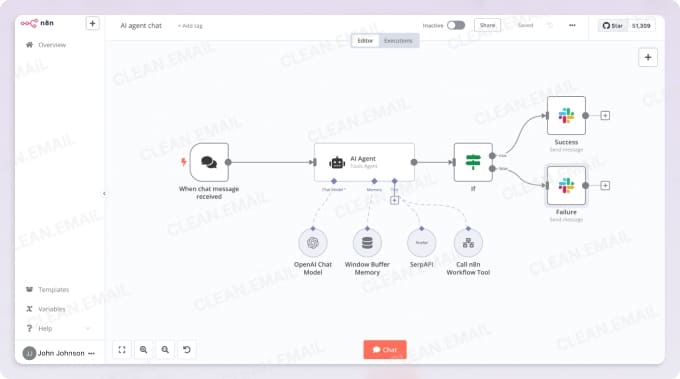
Zapier or n8n automation workflows: These tools connect the Gmail API to an LLM which can then use autopilot to classify, delete, and label emails.
- This option is flexible and has ready-made templates such as n8n’s "AI email classifier & auto-delete for Gmail". However, it does require both setup and API keys.
Open-source self-hosted apps: This uses tools like Inbox Zero (open-source, self-hostable) and MailMop which can scan your inbox for subscriptions, old data, and spam.
- This option provides full control without a subscription and the data stays yours. However, setup is required and although the tools may be free and private, you’ll trade convenience and a safety net for complete control.
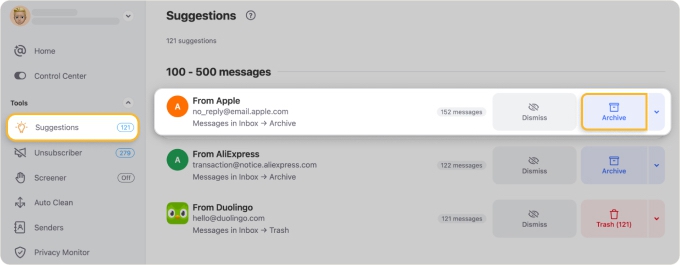
💡 Tip: For the result you want without the maintenance, consider Clean Email. It works similar to an AI tool offering intuitive filters with Smart Folders and behavioral recommendations with Cleaning Suggestions. The app is available on the web, macOS, and mobile.
Is it Safe to Let an AI Email Cleaner Into Your Inbox?
This is a completely legitimate question with how scary it can be to let any other source into your inbox. Because we can’t speak to every single AI email cleaner and you may look for options beyond our recommendations, here are some considerations.
OAuth vs. Full Access
OAuth (Open Authorization) is a security protocol that allows you to grant access to an application without sharing your username and password. Instead, it uses temporary tokens. With it, you can limit control over your data and what the application can do.
Full access gives the application complete control over your data. It can read, write, and manage things, and typically requires your username and password.
Whenever possible, you should use OAuth rather than providing full access to a third-party application.
What Reputable Tools Store
As you may know, some applications store more of your information and data than others. A reputable AI email cleaner normally stores your name, email address, user metadata, activity logs, and login keys or OAuth tokens. If it’s a paid service, it may also store your billing details.
Be sure to review the privacy policy and terms of service for any cleaner you select.
Self-Hosted / Open-Source Options
Self-hosted / open-source applications are maximum privacy options. With custom scripts and desktop applications, your data remains on your computer. The code is transparent, you can use your own authentication method, and there is no third-party tracking.
If you opt for this method, you can customize your AI cleaning options as mentioned in the DIY section above.
How to Revoke Access
When you grant access to your inbox for an application, you may want to remove its privileges later. Normally, you can do this by visiting your security settings or allowed applications list.
Be sure to check how to revoke access to your inbox for your particular provider and AI inbox cleaner.
How to Actually Clean a Messy Inbox With AI
If you’ve selected an AI email agent or application that you’re ready to put to work, there’s a recommended process to follow. By cleaning your inbox first, you can employ the tool to manage your cleanups moving forward.
- Perform a bulk cleaning with a dedicated tool. Some tools on our list offer bulk cleanup features including Clean Email, Zero Inbox, and Canary Mail.
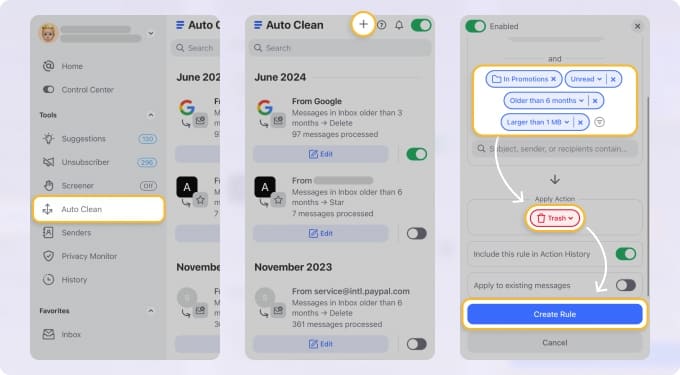
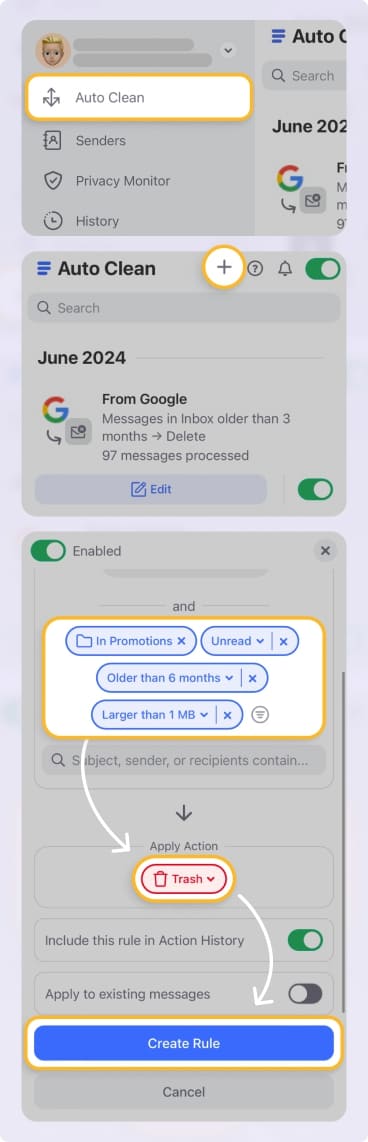
- Set up automatic inbox rules to handle and organize emails. Tools like Clean Email and Inbox Zero offer inbox automations. Clean Email thrives in this area with Auto Clean rules that manage both new and existing emails.
- Add an email agent or workflow to maintain your inbox. Once you clean and set up rules, consider adding a tool such as Zapier or n8n for custom workflows that allow for long-term management.
- Review the privacy terms and access permissions to ensure your safety. Be aware of notifications explaining policy changes and frequently check privileges you’ve granted for any updates.
Bottom Line
Wondering which AI email cleanup tool or method is best for you?
If you have an overloaded inbox and are looking for a privacy-first option with hands-off automation that’s available for free, one of the DIY methods is the way to go. These provide the control and flexibility you need with minimal cost and disadvantages.
Just remember to start with a bulk cleanup tool like Clean Email. Once you declutter and organize your inbox with this cleanup workhorse, you can use a DIY option to create custom automations tailored to your needs.
FAQs
Can AI clean up my emails?
Yes, AI can clean your emails but the tool you choose determines the scope and features. For instance, built-in AI such as Gemini in Gmail cannot clean your inbox; it can only do things like summarize and draft messages.
Consider an application like Clean Email which provides bulk cleanup, automatic filters, and inbox rules.
Can ChatGPT clean up my inbox?
ChatGPT can help clean your inbox, but only when you use it with a connector, script, or agent. For example, you can use ChatGPT with Google Apps Script to create custom commands for acting on emails like archiving, marking, and labeling.
ChatGPT is not capable of cleaning your inbox on its own.
What’s the best free AI email cleaner?
AI email cleaners that are completely free tend to lack the features you need to effectively clean your inbox. They can also come with ads, privacy risks, and caps on usage. Instead, consider one of the DIY methods for minimal cost and enhanced security.
Is it safe to give an AI tool access to my inbox?
The level of safety depends on the tool you select. Look for applications that use OAuth rather than full access, check the terms and policies for the data it stores, and consider a self-hosted, open-source option for transparency and controlled security.
Can a Gmail AI tool also work with my Outlook inbox?
No, Gmail AI tools are limited to Gmail and cannot read or manage your Outlook inbox. Opt for Outlook’s built-in AI assistant Copilot for summarizing and drafting emails and a dedicated cleaning tool to archive, delete, trash, move, and mark messages.