What's the Actual Deal About Top iPhone Storage Cleaner Apps?
I find myself constantly asking the question: Does Apple have an iPhone cleaner app? Especially every time that pesky “Storage Almost Full” pop-up makes an appearance at the worst possible time — right before capturing a stunning sunset or downloading a new app.
So I went on a mission to find iPhone cleaner apps that could rescue me from digital clutter.
Spoiler alert? There are some brilliant options out there, each with its own strengths and flaws.
Here’s a breakdown of my iPhone clean up app review, which hopefully can help you find the one that suits your vibe.
Check What’s Taking Up Storage First
Before jumping into full cleanup mode, let's try to understand where your storage is being eaten up. Only then can we nip the problem in the bud.
Let's look at the breakdown of your iPhone storage:
- Head to Settings and scroll down a little bit until you see General. Tap it.
- Select iPhone Storage. Wait for the breakdown to load. Spoiler alert: This can take a few minutes, especially if your storage is — in iPhone's own words — almost full.
- You’ll see a bar chart showing categories like Photos, Apps, Media, and more. Below it, iOS shows recommendations (like reviewing large attachments or offloading unused apps) and a list of your apps sorted by size, with iOS and System Data at the very bottom.
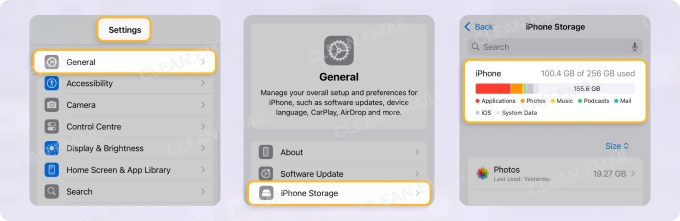
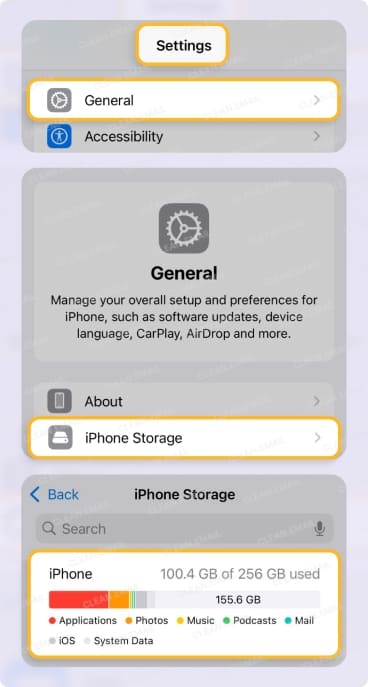
📌 This breakdown helps you pinpoint where to start. For example, if photos are hogging all your space, you can jump straight to Clever Cleaner. If Mail is near the top of the list, go to Clean Email. And if Messages or System Data is the culprit, skip to what iPhone cleaner apps can’t remove — no app can clean those for you.
Clever Cleaner: A Free iPhone Cleaner App
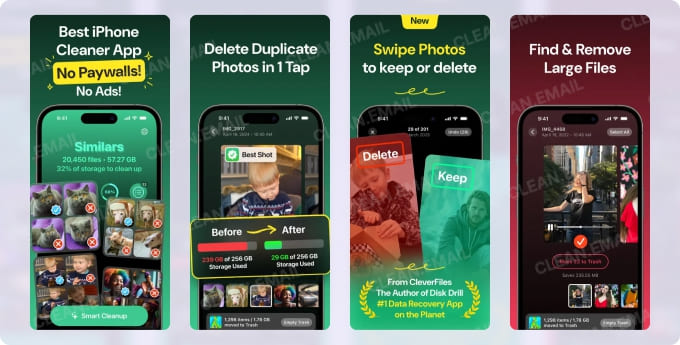
Clever Cleaner was my first pick, mainly because it’s free to use within generous daily limits — no ads and no mandatory subscription. An optional Premium plan only removes those limits. It’s straight to the point, focused, and does what it advertises.
First impressions
This app had me at “clean design and no ads.” Honestly, there’s nothing worse than being bombarded by pop-ups when you’re in cleanup mode.
It was simple to set up, and navigating through the menus was a breeze, even for someone who’s slightly less than a tech genius.
Key features
Clever Cleaner truly shines when it comes to photo and video management. It’s like having a Marie Kondo for your camera roll.
📌 AI-powered Photo Cleaner
Did you know you’re likely hanging onto five versions of the same restaurant food photo?
Clever Cleaner uses AI to find duplicate and similar photos (burst shots are a sneaky culprit). It grouped up my 27 coffee-snap variations and practically begged me to delete 26 of them.
A few taps later, my gallery was lighter — and my storage breathed a sigh of relief.
📌 Rogue screenshot wrangler
Whether it’s accidentally capturing your lock screen or saving yet another recipe you’ll never make, screenshots pile up fast. Clever Cleaner gathers them all for bulk deletion.
Goodbye, hundreds of screenshot embarrassments.
📌 Large file finder
The “Heavies” feature points out storage hogs like old concert videos or Live Photos from five years ago. Once flagged, you can decide whether to keep, delete, or even compress them.
Speaking of compression, it worked a charm on my Live Photos, cutting their size without losing quality. Newer versions can also compress screenshots and regular photos, or turn Live Photos into still images.
Safety first
Here’s peace of mind served on a silver platter — Clever Cleaner processes everything locally on your iPhone. None of your personal files end up in some mystery cloud server, so privacy isn’t a concern.
The catch
While Clever Cleaner is a lifesaver for photos and videos, it doesn’t branch out much. There’s no email cleanup, contact management, or calendar decluttering.
It’s also strictly iOS, so no help if you swing between devices.
But hey, it’s free and laser-focused on doing one thing brilliantly.
Verdict
Clever Cleaner is like that reliable friend who rocks up when there’s heavy lifting to do — hands down one of the best clean up apps for iPhone options out there.
Quick, efficient, and free for most everyday cleanups. It’s hard not to love!
If your main issue is photo or video chaos, this app nails it. Highly recommend giving it a whirl.
Clean Email: An iPhone Cleaner App that Targets Your Inbox
If photos are Clever Cleaner’s forte, emails are Clean Email’s bread and butter. It’s designed for anyone who looks at their inbox and feels immediate panic. Sound familiar? Yeah, this one’s for you.
First impressions
Setting up Clean Email is smooth as smooth can be. It’s straightforward and works across multiple providers like Gmail, Outlook, Yahoo, and Apple Mail. It's one of the best apps that can keep your inbox clean.
It quickly connected to my accounts and didn’t require any fancy tech knowledge to use.
Key features
📌 Bulk organizing emails
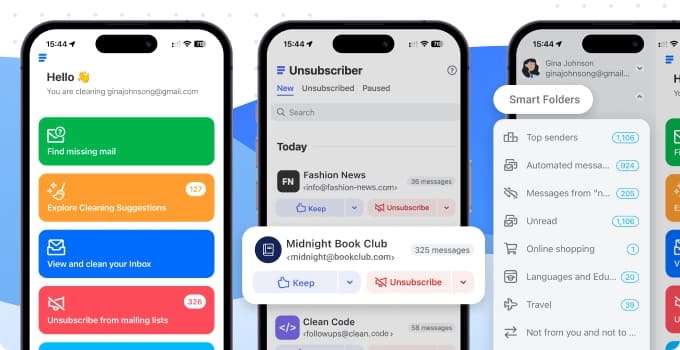
This is where things get real. Clean Email lets you sort emails by sender, subject, time, and even by attachments. It cleared out promotional emails faster than I could say, “unsubscribe from emails on my iPhone, please.” And if you're ready for a completely fresh start, it can even help you delete all your emails in one click.
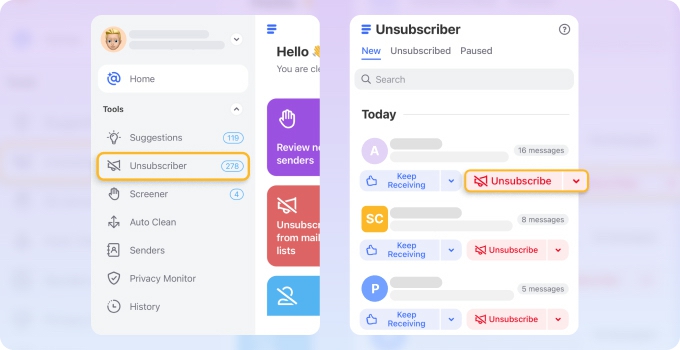
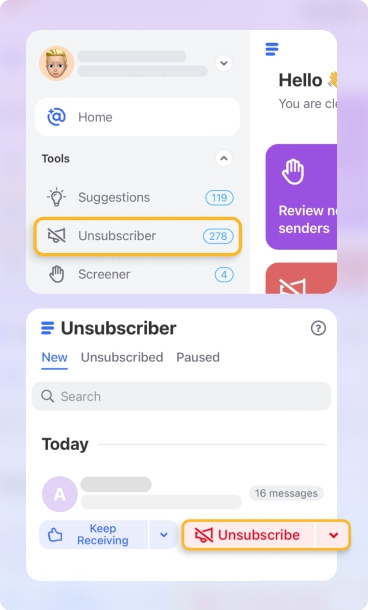
📌 Instant Unsubscribe
One click, and that annoying newsletter I hadn’t opened in three years was gone. Even promo-packed emails from the same sender (looking at you, online shopping sites) got grouped for mass deletion.
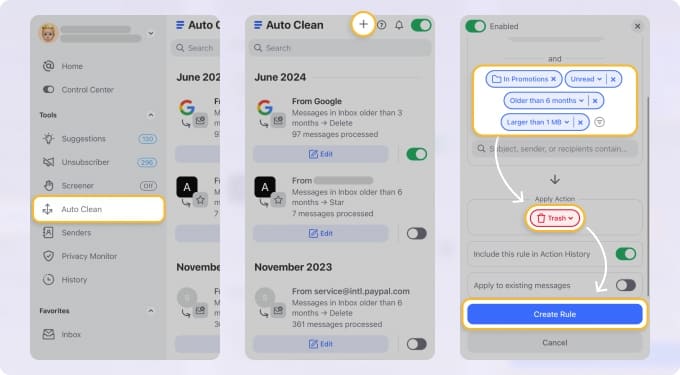
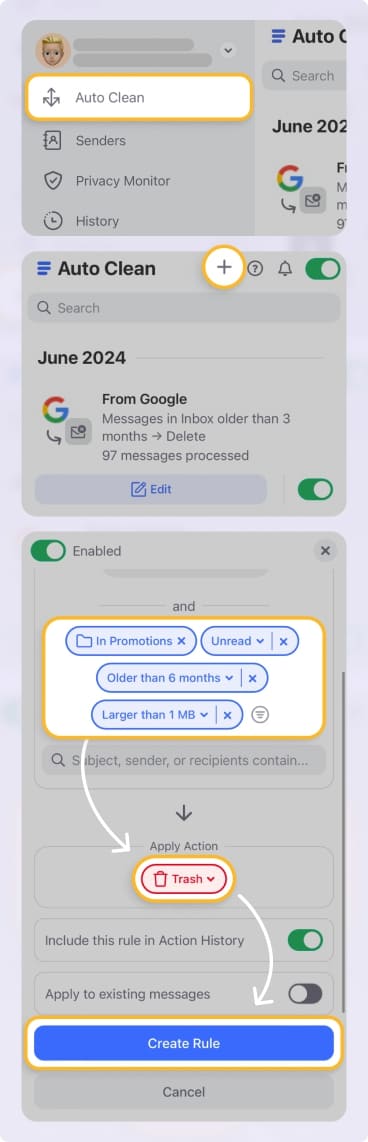
📌 Auto Clean rules
Once set, it’s like the app becomes self-aware (without the Terminator vibe). Auto Clean means no more future clutter — emails automatically go where they should (or to the trash).
Is it safe?
✅ Now, if you’re someone who worries about privacy, here’s some good news: Clean Email makes me feel safe about my personal data. It keeps your sensitive info where it belongs — right on your device — not shuffled off to the cloud.
And that gave me some serious peace of mind while I was digging into those older files and attachments.
Everything happens locally, which scores it big points in the trust department.
Also, as a Gmail user, it gives me much relief to know it's fully compliant with Gmail's privacy policy.
The catch
Here’s the kicker — it doesn’t clear out cached app attachments or offer broader iPhone cleanup tools. Also, while the trial is free, the top features sit behind a monthly subscription.
Verdict
For anyone drowning in email chaos, Clean Email is the knight in shining armor riding in to save your inbox. Sure, there can be a cost involved, but the time it saves and the sheer functionality make it worth every cent if emails are your pain point.
It's available not only on iPhone and iPad, but also on Android, macOS, and as a web app for flexible, cross-device access.
AI Cleaner: 'All-Rounder' App to Clean Up Storage
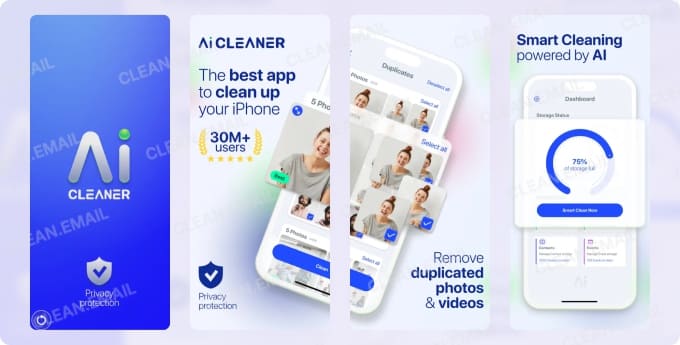
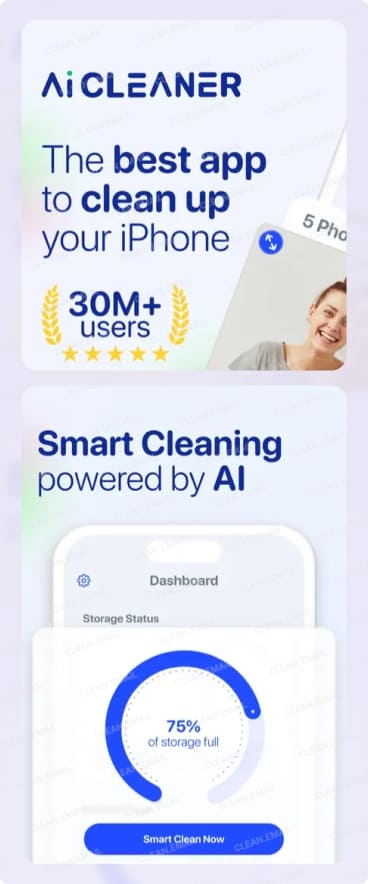
AI Cleaner markets itself as an all-rounder, promising to tackle everything from duplicate files to contact chaos. It’s got big ambitions, so I gave it a go.
First impressions
Opening AI Cleaner, the app gives off serious “ready-to-work” energy. It launched a full-device scan immediately, pulling up duplicates and forgotten files.
The downside? Ads popped up a bit too soon. It also teased premium features early on, which left me wary.
Key features
📌 Smart Duplicate Finder
It zoned in on duplicate photos and videos, picking up where Clever Cleaner left off. However, it wasn’t perfect. I caught it flagging valuable photos for deletion, so manual review is a must.
📌 Contact Overhaul
My contacts were full of “mom’s new number” or “Sheila Work?” entries. AI Cleaner found duplicates, incomplete entries, and even flagged old or unnecessary ones.
📌 Calendar Cleaner
The app highlighted outdated events like “Tanya - Meeting 2018.” Clearing them out felt oddly refreshing.
📌 Secret Storage Vault
For the private types, this lets you secure files, photos, or contacts with a PIN.
Security concerns
Here’s where AI Cleaner gave me pause — it asks for broad permissions, and some reviews flagged potential data-sharing. If you value absolute privacy, check its policies carefully. Its App Store privacy label also lists identifiers that may be used to track you across other companies’ apps and websites.
The catch
AI Cleaner added an Email Cleaner in late 2025 for removing unwanted emails and unsubscribing, but it’s a side feature of a photo-first app rather than a dedicated inbox tool (Clean Email is still my go-to in this department.)
Compare that to the lack of advanced app cache cleaning, and it’s clear it doesn’t quite hit every note.
Ads and limitations on its free tier also make the experience less seamless.
Verdict
AI Cleaner is decent at being a jack-of-all-trades, but when I did an AI Cleaner app review, it didn’t dazzle.
Yes, it’s useful for photos, contacts, or calendar events. But just tread carefully regarding permissions and ads.
Smart Cleaner: iPhone Cleaner for Photos, Contacts, and Calendar
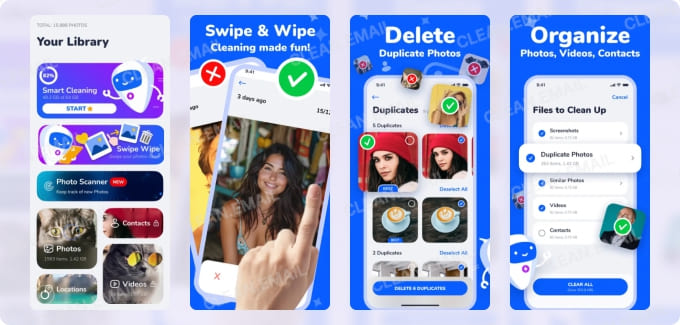
Smart Cleaner is one of the best phone storage cleaners for iPhone, promising to tidy up your mess. It offers smart tools to organize your media, contacts, and calendar, helping you offload what you no longer need — without losing anything important.
First impressions
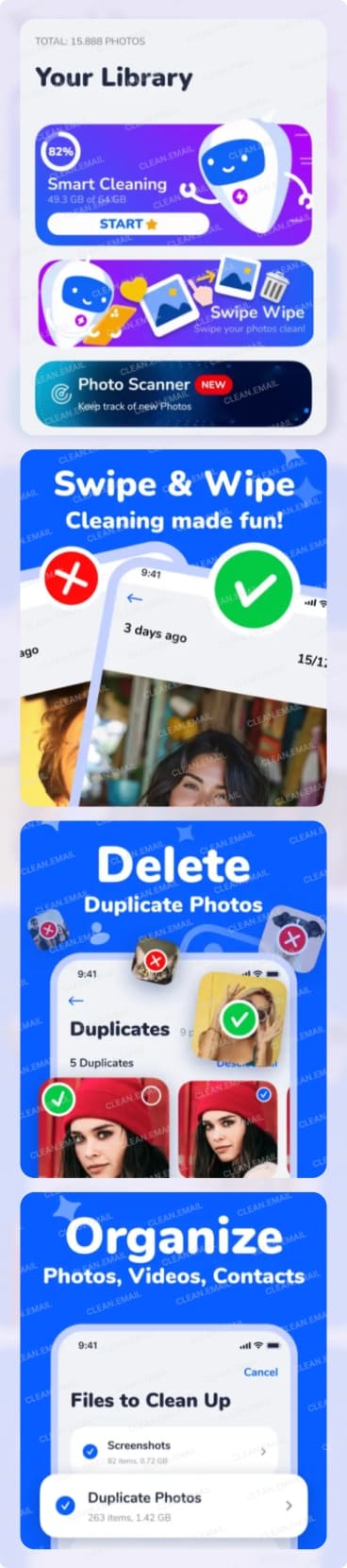
Simple interface with clear instructions. The app scans your library, suggests what to delete, and still leaves the final say to you — nothing goes until you confirm it.
Key features
📌 Smart photo cleanup
Smart Cleaner helps clean up everything from duplicate photos and similar shots to screenshots, selfies, Live Photos, and burst photos. It also flags blurry pictures and ones with closed eyes.
📌 Contact and calendar cleanup
It groups duplicate contacts by name, phone, or email so you can merge them, finds contacts with no number or email, and lists all your calendar events so you can clear old ones in one tap. There’s also a contacts backup and restore option.
📌 Swipe Wipe
Go through recent photos and videos (or random old ones) one by one and swipe to keep or delete them.
I retrieved nearly 1 GB by offloading old apps, merging duplicate contacts, and removing cluttered screenshots and similar images.
Safety first
According to its App Store privacy label, the developer doesn’t collect any data from the app — the cleanest privacy record of the apps on this list. Keep in mind that these labels are self-reported by developers.
The catch
Like the other cleaners here, Smart Cleaner doesn’t touch your emails. Its “Cleaning Guide” for Safari, WhatsApp, or Telegram cache only walks you through doing it yourself, because no app can completely clean up system files (Apple keeps this locked and so you won't be able to). Most features also sit behind a weekly, monthly, yearly, or lifetime plan, and the app hasn’t been updated since March 2025.
Verdict
If you want photos, contacts, and calendar cleanup in one app with a privacy-friendly track record, Smart Cleaner is worth a try. Just use the free trial to make sure it runs smoothly on your version of iOS before you subscribe.
What iPhone Cleaner Apps Can’t Remove
Even the best AI cleaner apps work within the limits Apple sets. iOS keeps every app in its own sandbox, so a cleaner can only reach what you give it permission to — usually Photos, Contacts, and Calendar. Messages, other apps’ caches, and System Data are off-limits, so you’ll need to handle those yourself.
Declutter Messages and Their Attachments
iMessages can sometimes be a sneaky storage thief, especially if you and your friends send a ton of photos, GIFs, and videos to each other. Fortunately, there are ways to clear them out easily — right in Settings.
- Delete Old Conversations: Go to Settings → Apps → Messages → Keep Messages and set it to 30 days or 1 year. This automatically clears out older chats.
- Clear Attachments: Open a conversation, tap the contact at the top, and scroll to "Photos" or "Documents." From there, you can delete attachments one by one.
- Review Storage: Head to Settings → General → iPhone Storage → Messages. You’ll see a breakdown of what’s hogging space — like photos, videos, or GIFs and stickers — and you can delete them directly.
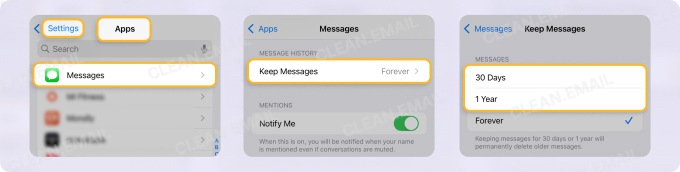
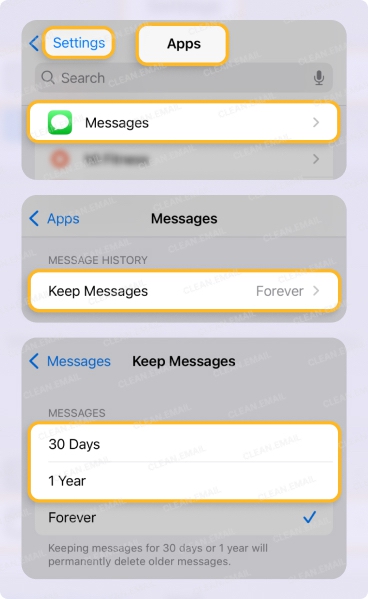
⚠️ Don’t expect a cleaner app to do this for you: iOS doesn’t give third-party apps access to your Messages, so any app that promises to bulk-delete old chats or iMessage attachments is overselling.
Tackle iPhone System Data Storage
Clearing out "System Data" on your iPhone can be a bit of a tough nut to crack. This part of your storage is like a black box — it holds things like caches, logs, and other behind-the-scenes files that keep your iPhone ticking.
Unfortunately, Apple doesn’t give us a straightforward way to clean it up manually. And if there's an app that claims it's the best free iPhone storage cleaner app that deals with system data, that's usually a red flag.
We suggest trying to clear out your gallery, messages, and emails first (as described in the earlier sections). You can also try to delete hidden apps on iPhone or offload unused ones.
But if desperate times call for desperate measures, you can do a full backup and restore of your iPhone to shrink that System Data. It’s a bit of a hassle, though.
Final Thoughts on iPhone Storage Cleanup
Each of these apps has its own strengths when it comes to cleaning up iPhone storage. Clever Cleaner is perfect for sorting out your photos, Clean Email is unbeatable for tidying up your inbox, and AI Cleaner and Smart Cleaner aim to tackle a bit of everything.
So, what’s the best clean-up app for iPhone? It really depends on what’s driving you mad:
➡️ Got a cluttered inbox? Clean Email is your go-to.
➡️ Swamped with duplicate photos? Clever Cleaner is the clear winner.
➡️ Need an all-rounder? AI Cleaner and Smart Cleaner are worth a shot, but tread carefully.
➡️ Messages or System Data eating your space? Skip the apps and use the built-in iOS settings covered above.
Here’s the big takeaway: there’s no one-size-fits-all app that can handle every type of clutter on your iPhone. You can either focus on one specific area or try a mix of these apps to see which one earns a permanent spot on your phone.
For example, most AI-powered iPhone cleaners are brilliant at clearing out photos, videos, and contacts, but they don’t touch the storage used by emails or attachments (or treat email as a side feature). If your inbox is the issue, a dedicated email cleaner like Clean Email is a must-have.
Whichever app you choose, start with a quick look at Settings → General → iPhone Storage. It shows exactly where your space is going, so you can pick the right tool — and avoid paying for a cleaner that can’t reach the problem in the first place.