


How to Choose the Right Communication Tools for Your Team
Not every tool works for every team. A ten-person startup has different needs than a 500-employee company with offices on three continents. Before you explore the best team communication tools, it helps to consider a few key factors that should shape your decision:
- Team size and structure: Consider whether you need something lightweight or a platform that can handle hundreds of users with complex permission settings. If you're in the latter camp, then many tools designed for small and medium-sized organizations won't work well for you because they won't have the features and settings you need. Likewise, it makes no sense for a smaller team to adopt some heavyweight enterprise solution.
- Synchronous vs. asynchronous needs: Real-time chat and video calls work great when everyone's online together, but distributed teams often benefit from async messaging tools that let people respond on their own schedule. The venerable email falls squarely into async territory, and it remains essential for external communication, formal documentation, and messages that don't require an immediate response.
- Core use case: Think about what you actually need to accomplish. Do you just need to exchange information, or would you also like to use your internal team communication tools for project management? Your core use case should determine what you're looking for.
- Integration with existing workflows: The best tool in the world won't help if it doesn't play nicely with what you're already using. Check whether a platform connects with your calendar, file storage, and other daily apps. Better yet, look for tools that support workflow automation for better productivity.
- Email management: Even with the best chat and video apps, email isn't going away. In fact, you would be hard-pressed to find a single company that doesn't use email at all. But without a strategy for managing your work email inbox, you risk swapping one source of overload for another, so don't forget about inbox management as you search for the ideal team communication tool.
- Privacy and data security: Especially for internal team communication tools, consider where your data lives and who can access it. Cloud-based platforms offer convenience, but make sure the provider meets your organization's security requirements.
- Budget: When considering how much your communication tools will cost, you should think not about what you'll pay today but what you'll pay a year or two from now. Many platforms offer steep first-year discounts or free tiers that disappear once you're locked in. Factor in per-user pricing as your team grows, add-on costs for premium features you might need later, and potential price increases at renewal time.
Fortunately for you, we've taken all of these criteria into consideration to find the best remote and hybrid team communication tools available in 2026, so let's take a closer look at our top picks.
| Tool | Paid/Free | Team Size Fit | Cloud-Based | Rating | Suitable Tasks | Best Roles |
|---|---|---|---|---|---|---|
| Clean Email | Paid (free trial) | S-M | Yes | 4.7/5 (App Store/Google Play) | Email inbox cleaning, bulk unsubscribe, auto rules, smart email management | Admins, individual professionals, small teams managing high email volume |
| Slack | Paid (free tier) | S-M-L | Yes | 4.5/5 (App Store) | Real-time chat, integrations, file sharing, quick updates | Sales, marketing, developers, all roles |
| Microsoft Teams | Paid (free tier) | M-L | Yes | 4.6/5 (Google Play) | Video meetings, chat, Office 365 integration, enterprise collaboration | Managers, IT, enterprise admins |
| Zoom | Paid (free tier) | S-M-L | Yes | 4.7/5 (App Store) | Video conferencing, webinars, screen sharing, large meetings | All roles, especially sales demos, HR |
| Asana | Paid (free tier) | S-M-L | Yes | 4.5/5 (Google Play) | Task workflows, project boards, team assignments, progress tracking | Product managers, marketers |

Best Team Communication Tools in 2026
The tools below cover the full spectrum of team communication needs. We've included options for teams of all sizes, so you should be able to find something that fits your workflow.
1. Clean Email
Best for: Teams drowning in email clutter who need to regain control of their inboxes.
One of the biggest problems with the good old email as a team communication tool (and one of the main reasons why teams look for alternatives) is that important messages get buried under newsletters, promotional blasts, and automated notifications. Clean Email addresses this problem by providing tools to clean any inbox quickly and efficiently, and it does so without ever accessing the actual content of your messages or sharing your data with third parties.
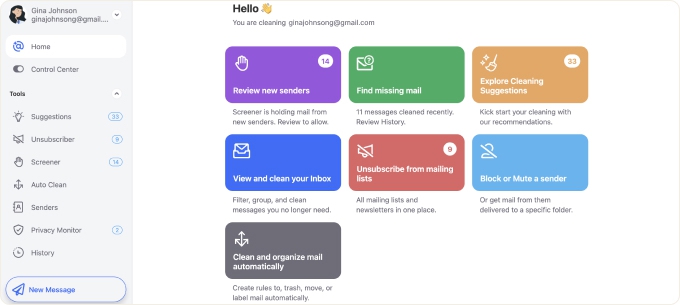
Each team member can use the web app to connect their own inbox (be it Gmail, Outlook, Yahoo, AOL, or just about any other IMAP-based service) and instantly receive Cleaning Suggestions on how to declutter the inbox. Each suggestion is accompanied by a button that lets you implement it with a single click, so it takes almost no effort for clutter to disappear. To prevent it from reappearing, you can create Auto Clean rules that automatically handle incoming messages based on sender, subject, age, or other criteria. For example, you could set a rule to trash all promotional emails older than 30 days or archive forwarded emails you never read anyway.
Clean Email is also amazing when it comes to taming subscription emails. The Unsubscriber feature displays all your mailing list subscriptions in one place and lets you unsubscribe from unwanted senders in bulk rather than hunting down tiny unsubscribe links at the bottom of each message. You can also pause subscriptions temporarily or redirect them to a Read Later folder if you're not ready to cut ties completely.
Pricing: Clean Email offers a free trial that lets you clean up to 1,000 emails, unsubscribe from 25 newsletters, and use Auto Clean rules for 14 days. After that, multiple subscription tiers are available based on how many email accounts you need to manage.
2. Slack
Best for: Teams that need fast, real-time communication with deep integrations into other work tools.
Slack has become synonymous with workplace chat for good reason. It organizes conversations into channels (think of them as topic-based chat rooms), so discussions about, for example, marketing campaigns don't get tangled up with engineering updates or HR announcements. You can also message colleagues directly, share files, and do quick audio or video calls without leaving the app.
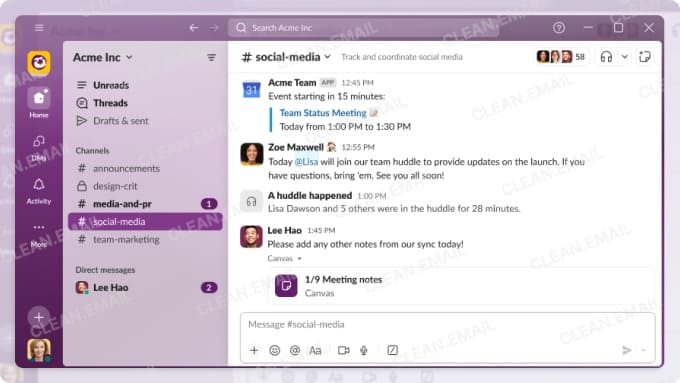
What makes Slack really stand out when compared with other similar solutions is its rich integration ecosystem, which includes connections to thousands of third-party apps, such as Google Drive, Salesforce, Trello, Zoom, and GitHub. Thanks to them, Slack can be a central hub where notifications and updates from your entire tool stack come together, which also makes it an excellent choice as a sales team communication tool since you can pipe CRM updates directly into a sales channel.
To help team members be more productive at home while working remotely, Slack offers customizable status indicators that let colleagues know when someone is available, in a meeting, on lunch break, or focused on deep work. For instance, the "Do Not Disturb" mode silences notifications during set hours, and scheduled messages allow team members in different time zones to communicate without disrupting each other's off-hours. That said, getting the most out of these features requires some intentional onboarding otherwise employees either ignore them or use them inappropriately.
Pricing: Slack offers a free tier with limited message history and integrations.
Paid plans start at $7.25 per user per month (billed annually) for the Pro plan, which adds unlimited message history, group video calls, and more integrations.
The Business+ plan costs $15 per user per month and includes AI features, single sign-on, and guaranteed uptime.
Enterprise Grid pricing is available on request for large organizations.
3. Microsoft Teams
Best for: Mid-size to large organizations already invested in the Microsoft 365 ecosystem.
If your company runs on Microsoft 365, Teams is the natural choice for an online team communication tool. It combines chat, video meetings, file storage, and real-time collaboration on Office documents in a single interface. You can jump from a group chat straight into a Word document, make edits together, and then go on a video call to discuss changes without switching apps.
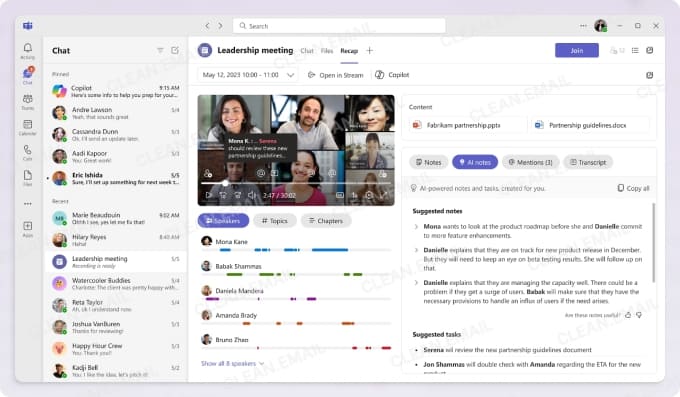
Similar to Slack, Teams organizes work into, well, teams and channels. Each channel has its own file storage, meeting history, and conversation threads, so it's one of the best tools for team communication during projects where documentation and discussions need to stay together. For larger enterprises, Teams scales well with features like breakout rooms for workshops, live events for company-wide broadcasts, and granular admin controls for IT departments.
In recent years, Microsoft has integrated Copilot directly into Teams, and you can use it to summarize meeting transcripts, draft follow-up messages, and surface action items automatically (read this if you're curious about what else Microsoft Copilot is used for). Thanks to these and other capabilities, Teams is also among the leading AI tools for team communication. The downside is that the same capabilities can make it feel heavy compared to lighter alternatives, and the learning curve is steeper for teams not already familiar with the Microsoft ecosystem.
Pricing: Microsoft Teams offers a free version with unlimited chat, 60-minute group meetings, and 5 GB of cloud storage per user.
The paid tiers are bundled with Microsoft 365 subscriptions: Microsoft 365 Business Basic starts at $6 per user per month and includes longer meetings, recording, and 1 TB of storage.
Business Standard ($12.50/user/month) adds desktop Office apps, while Business Premium ($22/user/month) includes advanced security and compliance features.
Enterprise plans with additional admin controls are also available.
4. Zoom
Best for: Teams that rely heavily on video meetings.
When the pandemic forced everyone into remote work, Zoom became the default virtual team communication tool practically overnight. It earned that position by being dead simple to use, especially when compared to the heavyweights like Microsoft Teams.

Even in 2026, Zoom is still one of the best tools for remote team communication and HR, especially if video is the main thing you care about thanks to its solid screen sharing that works smoothly and features like breakout rooms that make it easy to split larger groups into smaller discussions during workshops or training sessions.
Over time, Zoom has expanded well beyond basic video calls, and it now includes team chat, a VoIP phone system, and webinar hosting for up to thousands of attendees. Its AI Companion can generate meeting summaries, highlight action items, and even draft follow-up messages. That said, Zoom is best suited for synchronous communication. If you're looking for the best async video tools for team communication, you'll want to pair Zoom with a dedicated async platform or use its recording features creatively.
Pricing: Zoom's free Basic plan supports unlimited one-on-one meetings and 40-minute group meetings with up to 100 participants.
The Pro plan costs $14.99 per user per month (or $13.33 billed annually) and extends meetings to 30 hours with 5 GB of cloud recording.
The Business plan at $21.99 per user per month adds features like single sign-on, managed domains, and company branding.
Enterprise pricing is available on request for larger organizations needing custom solutions.
5. Asana
Best for: Teams that need structured project tracking alongside their communication.
Asana solves a project management problem that plagues many teams. That problem is scattered conversations that lose context once a project wraps up. In Asana, every task, comment, and file attachment stays connected to the work it relates to, which means you can revisit a discussion months later and understand exactly what happened.
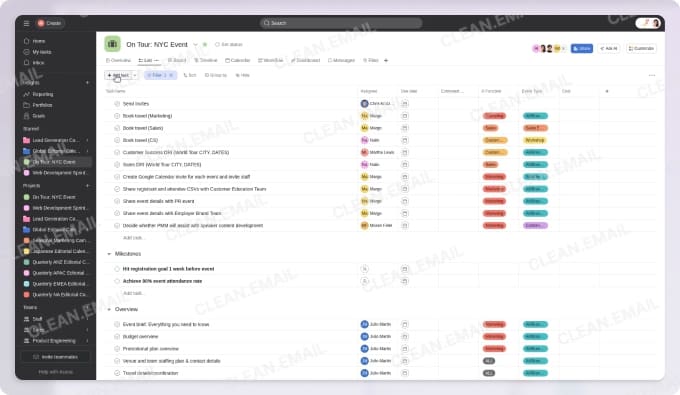
For teams wondering how they can use collaboration tools to improve team communication, Asana provides a clear answer that includes everything from traditional list views, Kanban boards, timelines, and Gantt charts to AI capabilities through its AI Studio feature, which can summarize project status, draft updates, and automate routine task creation (other AI tools for business offer similar features). Combined with integrations for Slack, Microsoft Teams, Google Workspace, and hundreds of other apps, it fits neatly into most existing workflows.
The biggest tradeoff when it comes to using Asana as a team communication tool is that it requires more setup than simpler tools and can feel like overkill if all you need is quick messaging. But for teams managing complex, ongoing projects, the structure pays off in clarity and accountability.
Pricing: Asana's Personal plan is free for individuals and teams of up to 10 users. It covers basic task management and list, board, and calendar views.
The Starter plan costs $10.99 per user per month (billed annually) and adds timeline views, workflow automation, and project dashboards.
The Advanced plan at $24.99 per user per month includes goals, portfolios, advanced reporting, and time tracking.
Enterprise and Enterprise+ plans with custom pricing are available for larger organizations needing enhanced security, compliance tools, and dedicated support.
How to Combine Team Communication Tools for Maximum Productivity
No single tool does everything well. The most effective teams understand how all-in-one tools improve team communication while also recognizing when specialized solutions fill gaps that bundled platforms miss.
Here's one example of a practical combination that's guaranteed to deliver great results:
- Slack or Microsoft Teams: Use this as your hub for real-time chat, quick questions, and day-to-day coordination. Channels keep conversations organized by topic or project, and integrations pull notifications from your other tools into one place so you're not constantly switching apps.
- Asana: When discussions in Slack or Teams lead to action items, create tasks in Asana so nothing falls through the cracks. The separation keeps your chat from becoming a graveyard of buried to-dos.
- Clean Email: Keep your inbox under control so email remains a useful async channel rather than another source of overwhelm. Auto Clean rules handle repetitive clutter automatically, and Unsubscriber cuts down on newsletters and promotional noise. This way, when important external messages arrive from clients or vendors, they actually stand out.
When your communication stack is intentional, each platform serves a distinct purpose, and you spend less time managing tools and more time doing actual work. For more ideas on streamlining your daily workflow, check out these best productivity tips that pair well with the tools we've covered.












