


How to Tell If an Unsubscribe Link Is Safe: 5 Signs
Before you click on any unsubscribe link, check these five red flags:
- Did you receive this email without signing up?
- Does the sender's address look suspicious?
- Is the email making you feel like you have to act fast?
- Does the unsubscribe link URL look suspicious?
- Does the email lack branding or look poorly made?
🚩 If you don't know who sent the email or didn't sign up for it, the unsubscribe link might just be there to make sure your email is still active.
🚩 Common signs of phishing are misspelled domains, random character strings, and addresses that don't match the brand name.
🚩 "Act now" and "your account will be closed" are examples of pressure tactics that make you click without thinking.
🚩 Before you click on the link, hover over it. Don't click on a link if the URL doesn't match the sender's domain or if it uses a URL shortener.
🚩 Real companies use consistent branding. If an email looks like it came from a big brand but is in plain text, it's probably fake.
⚠️ Don't click the unsubscribe link if you said "yes" to any of these. Instead, mark the email as spam or block the sender.
GOODBYE TO INBOX CLUTTER
Unsubscribe from unwanted emails instantly with one click.
Get started for FreeConfirm the sender’s email address
Before unsubscribing or blocking a sender, view the email address to be sure it’s not from a legitimate sender. It can be just as easy to confuse a valid sender with a spammy one and mistakenly unsubscribe or block them.
💡 This is where Clean Email’s Screener feature comes in handy by letting you review messages from unknown senders before they hit your inbox.
Report or block spam
Marking suspicious senders as spam helps your provider recognize future emails as junk and move them to the spam folder, and blocking senders keeps their emails from reaching your inbox.
Risks of Unsafe Unsubscribe Practices
When it comes to handling unsolicited messages and spam emails, there are certain precautions you can take to keep yourself safe out of the gate.
⚠️ What Not to Do:
- Do not click any links in the message.
- Do not open any attachments in the email.
- Do not reply to a spam or junk email.
These three “don’ts” are the most basic actions you should avoid, here’s why:
- Visiting links can lead to phishing attempts and activity tracking.
- Opening attachments that contain malware can affect your device security.
- Replying to junk mail can confirm to the sender that you have an active email account resulting in more spam.
Keep in mind that unsubscribing is only as good as the sender’s willingness to remove you from their mailing list. Check out more on this particular topic in our article "Does unsubscribing from emails work?"
How Clean Email Makes Unsubscribing Safer
For identifying those emails from unknown senders, visit the Clean Email’s Screener tool. As mentioned above, you can preview messages without actually opening them. You can then easily Block emails from spammy senders or those you no longer want to receive.
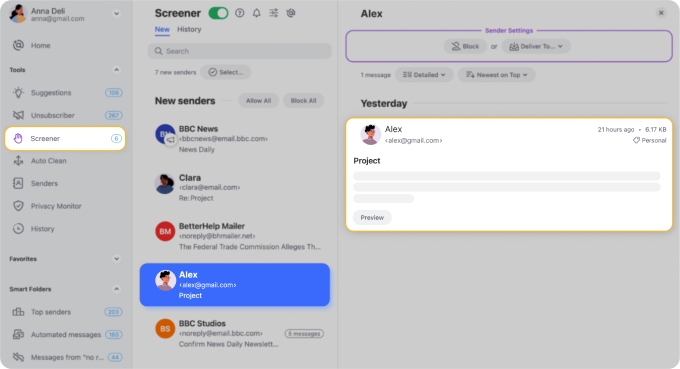
- Screen unknown senders before they reach your inbox so you never interact with a suspicious unsubscribe link.
- Block suspicious senders automatically by setting up rules to remove junk from certain domains without ever opening the email.
- Unsubscribe only when it's safe and remove yourself from the list in one click.
If you receive a large number of unwanted messages from certain domains or senders, you can also use the app’s Auto Clean feature to automatically filter out junk based on sender, domain, or keywords.
💡 You can use Clean Email’s features on the web, Mac desktop, and mobile. It works with all IMAP email providers like Gmail, Outlook, Yahoo, and others.
Wrap-Up
Is it safe to block spam emails? Yes. Is it safe to unsubscribe from phishing emails to prevent further messages? It’s better to mark spam or block them.
Before you click any unsubscribe link, check who sent the email and whether the sender is legitimate. When in doubt, use Clean Email's Screener to preview and block suspicious messages without risk.
💡 Read more: How to unsubscribe from spam emails without opening them.
FAQs
Is it safe to unsubscribe from emails?
Yes, but only from legitimate senders. Unsubscribing from trusted companies is safe, but avoid clicking unsubscribe links in suspicious emails.
Should you unsubscribe from spam emails?
No, it's best to mark them as spam instead. Clicking "unsubscribe" on spam emails can confirm your address to scammers.
Why can't I unsubscribe from spam emails?
Many spam emails don’t offer a real unsubscribe option. Scammers often include fake links to trick you into engaging.
What happens if you unsubscribe from spam emails?
In some cases, nothing happens. However, scammers may use it to verify your email is active and send more spam.
Is it safe to reply to spam emails?
No, replying confirms your email is active and may lead to more spam or phishing attempts. It's best to ignore and report them.












