


How Zoho Mail Spam Filtering Works
Zoho Mail doesn't rely on a single spam filter. It uses multiple layers, applied to both incoming and outgoing mail.
At a high level, Zoho evaluates emails using:
- Sender reputation (IP and domain history)
- Authentication checks (SPF, DKIM, DMARC)
- Content and pattern analysis
- User actions (Report Spam / Not Spam)
- Organization-level spam policies
Based on the score, messages are delivered to the inbox, spam folder, or quarantine (in admin-managed environments).
Importantly, Zoho also evaluates outgoing mail—which is why "Zoho email going to spam" is usually caused by configuration or sending behavior, not random filtering.

Zoho Mail Spam Filtering Features You Can Control
User-Level Spam Controls
Individual Zoho Mail users can:
- Report Spam — Sends the message to Spam and trains Zoho's filter.
- Mark as Not Spam — Restores the message and tells Zoho the sender is legitimate.
- Block Senders or Domains — Prevents future messages from reaching the inbox.
- Allowlist Senders — Ensures trusted senders bypass spam checks.
These actions affect incoming mail only and work best when used consistently.
Admin-Level Spam Settings (Business Accounts)
Admins can configure stricter rules, including:
- Organization-wide spam thresholds
- Allowed and blocked sender lists
- IP and domain restrictions
- Attachment and content policies
- Quarantine and review workflows
This is where Zoho's anti-spam policy shows its enterprise focus. It prioritizes domain safety over flexibility.
How to Create a Filter in Zoho Mail
Zoho's spam filter handles obvious threats automatically. For borderline email—SaaS notifications, newsletters, billing alerts—you need manual filter rules.
Filters let you route incoming messages based on sender, subject, keywords, or other conditions before they reach your inbox.
To create a filter:
- Open Zoho Mail and click the Settings gear icon.
- Select Filters from the left menu.
- Click Add Filter.
- Set your conditions: sender address, domain, subject contains, has attachment, and so on.
- Choose an action: move to a folder, mark as read, delete, forward, or label.
- Save the filter.
Filters apply to new incoming mail going forward. They don't retroactively process messages already in your inbox.
Filter vs. Spam Control: When to Use Which
Use Zoho's built-in spam controls—allowlist, blocklist, Report Spam—for senders that are clearly junk or clearly trusted. Use filters for the gray area: messages that aren't dangerous but still don't belong in your main inbox.
Inbox-Side Spam Control for Zoho Mail
Zoho Mail does a strong job blocking dangerous spam—phishing, malware, and obvious junk. Where many users still struggle is everything that isn't clearly malicious but still overwhelms the inbox over time.
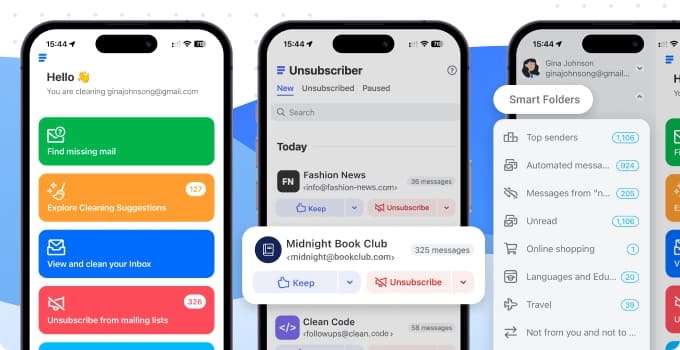
That's where Clean Email fits for Zoho Mail users. It connects via IMAP and works across web, macOS, iOS, and Android. It doesn't replace Zoho's spam filter or interfere with it—it works after emails arrive, focusing on prevention and cleanup.
Screener: Stop Unknown Senders Before They Take Over
Zoho's spam filter reacts after messages arrive. Clean Email's Screener adds a preventive layer: emails from new or unknown senders are held for review, and you make a one-time decision per sender—allow, block, or keep them out of the inbox permanently.
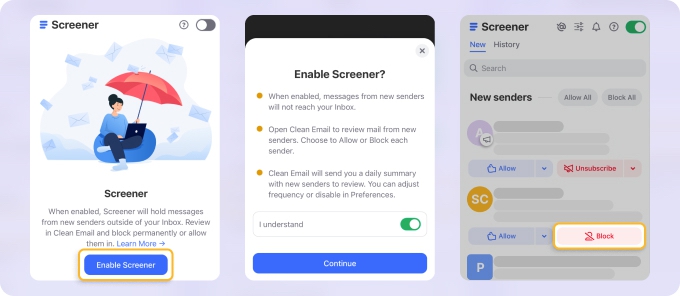
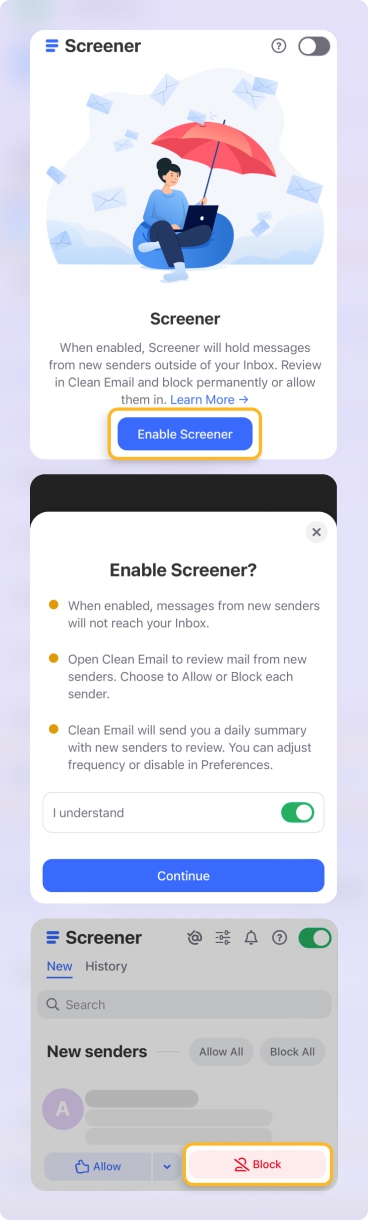
This is especially useful for custom domains, shared or role-based inboxes, and Zoho users flooded with SaaS signups and vendor emails. Once you've made a decision, Clean Email applies it automatically to future messages from that sender.
Auto Clean: Rules That Handle Recurring Noise
For email that keeps coming back—the same newsletter, the same alert, the same domain—Auto Clean lets you create rules based on sender, keyword, date, size, or category, then apply actions like archive, delete, move, or mark as read automatically.
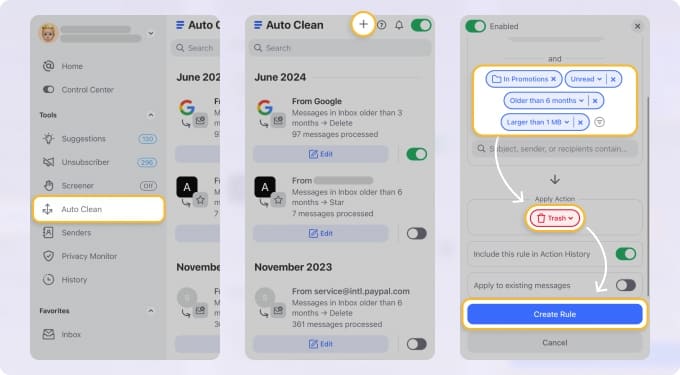
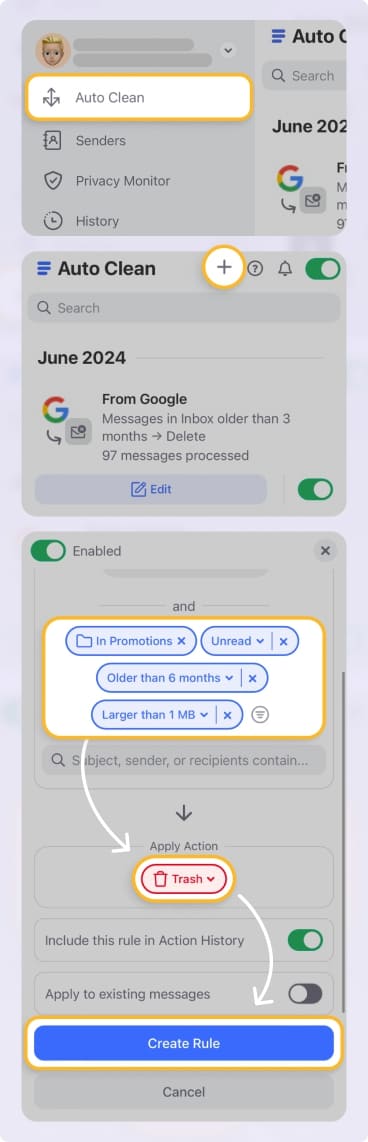
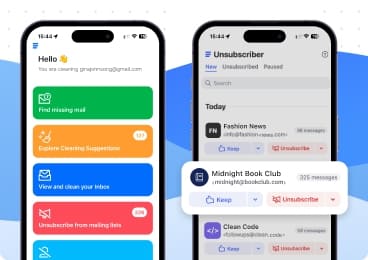
You can also unsubscribe from mailing lists in bulk through Unsubscriber, and if spam suddenly spikes, Privacy Monitor checks whether your email address has appeared in known data breaches—which is often the cause.
All rules are visible, adjustable, and reversible.
Why Are My Zoho Emails Going to Spam?
This is one of the most common Zoho Mail problems—and it's usually not a bug. Most cases trace back to authentication gaps, domain reputation, or sending patterns that look suspicious to receiving mail servers.
SPF Not Configured or Incorrect
SPF (Sender Policy Framework) tells receiving servers which IP addresses are authorized to send email for your domain. Without it, your Zoho emails have no verified sender identity.
To fix:
- Log in to your DNS provider (GoDaddy, Cloudflare, Namecheap, etc.).
- Add a TXT record: v=spf1 include:zoho.com ~all
- If you already have an SPF record, add include:zoho.com to the existing record rather than creating a second one—multiple SPF records break validation.
DKIM Not Enabled
DKIM (DomainKeys Identified Mail) adds a cryptographic signature to outgoing messages. Zoho provides DKIM signing, but it must be enabled per domain in the Admin Console.
To fix:
- Go to Zoho Mail Admin Console → Domains → select your domain → DKIM.
- Generate the DKIM key.
- Add the provided TXT record to your DNS.
- Verify the setup in the Admin Console.
No DMARC Policy
DMARC builds on SPF and DKIM to tell receiving servers what to do when authentication fails. Without it, your domain has no explicit policy.
To fix:
- Add a TXT record to your DNS for _dmarc.yourdomain.com
- Start with a monitoring-only policy: v=DMARC1; p=none; rua=mailto:you@yourdomain.com
- Review the reports, then move to p=quarantine or p=reject once you're confident everything is aligned.
New or Low-Reputation Domain
New domains have no sending history, which makes them inherently less trusted. Receiving servers can't distinguish them from freshly registered spam domains. Start with low daily email volume, increase gradually, and prioritize sending to recipients likely to open and reply. Avoid mass sends in the first few weeks.
Content Triggering Filters
Even with clean authentication, certain content patterns raise spam scores: excessive links or images relative to text, common spam phrases, links to low-reputation domains, or a missing plain-text version of your HTML email.
Test Before Sending
After fixing authentication, use a tool like mail-tester.com or MXToolbox to verify your SPF, DKIM, and DMARC setup. These tools show exactly what receiving servers see and flag misconfiguration before it causes problems.
💡 Note: Zoho Mail is not designed for cold outreach or bulk sending. For high-volume transactional or marketing email, use a dedicated sending service—Zoho Campaigns, Mailchimp, or SendGrid—rather than Zoho Mail directly.
When the Problem Is Microsoft 365, Not Your Setup
One of the most frequently reported Zoho spam issues has nothing to do with your SPF, DKIM, or DMARC. If your emails are landing in spam specifically for recipients using Microsoft 365 or Outlook.com—but delivering fine elsewhere—the likely cause is Exchange Online Protection (EOP) flagging Zoho's shared sending IPs.
Zoho Mail uses shared IP infrastructure. When another sender on the same IP range behaves badly, Microsoft can classify the entire IP block as "high confidence spam." Your authentication can be perfectly configured and it still happens, because the problem is at the infrastructure level, not the account level.
What you can do:
- Ask the recipient's IT admin to allowlist Zoho's IP range or your sending domain in their EOP settings (Microsoft 365 Admin Center → Security → Threat policies → Allow/block lists). This is the most reliable fix.
- Submit a false positive report to Microsoft via the Microsoft Junk Mail Reporting page. This flags the misclassification to Microsoft's team.
- Check Zoho's IP reputation using MXToolbox Blacklist Check with the sending IP. If Zoho's IP appears on a blocklist, the issue is confirmed as infrastructure-level and you can report it directly to Zoho support to request an IP change.
This situation is outside your control as an individual sender, but knowing the cause prevents hours of debugging authentication records that are already correct.
Zoho Mail Spam Settings: What to Check First
If you're troubleshooting spam issues, start with these four areas:
- Spam folder — Check it regularly and use "Not Spam" on misclassified messages to train Zoho's filter over time. Note on terminology: Zoho labels this folder "Spam," not "Junk." If you're coming from Outlook or another client that uses "Junk," the folder and settings are identical—only the label differs.
- Allowlist — Add trusted senders and domains so their messages always bypass spam checks. Individual users can do this from Mail Settings; admins can set organization-wide allowlists in the Admin Console.
- Admin Console (business accounts) — Review organization-level spam thresholds, quarantine rules, and blocked/allowed sender lists. Many issues that look like filter bugs are caused by organization policies set here.
- Authentication records — Confirm SPF, DKIM, and DMARC are correctly configured for your sending domain. Skipping authentication is the most common root cause of recurring Zoho spam problems—start here before adjusting anything else.
Zoho Forms Spam Protection
Zoho Forms spam isn't filtered by Zoho Mail directly. Form spam typically arrives as email notifications.
Best practices:
- Add CAPTCHA or reCAPTCHA to your forms
- Limit notification recipients
- Filter form alerts into a dedicated folder using the filter rules above
Form spam must be addressed at the form level—email filters only manage the notifications after the fact.
Final Take
Zoho Mail's spam filter is strong where it matters most: blocking phishing, malware, and high-risk senders at the domain level. The admin controls are genuinely enterprise-grade.
What it doesn't handle is softer inbox noise—subscriptions, SaaS notifications, unknown senders, and clutter that accumulates after your address gets into circulation. That's an inbox management problem, not a spam filtering one.
Many Zoho users handle both layers: Zoho's filter for real threats, Clean Email for everything else—consistently across web, macOS, iOS, and Android.












