


This guide walks through:
- how sorting works natively in Zoho Mail
- what each option is actually good for
- and how some users extend sorting with Clean Email when built-in tools stop scaling
No shortcuts. No hype. Just how to make sense of a busy Zoho inbox.
Before You Start: How Sorting in Zoho Mail Actually Works
Zoho Mail sorting happens in a few main ways:
- Clicking column headers (Date, From, Subject, Size)
- Using search operators and filters
- Working folder by folder
What Zoho doesn’t really offer is:
- global sorting across all folders
- layered sorting (for example: sender and size and age)
- visibility into inbox patterns
That context matters as we go through each method.
Read more about the best Zoho features.

1. Sorting Emails by Category or Type
Zoho Mail: Manual and Folder-Based
Zoho Mail doesn’t automatically categorize emails into types like “shopping,” “travel,” or “subscriptions.”
If you want that kind of structure, you need to:
- create folders manually
- set up filters
- apply tags consistently
It works—but only if you invest time upfront and maintain it over time.
How Clean Email Supports This
Clean Email approaches categorization differently.
- Smart Folders automatically group emails by type (shopping, travel, social, subscriptions, finance, notifications, etc.) → Try it for Free
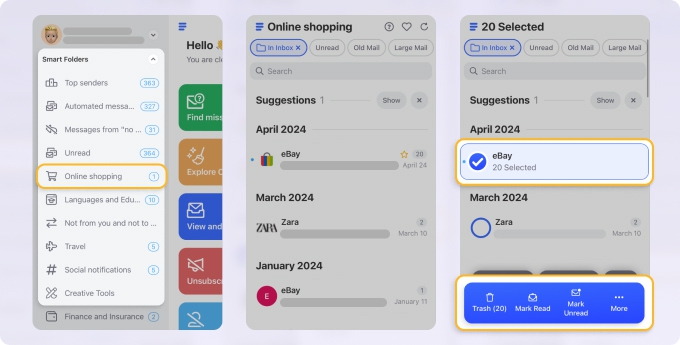
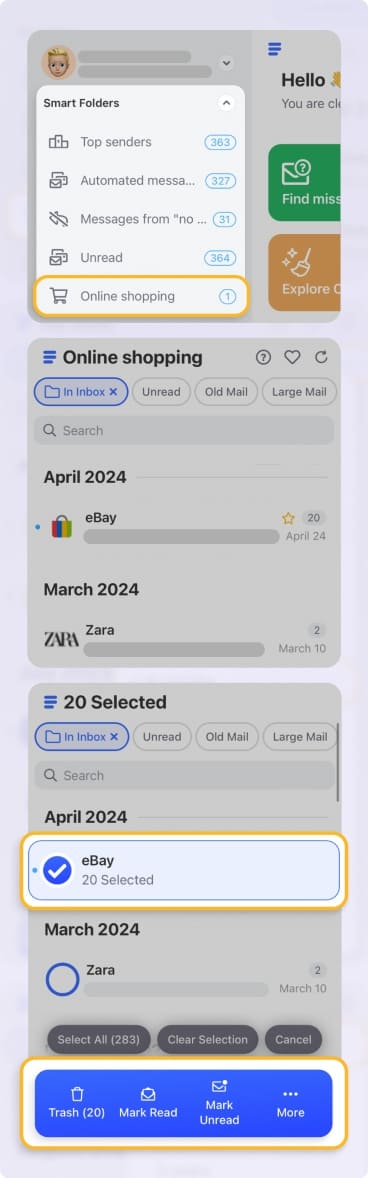
- No setup, rules, or tagging required
- Each category is actionable: bulk archive, delete, move, or automate
For Zoho users, this often replaces the need for dozens of folders that slowly get out of sync with reality.
2. Sorting Emails by Sender (and Finding the Noisiest Ones)
Zoho Mail: Alphabetical Sender Sorting
In Zoho Mail, you can:
- click the From column to sort A–Z or Z–A
- search for a specific sender
- use Scrub (with limits and folder constraints)
This works for finding one sender—but not for understanding sender patterns.
How Clean Email Supports It
Clean Email treats sender-based sorting as a core use case. → Try it for Free
- Emails grouped by sender name and email address
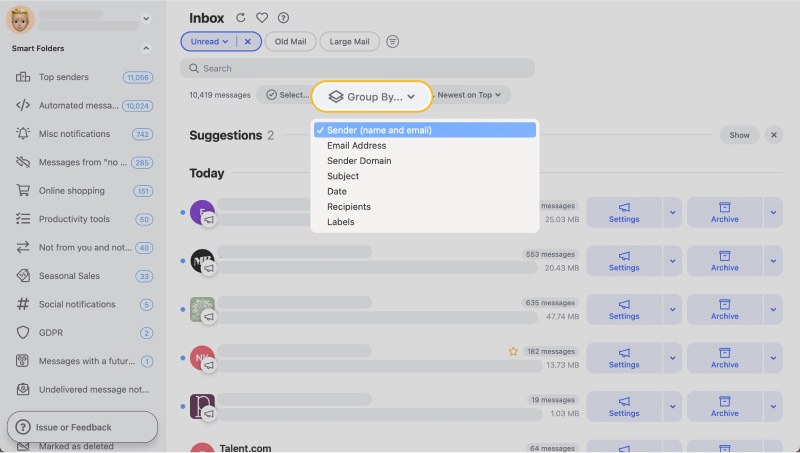
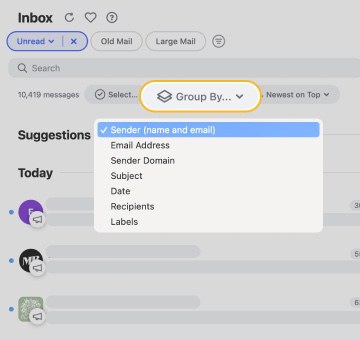
- Option to group by sender domain
- Sort senders by number of emails (high → low or low → high)
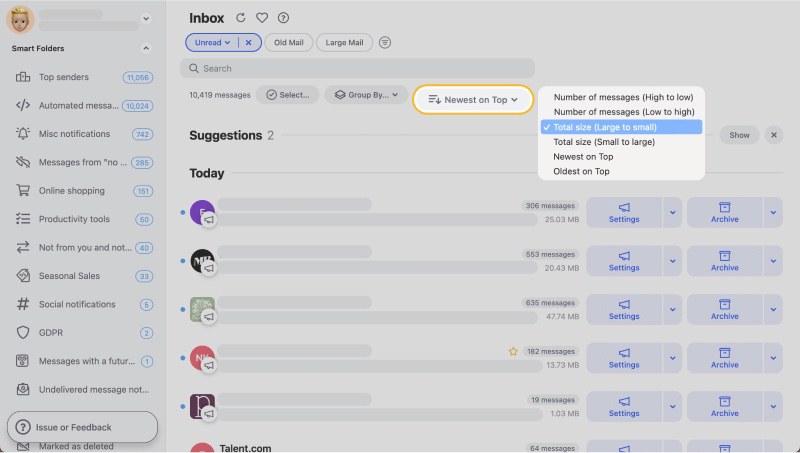
This makes it immediately obvious which senders are responsible for most inbox volume—something Zoho Mail doesn’t surface natively.
3. Sorting Emails by Recipient
Zoho Mail: Search-Driven
Zoho lets you search by:
- To
- CC
- BCC
But it doesn’t show recipient-based volume or patterns.
That means you can find messages sent to you—but not easily see:
- how much mail comes via CC
- which aliases receive the most traffic
- how shared inboxes contribute to clutter
How Clean Email Supports It
Clean Email adds recipient-based grouping:
- Group emails by recipient
- Sort recipients by message count
- Quickly separate:
- direct messages
- CC-heavy threads
- shared or role-based inbox traffic
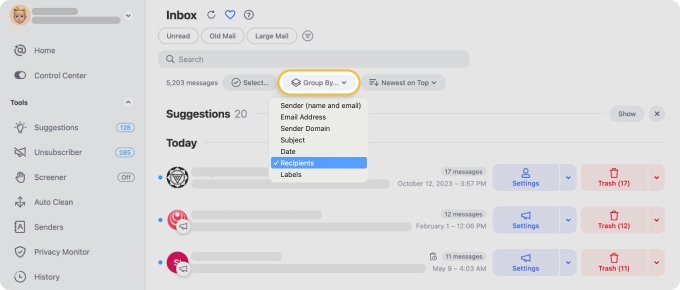
This is especially useful for Zoho users with multiple aliases or team addresses.
4. Sorting Emails by Subject (Alphabetically)
Zoho Mail: Column Sorting Only
Zoho Mail allows sorting by Subject A–Z or Z–A via the column header.
Limitations:
- works only within one folder
- doesn’t group similar subjects
- no visibility into message volume per subject
How Clean Email Supports It
Clean Email groups emails by subject line instead of just sorting them.
- View entire subject-based groups
- Sort subjects alphabetically
- See message count per subject instantly
- Manage the whole group at once
This is particularly helpful for recurring alerts or automated notifications with similar subject patterns.
5. Sorting Emails by Size
Zoho Mail: Folder-Level Size Sorting
Zoho Mail supports sorting by Size, but:
- only inside a single folder
- no way to filter by size thresholds
- no mailbox-wide “large mail” view
It’s functional, but limited when storage is the real concern.
How Clean Email Supports It
Clean Email makes size-based sorting practical.
- Dedicated Large Mail view
- Filter by specific size thresholds (many preset options)
- Focus on the largest emails first → Try it for Free
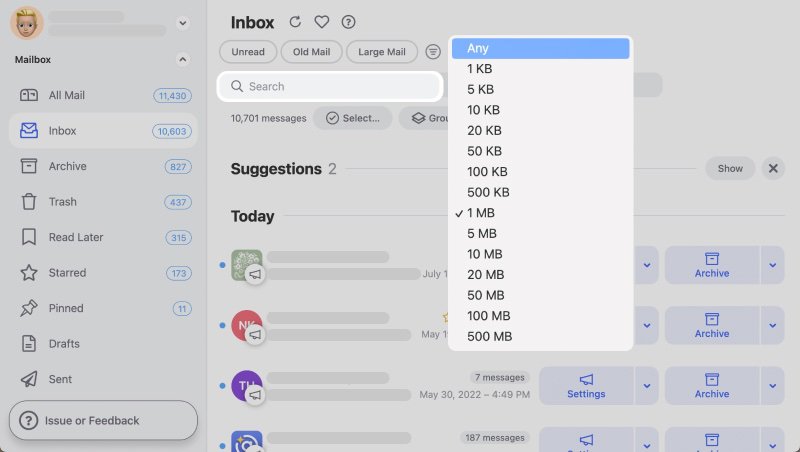
For Zoho users approaching storage limits, this is often the fastest cleanup method.
6. Sorting Emails by Date
Zoho Mail: One of Its Stronger Areas
Zoho Mail handles date sorting reasonably well.
You can:
- sort newest → oldest or vice versa
- filter by date range
- archive by date at folder level
The main limitation is scope: it’s usually one folder at a time.
How Clean Email Supports It
Clean Email groups emails by age, not just chronological order.
- View emails older than 1 year, 2 years, etc.
- Combine date with other criteria (sender, size, unread)
- Automate cleanup of old emails instead of repeating it manually
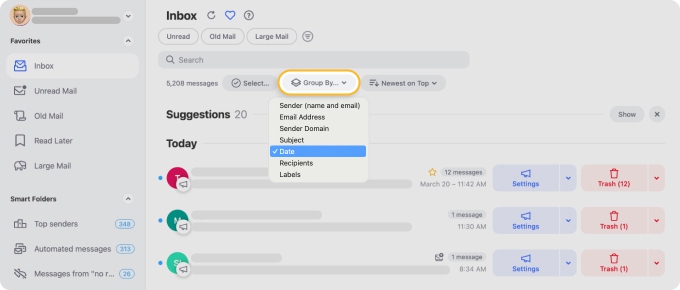
This helps turn date-based sorting into something sustainable. → Try it for Free
7. Sorting Emails by Unread Status
Zoho Mail: Simple but Shallow
Zoho lets you filter unread emails per folder.
That’s fine for triage—but unread often just means “ignored,” not “important.”
How Clean Email Supports It
Clean Email gives unread emails structure.
- Dedicated Unread Mail view
- Further grouping by:
- sender
- subject
- date
- recipient
Unread stops being a long list and becomes something you can reason about.
8. Automatic Sorting (Rules and Automation)
Zoho Mail: Filters and Rules
Zoho Mail supports filters and rules, but they are:
- folder-based
- rule-heavy
- easy to overcomplicate
They work—but require careful planning and maintenance.
How Clean Email Supports Automatic Sorting
Clean Email focuses on safe, transparent automation.
- Auto Clean rules sort emails automatically
- Conditions based on sender, category, age, size, and more
- Actions include:
- move
- archive
- delete
- label
- send to Read Later
Rules are easy to review and adjust, which reduces cleanup anxiety.
Read more: Zoho Email Automation in 2026
9. Sorting Emails on Mobile (iOS and Android)
Zoho Mail: Limited on Mobile
Zoho’s mobile apps handle basic sorting and filtering, but advanced views are reduced compared to web.
How Clean Email Supports Mobile Sorting
Clean Email offers full sorting and filtering on iOS and Android.
- Same grouping logic as web and macOS
- Sender, size, unread, and date views all available
- Auto Clean rules apply consistently across devices
No feature drop-off just because you’re on your phone.
Final Take
Zoho Mail gives you the essentials:
- sorting by date, sender, subject, and size
- predictable, business-safe behavior
- strong folder-based control
That’s enough for light organization.
Where it starts to strain is when you want to:
- sort across the entire mailbox
- combine multiple criteria
- understand inbox patterns instead of scrolling
That’s why many Zoho users keep Zoho Mail as their core email system—but layer Clean Email on top for deeper sorting, grouping, and automation across web, macOS, iOS, and Android.
Not because Zoho is missing features. But because sorting at scale is a different problem than just listing emails.












