


What Is Email Security?
Email security includes everything from authentication protocols like SPF, DKIM, and DMARC to encryption, spam filtering, and user habits that prevent attacks. It protects private information while it's being sent, checks the sender's identity, and stops harmful content from getting to your inbox.
The stakes are high: email is still the most common way for cybercriminals to get into your computer, whether it's through phishing, malware, or business email compromise. Both enterprises and individual users are at risk.

Common Email Security Threats
The first step to keeping your inbox safe is to know what the threats are. These are the most common types of attacks that happen over email:
Phishing
Phishing emails pretend to be from a bank, a coworker, or a SaaS platform that the recipient trusts in order to get them to click on bad links or give out their login information. Variants include spear phishing (targets specific individuals) and whaling (targets executives).
Business email compromise (BEC)
BEC attacks happen when an attacker pretends to be a trusted partner or company executive and asks for a wire transfer or sensitive data. These emails don't usually have any harmful links or attachments, which makes them harder to find with traditional spam filters.
Malware and ransomware
Malicious links or attachments in emails can install malware on the device of the person who opens them.
Ransomware is a particularly destructive type of malware that locks up files and asks for money to get them back. Email is still the most common way for ransomware to spread.
Email spoofing
Spoofing is when an attacker changes the "From" address on an email to make it look like it came from a real person. Spoofed emails can easily get past basic spam filters if there aren't proper authentication protocols in place, such as SPF and DKIM.
Spam and unwanted email
Spam fills up inboxes and wastes time, even though it's not always harmful. Spam campaigns are also a common way for phishing and malware to get to people. Email spam checkers and filtering tools can help keep the noise down.
Man-in-the-Middle (MitM) attacks
In a MitM attack, an attacker gets in the way of email communication between two people and may be able to read or change messages while they are being sent. The main way to protect against this kind of threat is to use Transport Layer Security (TLS) encryption.
Email Security Protocols and Standards
A strong email security posture depends on a number of technical protocols that work together to authenticate senders, encrypt messages, and stop tampering.
SPF (Sender Policy Framework)
Domain owners can use SPF to choose which mail servers are allowed to send email for them. When a server gets a message, it uses the SPF record to make sure that the server that sent it is real. This helps prevent spoofing.
DKIM (DomainKeys Identified Mail)
DKIM adds a cryptographic signature to outgoing emails. This lets the receiving server check that the message hasn't been changed while it was being sent and that it really came from the domain it says it did.
DMARC (Domain-based Message Authentication, Reporting & Conformance)
DMARC is an improvement on SPF and DKIM because it lets domain owners choose what to do if authentication fails (quarantine, reject, or allow). It also lets domain owners see reports, so they can keep an eye on who is using their domain without permission.
TLS (Transport Layer Security)
TLS protects the connection between mail servers while it is in transit, stopping eavesdropping and man-in-the-middle attacks. Most big email services automatically support TLS.
S/MIME and End-to-End Encryption
S/MIME (Secure/Multipurpose Internet Mail Extensions) and E2EE (end-to-end encryption) take it a step further by encrypting the email itself, not just the connection. E2EE makes it so that only the sender and recipient can read the message. Not even the email provider can get to it.
Secure email providers like ProtonMail and Tutanota are two providers that offer built-in E2EE to their users.
Email Security Best Practices
Technical protocols are essential, but they aren't the only thing that matters. Here are the practical steps every user and organization should follow:
1. Enable multi-factor authentication (MFA)
A strong password alone isn’t enough. MFA adds a second step to verify your identity, such as a code from an authenticator app or a hardware key. This makes it much harder for hackers to get into your account even if they have your password.
2. Learn to recognize phishing attempts
Look for warning signs like an unexpected sense of urgency, sender addresses you don't know, misspelled domains, and requests for private information. When in doubt, verify the request through a separate channel before clicking any links or downloading attachments.
3. Keep software up to date
Email clients, web browsers, and operating systems all get security updates on a regular basis. One of the easiest ways for attackers to get in is through old software, so it's important to make sure everything is up to date.
4. Use email filtering and management tools
Automated email filtering can block known threats from getting to your inbox. Beyond security-focused tools, inbox management apps help reduce clutter and surface only the messages that matter, minimizing the risk of accidentally engaging with malicious content.
5. Train your team
One of the best ways for businesses to protect themselves is to make sure their employees are aware. Regular training on recognizing phishing, reporting suspicious messages, and following data-handling protocols can prevent most of email attacks.
How Clean Email Helps Protect Your Inbox
Clean Email is an inbox management app that can reduce your exposure to email threats by keeping your mailbox clean and controlled. It’s free to try and conveniently works on web, Mac desktop, and mobile.
Its Privacy Monitor feature checks to see if your email address has been involved in any known data breaches. And the Screener tool keeps messages from first-time senders separate so you can approve or block them before they get to your inbox.
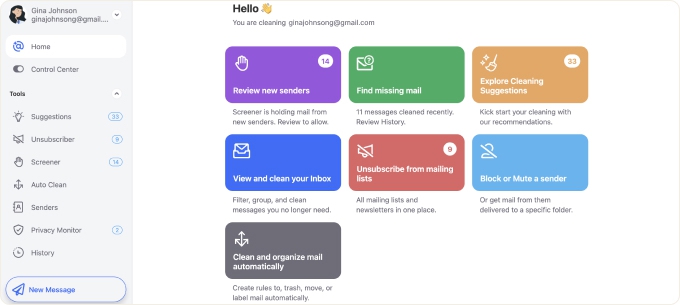
You can also block senders, safely unsubscribe from spam and persistent email lists, and set up automatic filtering rules with Clean Email so you don't get as many unwanted emails. The less junk in your inbox, the lower the chance of clicking something malicious.
📌 Wondering how to protect your main mailbox? Check out our articles about free private email providers, the best email security software, and the best fake email address generators.
Email Security – FAQs
How does email security work?
Email security works through a mix of filtering tools that look for known threats, encryption (TLS, S/MIME), and authentication protocols (SPF, DKIM, DMARC). All of these layers work together to check the sender's identity, keep the message safe while it's being sent, and stop bad emails from getting to your inbox.
What are the main types of email security threats?
Phishing (sending fake emails to steal credentials), business email compromise (pretending to be an executive or partner), malware sent through attachments or links, email spoofing, and spam campaigns that can be used to launch other attacks are some of the most common threats.
What is the difference between SPF, DKIM, and DMARC?
SPF checks to see if an email came from a server that was allowed to send it. Using a cryptographic signature, DKIM proves that the message wasn't changed while it was being sent. DMARC connects SPF and DKIM by telling receiving servers what to do when authentication checks fail and giving the domain owner reports.
Why is email security important for small businesses?
Hackers often go after small businesses because their email security is usually weaker. A single successful phishing or BEC attack can cause a lot of damage to a company's reputation, steal customer data, and cost a lot of money. Setting up basic rules and training employees is a cheap first step.
What is the most secure type of email?
End-to-end encryption (E2EE) makes emails the safest because only the sender and recipient can read them. ProtonMail and Tutanota are two providers that offer E2EE by default.












