


How the Mail.com Spam Filter Works
Mail.com uses automated filtering based on:
- Sender reputation
- Message headers
- User spam reports
It runs automatically and requires no setup. Flagged messages go to your Spam folder, where they're deleted after 14 days if you don't act on them.

How to Configure Mail.com's Spam Filter
The built-in settings are minimal but worth checking:
- Spam folder: Go to Settings → Mail → Spam Protection to confirm it's enabled.
- Blocked senders: You can add individual addresses under Settings → Mail → Blocked Senders. Mail from those addresses is rejected automatically.
- Mark as Spam: Select any message and use the Spam button. This trains the filter and moves the sender's future mail to Spam.
- Mark as Not Spam: Open your Spam folder, select a misclassified message, and use Not Spam. This helps recover legitimate senders going forward.
That's the full extent of what mail.com exposes to users — there's no sensitivity slider, no rule builder, and no preview of filtering logic.
Common Spam Filter Problems
Users frequently report:
- Legitimate emails landing in Spam (false positives from newsletters, receipts, notifications)
- Marketing emails flooding the inbox despite being technically "not spam"
- No way to see why a message was filtered or adjust the threshold
The filter is binary: inbox or spam. There's no middle ground for graymail — the bulk of what most inboxes actually struggle with.
When Mail.com's Filter Isn't Enough
The filter handles obvious spam well. It struggles with:
- Newsletters and promotional mail — these pass sender reputation checks but clutter your inbox
- New senders — no reputation data means no filtering, so first-contact messages always land in the inbox
- Sender patterns — you can block an address, but not a domain or a sending pattern
If your inbox is already cluttered, blocking individual senders one by one doesn't scale.
Adding Clean Email for Better Screening
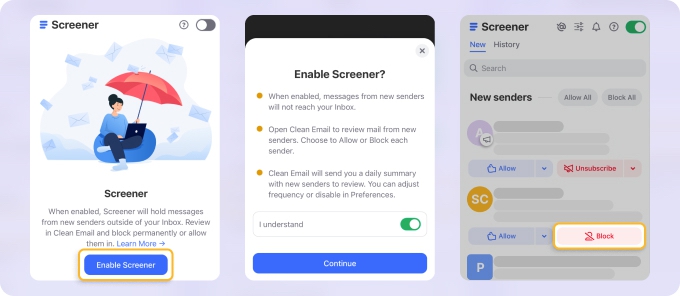
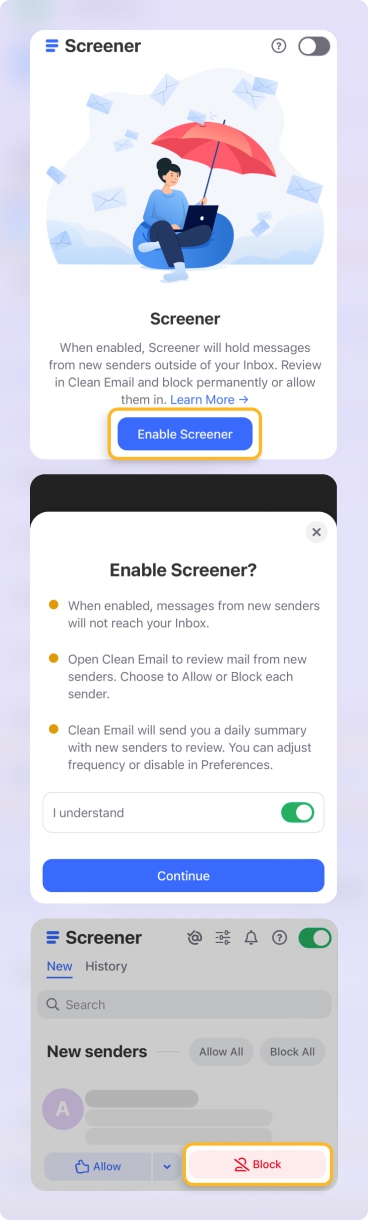
Clean Email’s Screener feature works alongside Mail.com:
- Holds new senders for review
- Lets you decide inbox, archive, or block
- Prevents future clutter proactively
It’s not about replacing spam filtering—it’s about visibility and control. → Try it for Free
Reporting Spam Sent From @mail.com Addresses
If you're receiving spam from an @mail.com address rather than to your mail.com inbox, that's a separate issue. You can report abuse directly at reportabusemail.com, which routes reports to mail.com's trust and safety team.
Pros and Cons
- ✅ Automatic filtering
- ✅ Low maintenance
- ❌ No customization
- ❌ No sender-level insight
- ❌ Limited recovery options
Final Thoughts
Mail.com's spam filter is serviceable for clear-cut junk. For anything more nuanced — new senders, newsletters, or an inbox that's already gotten out of hand — you need either a manual habit of blocking and training, or a tool like Clean Email that handles the gray zone proactively.












