


The Short Answer
No — deleting an email does not unsend it.
Once an email is delivered, it remains in the recipient’s inbox. Deleting it only removes your copy of the message.
What Happens When You Delete a Sent Email
When you send an email, two separate copies are created:
- One is stored in your Sent folder
- One is delivered to the recipient’s inbox
Deleting the email:
- Removes it from your account
- Does not affect the recipient’s copy
This applies across all major providers, including Gmail, Outlook, and Yahoo.

How to Delete a Sent Email
Deleting emails from your Sent folder removes them from your account but does not affect the recipient.
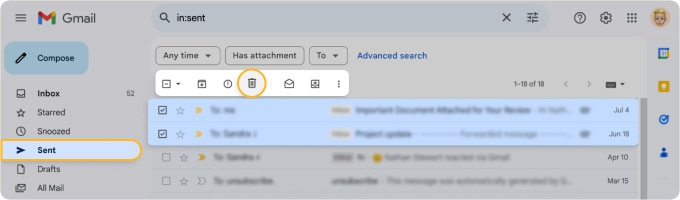
To delete a sent email in Gmail, go to the Sent folder, select the message, and click the trash icon. Then open the Trash folder and choose Delete forever to remove it permanently.
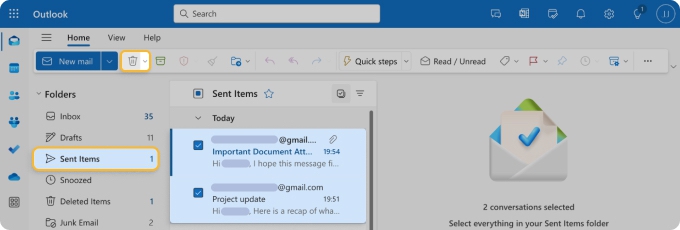
To delete a sent email in Outlook, go to the Sent Items folder, select the message, and click Delete. To remove it permanently, open the Deleted Items folder and delete it again.
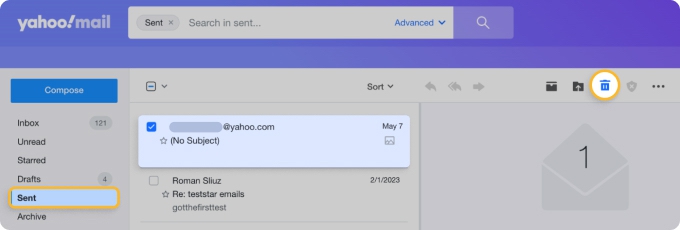
To delete a sent email in Yahoo Mail, open the Sent folder, select the message, and click Delete. To remove it permanently, empty the Trash folder.
When Can You “Unsend” an Email?
There are limited cases where you can stop an email, but these are not true deletion. They are short cancellation windows or restricted recall features.
Deleting vs. recalling an email
- Deleting an email removes this message from your Sent folder or Outbox. This frees up some space but will not unsend an email or remove it from the recipient’s inbox.
- Recalling an email means retracting an email you’ve already sent so it’s no longer in the recipient’s Inbox. If you accidentally send an incomplete message or need to cancel the delivery of the message right after sending it, this is what you’d want to do.
Email unsend options by provider
| Provider | Can you remove from recipient? | Feature | Time limit |
|---|---|---|---|
| Gmail | No | Undo Send (delayed sending) | Up to 30 seconds |
| Outlook | Limited | Recall (specific conditions) | Up to ~2 hours |
| Yahoo Mail | No | Undo (mobile only) | ~3 seconds |
Gmail: Undo Send
Gmail allows you to cancel sending within a short time window.
- You can set the cancellation period to 5, 10, 20, or 30 seconds
- During this time, the email is not fully sent yet
After the time expires:
The message is delivered. It cannot be deleted from the recipient’s inbox. Read more about unsending emails in Gmail.
Outlook: Recall message
Outlook includes a recall feature, but it only works under specific conditions:
- Both users must use Microsoft Exchange
- Both must be in the same organization
- The message must not be opened
Even when these conditions are met, recall is not guaranteed. Read more about how to recall an email in Outlook.
Yahoo Mail: Limited options
Yahoo Mail does not offer a true recall feature.
- A short “Undo” option may appear on mobile
- After a few seconds, the message is permanently sent
Read more about recalling an email in Yahoo Mail.
Can You Delete an Email from Someone Else’s Inbox?
No, in most cases you cannot.
Email systems do not allow senders to remove messages from another person’s inbox after delivery.
There are no standard settings or tools that can:
- Delete a sent email from the recipient
- Remove it after minutes, hours, or days
What to Do If You Sent an Email by Mistake
If you cannot cancel the email, the most practical solution is to correct the situation.
Recommended steps:
- Act immediately
Use Undo Send or Recall if available - Send a follow-up email
- Acknowledge the mistake
- Clarify the correct information
- Ask the recipient to ignore the previous message
This approach is often more effective than relying on recall features.
Does it matter if the email has been opened?
Yes. If the recipient has already opened the message:
- Recall will not work
- The content has already been seen
In some cases, emails may also be visible through:
- Notifications
- Preview panes
- Offline access
Does Deleting Sent Emails Help at All?
Deleting emails is useful for managing your own inbox, but it does not affect delivery.
It can help you:
- Free up storage space
- Keep your mailbox organized
- Remove unnecessary messages
However, it has no impact on the recipient’s copy.
How to Avoid Sending Emails You Can’t Undo
Since emails cannot usually be unsent, prevention is the most effective strategy.
Best practices:
- Double-check recipients before sending
- Attach files before writing the message
- Review the email briefly before sending
- Use delay or confirmation features when available
Reduce Mistakes with Better Email Organization
Email errors often happen due to:
- Cluttered inboxes
- Distractions
- High message volume
Tools like Clean Email help reduce these risks by automatically organizing your inbox, grouping similar messages, and removing unnecessary noise. With fewer distractions and better visibility, you can focus on important emails and avoid common sending mistakes.
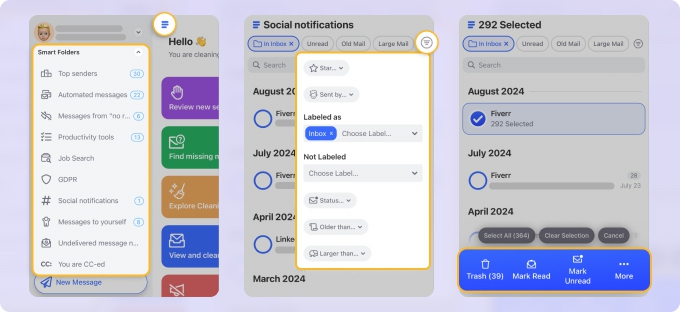
Features like Screener help you review emails from new senders before they reach your inbox, while privacy-first processing ensures your data stays secure and protected. This reduces distractions and helps you avoid rushed or accidental emails.
FAQs
Can I delete an email I sent in Gmail?
Only within the Undo Send window (up to 30 seconds). After that, it cannot be removed.
Can Outlook delete a sent email?
Only in limited cases using Recall, and it is not always successful.
Can I delete an email sent to the wrong person?
No. You cannot remove it from the recipient’s inbox. Sending a follow-up email is the best option.
Can emails be unsent after a long time?
No. Most email services do not support unsending emails after delivery.












